

AI providers and models
Provider setup, embeddings, per-feature model overrides, spend controls, and reindexing.
Admin -> AI settings is the one place every AI feature in orboto reads its provider, model and cost configuration from - summaries, duplicate detection, semantic search, translation, and the AI Chat assistant.
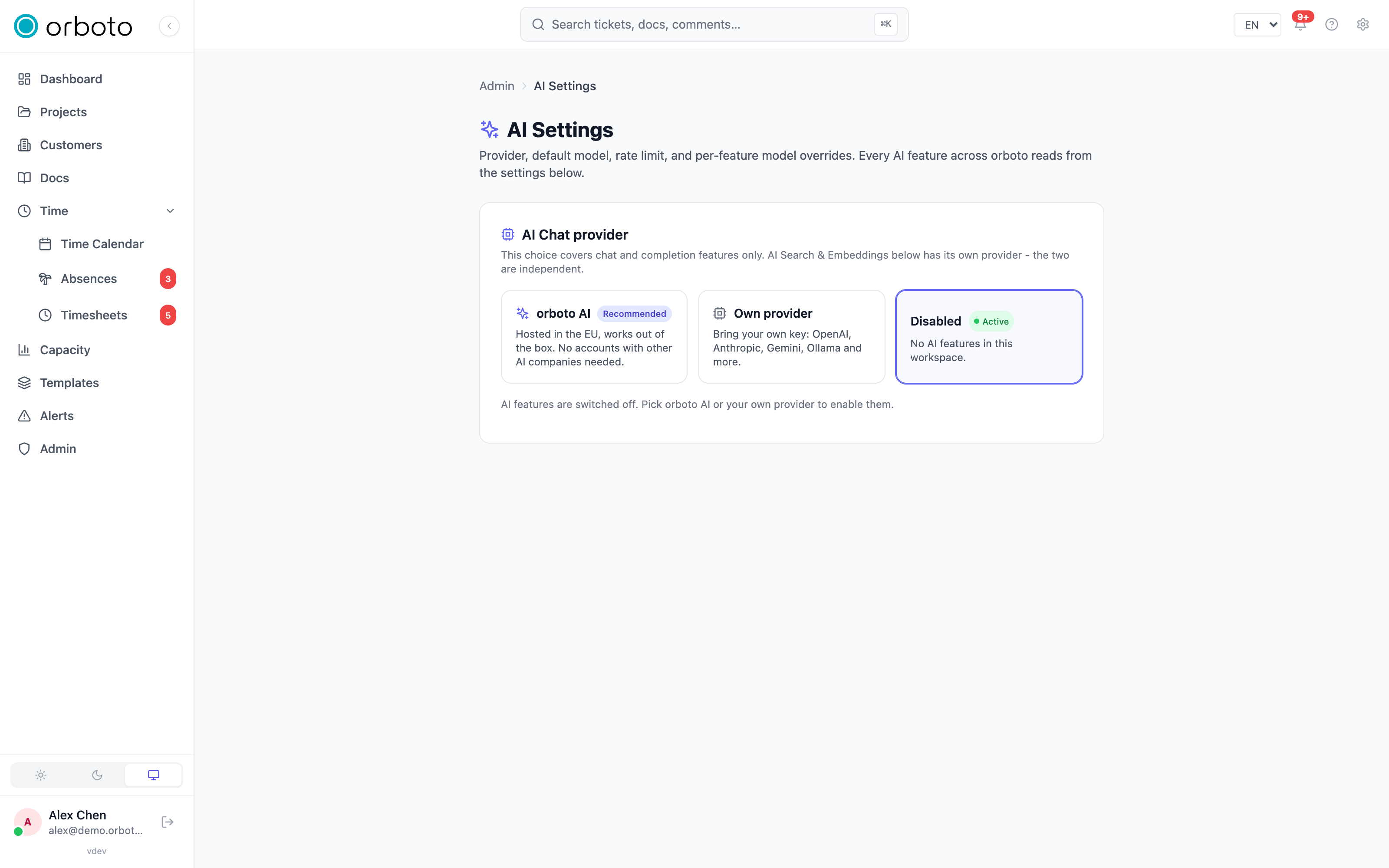
Picking a provider
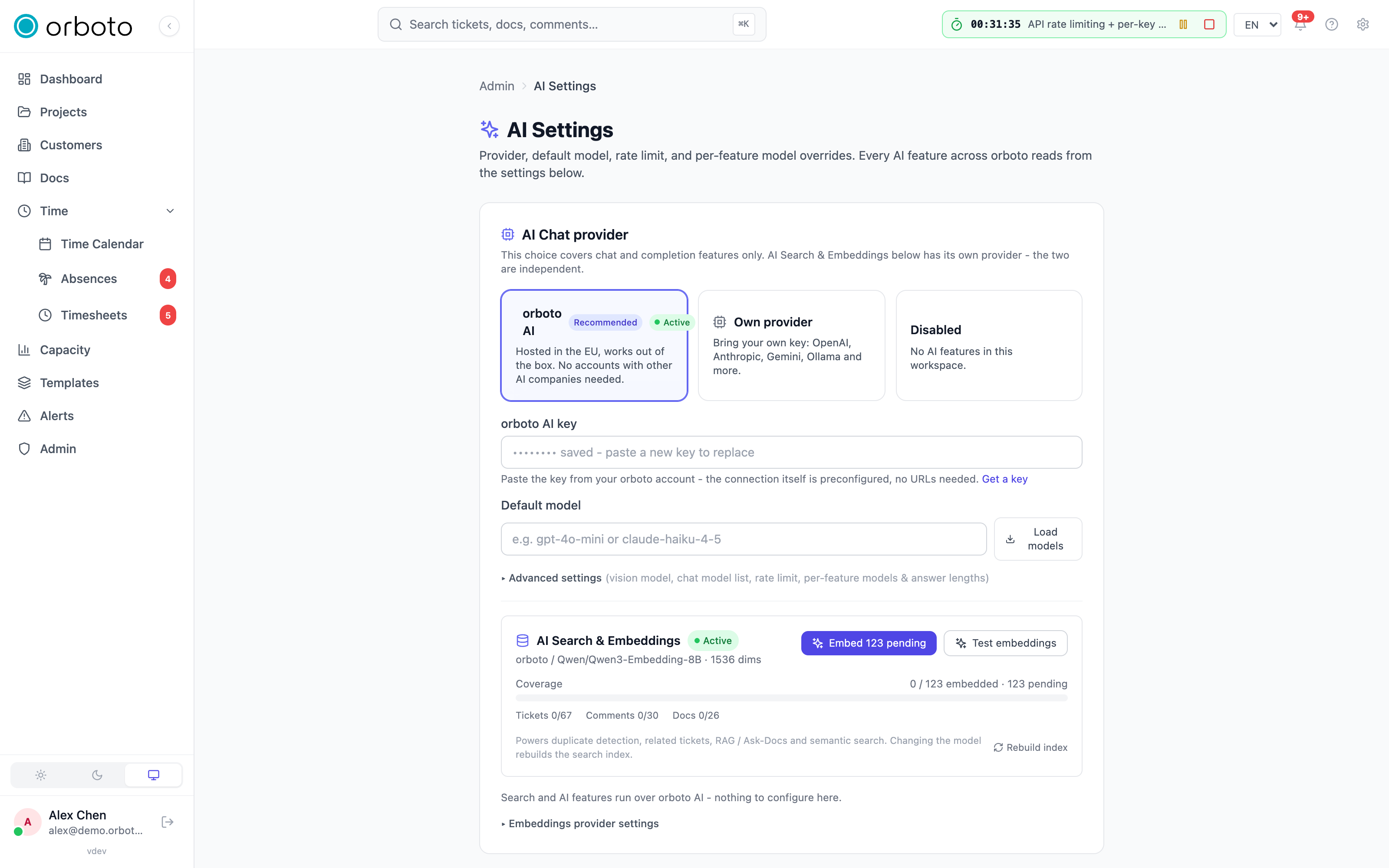
Three cards lead the page - clicking a card only previews it, it does NOT switch anything yet. A previewed card shows a note ("Just looking - nothing changes until you activate. Your current setup keeps running...") and its own explicit activation button - only clicking that button actually switches the live provider. This means you can safely click through all three cards to see what each one asks for before committing to anything:
- orboto AI (recommended) - hosted in the EU, works out of the box on a managed (Coolify/cloud-hosted) tenant with no key to paste at all; usage is billed pay-as-you-go from your subscription wallet. On self-host without a managed subscription, you paste a key from your orboto account instead - still no base URL or other wiring to figure out. Click Activate orboto AI to switch to it.
- Own provider - bring your own key. A dropdown lets you pick OpenAI,
Anthropic (Claude), Google Gemini, GitHub Copilot (Business/Enterprise
seat only - an individual Copilot subscription violates its terms of
service for this kind of use), Ollama (self-hosted, no key needed at
all), or any OpenAI-compatible endpoint (OpenRouter, Groq, DeepSeek, LM
Studio, vLLM, and others; a self-hosted install with Ollama on the same
box follows Everything local with Ollama).
Picking a provider here reveals a Switch
to
<provider>button - nothing changes until you click it, even after picking from the dropdown. For OpenAI-compatible or Anthropic providers, a preset picker appears that autofills the base URL and a sensible default model for known vendors, saving you from typing a raw API endpoint by hand. - Disabled - no AI features anywhere in the workspace. Click Turn AI features off to confirm.
Switching providers (either direction) is lossless: the outgoing provider's base URL, key and model are stashed server-side, so switching back later restores exactly what you had configured before, rather than making you re-enter it from scratch.
This choice covers chat and completion features only - embeddings have their own independent provider below, so switching one never switches the other. A common combination: Anthropic for chat (it has no embeddings endpoint at all) with orboto AI or OpenAI for embeddings.
Default model
Once a provider is wired up, Load models fetches its live model catalog into a searchable picker; providers with no catalog endpoint accept a typed model id instead. An optional vision model routes any call carrying image attachments to a multimodal model even when the default model is text-only - useful to keep a cheap default while still supporting image attachments in AI Chat. Allowed chat models (comma-separated ids) lets end users pick among a curated set inside the chat drawer; leave empty to hide that picker and always use the default.
On the managed orboto AI provider every model in the picker carries its price in orboto Token per 1 million tokens, input and output separately (embedding models a single figure); 1 orboto Token is 1 cent, billed per token from the workspace's included allowance first and from the balance after that. The figures come from the provider catalogue at load time, so they are the same the price list in your orboto account shows; the Price list link under the picker opens it. A model without a published price says so instead of showing a number.
Per-feature model overrides and answer length
Every AI operation orboto runs (grouped as classifiers, summarization, content rewriting, chat/reasoning, and utility) can override the default model - useful for a cheap, fast model on classification and a stronger one for chat or RAG. Each override also has its own answer length budget (how many tokens the operation may write back), offered as plain-language presets - Short, Standard, Long, Very long - each a multiple of that operation's own default, with a numeric override for advanced tuning. If a feature's replies come back empty, its budget is likely too small to leave room for both a reasoning model's silent "thinking" and the visible answer - try Long or Very long first.
Added in v0.236.0 Wiki questions run with the thinking off. The operation behind Ask AI on docs, orboto knowledge ask and the wiki questions of MCP and chat (ask-docs) answers a question from passages it is given, which needs no chain of thought, so its thinking is Off by default. A Thinking preset you set for it on this page still wins; chat and the other Q&A operations keep the model's default. The answer length of this operation is unchanged.
Wiki answer deadline
Added in v0.236.0 One wiki question runs under one deadline, counted from the moment the request arrives: 25 seconds on a hosted provider and 120 seconds on a local one (Ollama, or an OpenAI-compatible endpoint on loopback, a private address, a .local name or a single-label name, which also covers a server that loads its model on the first call). Wiki answer deadline (seconds) in the provider card sets your own, from 5 to 300; empty keeps the two defaults. It needs the AI-admin permission (admin:ai:write), and a change is written to the audit log with the old and the new value. The deadline is the only clock of a question: the answering and the reviewer calls take the time that is left, so a setting above the 180-second call timeout of other long operations is not cut at 180.
When the deadline passes during retrieval or while the answering model works, the question ends with HTTP 504 errors.ai.ask_deadline, which names the phase, and the failed question is written to the usage log. When it passes during the reviewer's check, the answer you already have comes back marked as flagged, and every surface shows "Reviewer flagged" (with no quote, the review did not finish in time).
Rate limit
Requests per user per minute caps how often one person can call an AI feature; the default is 30.
Embeddings and reindexing
Vector-based features (semantic search, duplicate/related detection, Ask-Docs) need an embedding provider, independent of the chat provider chosen above. Scroll down to the Embeddings subsection:
- On a managed tenant, two buttons let you choose Use orboto AI (managed) (the default - billed from your subscription wallet, zero configuration) or Bring your own provider. Picking "bring your own" reveals the same kind of provider dropdown as the chat section above - OpenAI, Google Gemini, Ollama, or OpenAI-compatible (Anthropic is absent here on purpose - it has no embeddings endpoint to configure).
- On self-host without a managed subscription, the provider dropdown is the only option - pick one directly and fill in its base URL/key/ model, the same as the chat section.
A Load models button here works the same way as on the chat section, scoped specifically to embedding-capable models on the chosen provider.
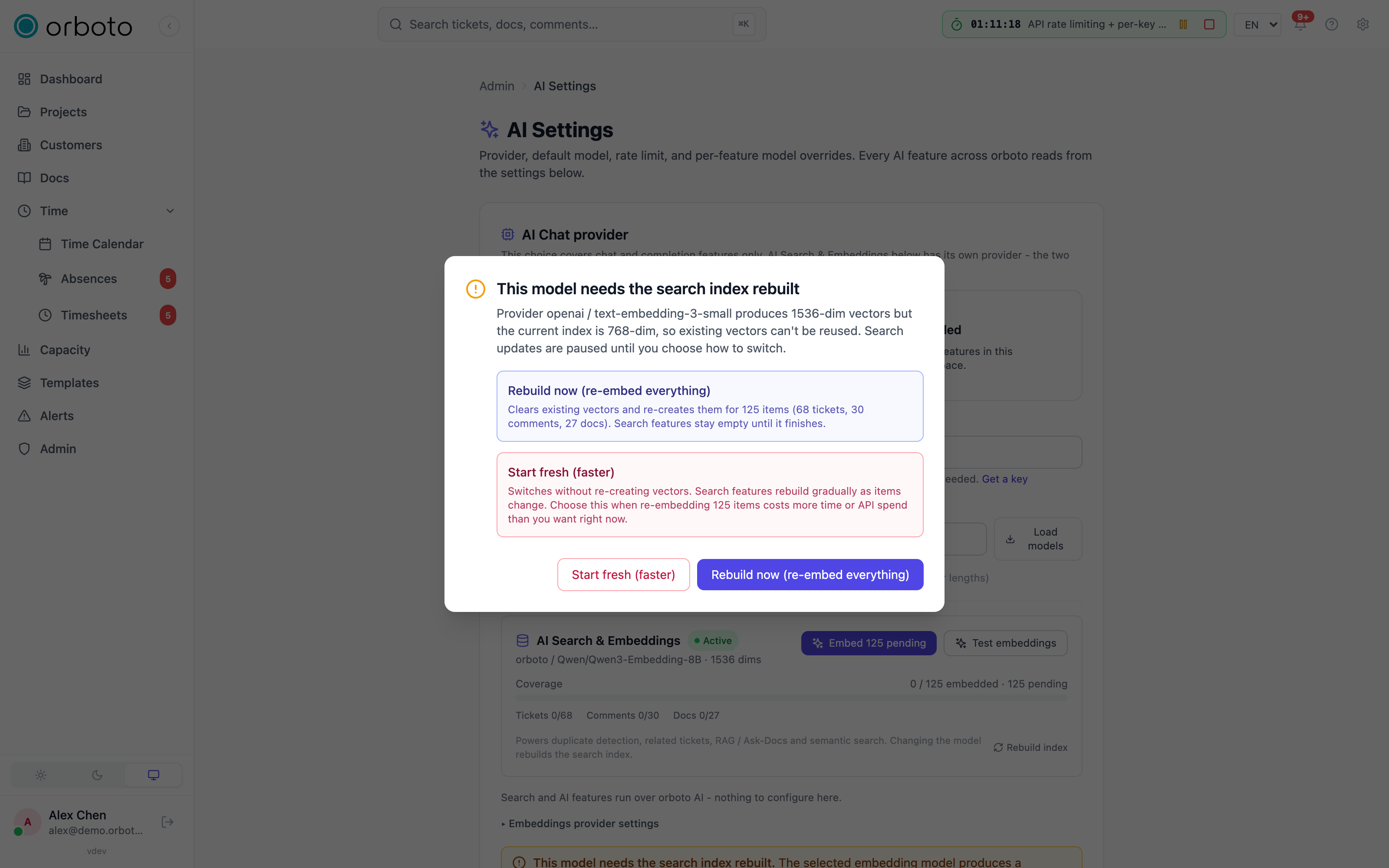
Changing the embedding provider or model can change the vector size the index needs to store. When that happens, an unblockable modal appears with two recovery paths: Rebuild now clears and re-creates every vector for every ticket, comment and doc (search features are empty until it finishes), or Start fresh switches immediately and lets vectors refill gradually as content changes (faster, but search stays partially empty for longer). If the new model's vectors are larger than what the search index can store at all, neither option can proceed - the fix is to pick a smaller-dimension model in the settings behind the modal.
Added in v0.212.0 An embedding call to the provider that times out or loses its connection is retried, up to four attempts, each with a longer time limit than the one before (60 seconds, then 90, 120 and 150), next to the retries for a busy provider (HTTP 429, 500, 502, 503 and 504). A call that still fails leaves its job queued for another try, and the job is reported to error tracking once, when its own retries are used up, not once per attempt. Self-hosted instances can watch orboto_embedding_calls_total (Monitoring).
AI Usage
Admin -> AI Usage reports total calls, input/output tokens, and errors, plus a daily-calls chart, per-user and per-operation breakdowns, a "Top AI Chat users" table, and a recent-failures list - the place to check before assuming a provider issue is a orboto bug. Added in v0.236.0 Wiki answer latency below it shows, for the selected range, the median and the 95th percentile of a wiki question from retrieval to the reviewed answer, the share that hit the deadline (a review that ran out of time included), the share that failed otherwise, and the median time per phase: retrieval, the answering model and the reviewer. Added in v0.236.0 A call that orboto ends itself, because its deadline passed or the client left, is not counted as an error and is not listed as a failure. The page also has a Knowledge use panel that draws how agents use the wiki: the share of offered pages that were read and the share of writes that were undone, per week, with an Export CSV button; see Knowledge use.
Troubleshooting
- "Load models" fails or returns nothing - a wrong base URL or an invalid/expired key is the most common cause; the error shows inline and you can still type a model id manually while you fix the wiring.
- Chat model list is empty but embeddings still work - some managed plans include embeddings only; switch the chat card to "Own provider" with your own key while keeping the included embeddings unchanged.
- The default model looks like an embedding model - a stale value from an old default surfaces a visible warning on this page; chat calls cannot work with an embedding model, clear it or pick a real chat model.
- A feature's answers come back empty or truncated - raise its answer length preset (Long / Very long) before assuming the model is broken; reasoning models spend part of the budget thinking before they answer.
- Reindex modal won't go away - it stays open on purpose while the schema and the live provider disagree on vector size; pick Rebuild or Start fresh (or fix the model setting first, if the size exceeds what the index can hold at all - that state explains itself in the modal).
Compliance control catalog
Catalog the controls you attest to for ISO 27001, SOC 2 or your own framework, give each an owner and a recurring attestation cadence, and keep an append-only attestation history.
AI Chat assistant
Let users run orboto operations by talking to an in-app assistant - enabling it, per-user controls, cost caps, and auditing.