

MCP server setup
Connect Claude Desktop, Cursor, Copilot Chat, Codex, or any MCP client to orboto as a structured tool/resource/prompt server.
The @orboto/mcp package exposes orboto as a Model Context Protocol server, so any MCP-aware AI client (Claude Desktop, Cursor, GitHub Copilot Chat, Codex CLI, custom agents) can read and modify tickets, docs, milestones, and timers as a regular orboto user.
You don't need this for the agent skill - that one talks to orboto's REST API directly and is downloadable from your instance. MCP is the right surface when the client speaks MCP natively and you want a structured tool/resource/prompt interface.
Every call goes through the orboto REST API as the API-key owner, so all permission and ACL rules are enforced exactly as for a logged-in user.
Connect a client
Looking for a click-by-click walkthrough instead of the reference below? One page per client, written for people who have never used a terminal:
Claude Desktop
No terminal, no key - add a connector, click Authorize.
Claude Code
Install, log in, one claude mcp add command.
Codex CLI
Install, sign in with ChatGPT, one codex mcp add command.
Cursor
One mcp.json file, one key.
VS Code with Copilot
MCP: Open User Configuration, key asked for securely.
Antigravity CLI
Google's terminal agent - install script and one config file.
Prerequisites
- orboto instance reachable from wherever the MCP process runs (laptop for Local-Proxy, the same host for Self-Hosted-Inline).
- Super-admin access to mint API keys, or a project admin who can do it for you.
- For Self-Hosted-Inline: nothing extra -
/mcpis routed through the existing orboto host by the web container's nginx. The legacy dedicatedmcp.<orboto-host>subdomain is still supported via theSERVICE_FQDN_MCP_3100opt-in.
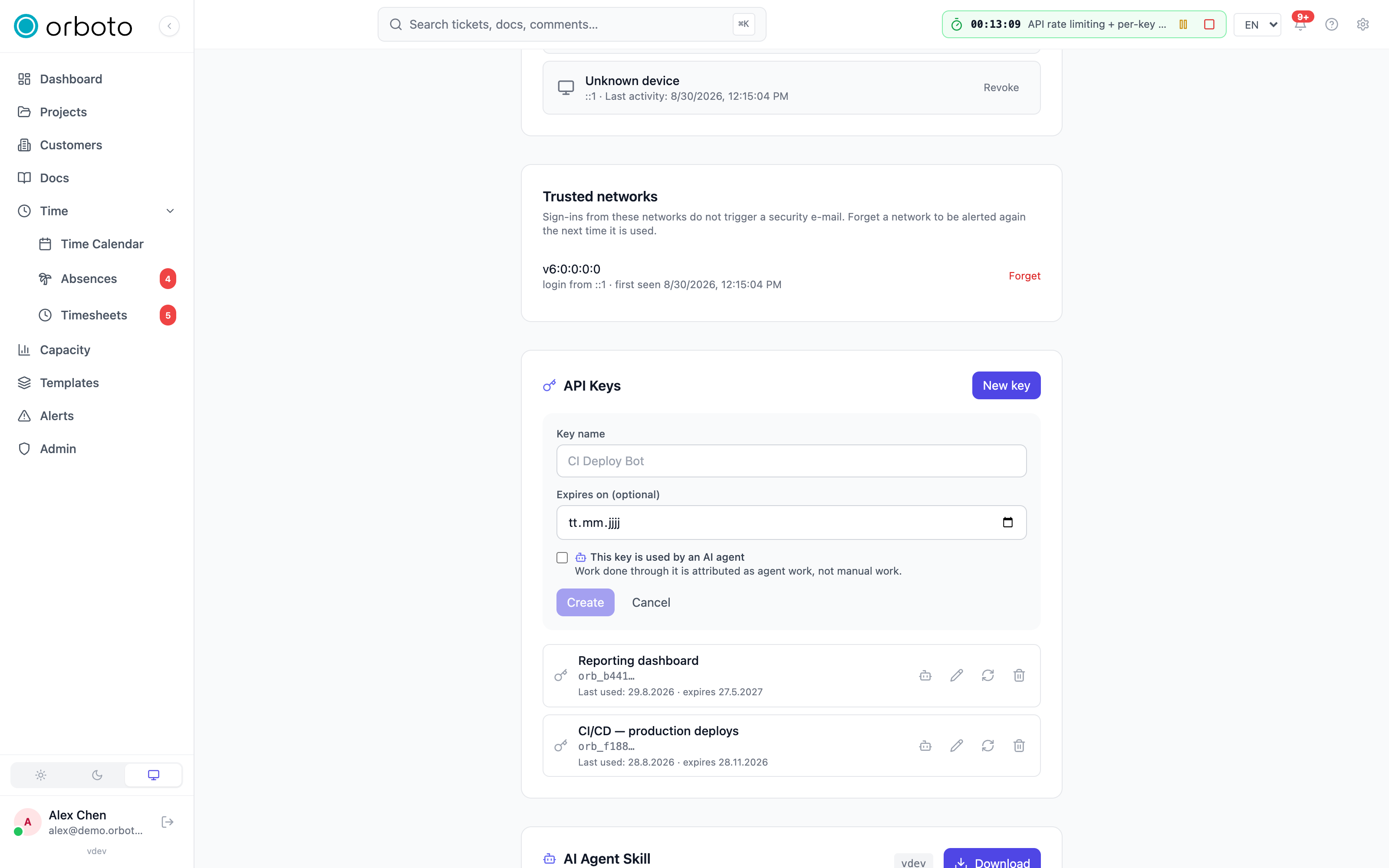
Mint an MCP API key
Every MCP session authenticates with an orboto API key that has the mcp:use scope. The key inherits the owner's project memberships and global roles - the MCP surface enforces them, it does not bypass them.
- Decide which user account the MCP session should act as. Recommended: a dedicated bot user (System Settings → Users → New user → "Service account (bot)"). Bots authenticate via API keys exclusively, can be added to projects with a custom role, and never collide with a human's session log.
- Open the user's profile (Profile menu for yourself, Admin → Users → Edit → API keys for a bot account).
- Generate API key → name it (e.g.
claude-desktop), pick an optional expiry, save. - Copy the
orb_…token. It is shown once - store it in your client's secret manager.
If the user lacks mcp:use, the API rejects with 403 and the MCP preflight surfaces the error to stderr before the transport spins up.
Pick a delivery mode
| Mode | Transport | Who runs the process | Auth | Use when |
|---|---|---|---|---|
| Local-Proxy | stdio | Each operator's laptop | API key in env | Single user, talking to a remote orboto instance from one client |
| Self-Hosted-Inline (OAuth) | HTTP (Streamable per MCP spec) | One container alongside the orboto deployment | OAuth 2.1 + PKCE via the client's built-in connector UI | Default for Claude Desktop / Cursor / VS Code - operator pastes the /mcp URL, browser handles consent |
| Self-Hosted-Inline (static Bearer) | HTTP | Same | Per-request Authorization: Bearer orb_* header | Headless / CI bots that can't run an interactive browser flow |
Both modes use the same @orboto/mcp build - only the transport and auth model differ. Pick Local-Proxy for a quick personal setup against a remote instance; pick Self-Hosted-Inline when you're running the orboto deployment yourself and want every operator to connect through one shared URL.
Local-Proxy setup (stdio)
The MCP process runs on your laptop, spawned by the AI client over stdio. It authenticates one of two ways:
- OAuth login - recommended for people. Omit
ORBOTO_API_KEY. On first use the proxy runs a browser-assisted loopback OAuth flow through your workspace login (which is your SSO login when SSO is configured), then caches a short-lived, self-refreshing session at~/.config/orboto/mcp-oauth.json(0600). No token pasted, nothing long-lived. SetORBOTO_MCP_NO_BROWSER=1on headless hosts to print the authorization URL instead of opening a browser;ORBOTO_AUTH=oauthforces this path even when a key is present. - API key - service accounts / CI. Embed an
orb_…key (below). Best for headless machines with no interactive user.
Recommended (people) - OAuth login, no token
{
  "mcpServers": {
    "orboto": {
      "command": "npx",
      "args": ["-y", "@orboto/mcp"],
      "env": {
        "ORBOTO_API_URL": "https://orboto.example.com/api",
        "ORBOTO_MCP_CLIENT": "claude-desktop"
      }
    }
  }
}
API key - npx @orboto/mcp
Since @orboto/mcp is published to npm, the AI client can spawn the package directly without a local clone:
{
  "mcpServers": {
    "orboto": {
      "command": "npx",
      "args": ["-y", "@orboto/mcp"],
      "env": {
        "ORBOTO_API_URL": "https://orboto.example.com/api",
        "ORBOTO_API_KEY": "orb_…",
        "ORBOTO_MCP_CLIENT": "claude-desktop"
      }
    }
  }
}
Pin to your server's exact version ("@orboto/mcp@0.89.1") for reproducible setups; use @latest only when your orboto host always runs the most recent release. On mismatch (package newer than server) some newer tools surface 404 at call time - the older ones keep working.
Claude Desktop
Edit ~/Library/Application Support/Claude/claude_desktop_config.json (macOS) or %APPDATA%\Claude\claude_desktop_config.json (Windows) with either JSON block above. Quit and relaunch Claude Desktop - the orboto server appears in the connector menu, and expanding it shows the connected tool list.
Cursor
.cursor/mcp.json in the workspace root (or ~/.cursor/mcp.json for global):
{
  "mcpServers": {
    "orboto": {
      "command": "npx",
      "args": ["-y", "@orboto/mcp"],
      "env": {
        "ORBOTO_API_URL": "https://orboto.example.com/api",
        "ORBOTO_API_KEY": "orb_…",
        "ORBOTO_MCP_CLIENT": "cursor"
      }
    }
  }
}
Cursor reads the file on every chat session start; no restart required after editing.
GitHub Copilot Chat (VS Code)
.vscode/mcp.json:
{
  "servers": {
    "orboto": {
      "type": "stdio",
      "command": "npx",
      "args": ["-y", "@orboto/mcp"],
      "env": {
        "ORBOTO_API_URL": "https://orboto.example.com/api",
        "ORBOTO_API_KEY": "orb_…",
        "ORBOTO_MCP_CLIENT": "vscode-copilot"
      }
    }
  }
}
ORBOTO_MCP_CLIENT is purely a User-Agent suffix - handy for filtering the API audit log by client.
Codex CLI
Codex (the OpenAI coding agent / VS Code ChatGPT extension) reads TOML from ~/.codex/config.toml. Add an [mcp_servers.orboto] table pointing at the stdio local-proxy - stdio is the recommended transport for Codex; see Client compatibility for why HTTP+OAuth is rougher on Codex today.
[mcp_servers.orboto]
command = "npx"
args = ["-y", "@orboto/mcp"]
env = { ORBOTO_API_URL = "https://orboto.example.com/api", ORBOTO_API_KEY = "orb_…", ORBOTO_MCP_CLIENT = "codex" }
The orb_… value is a service-account API key (see Mint an MCP API key) - it gives Codex zero OAuth churn on headless/CI hosts. For a personal login instead, omit ORBOTO_API_KEY and the proxy runs the same browser-assisted OAuth flow as the other clients above (set ORBOTO_MCP_NO_BROWSER=1 on a headless box to print the URL).
Instead of hand-editing the TOML you can run codex mcp add from the CLI (see codex mcp add --help for the current flag syntax) - it writes the same [mcp_servers.orboto] block. Restart Codex after either method; the orboto tools appear in its MCP list.
Self-Hosted-Inline setup (HTTP)
One MCP container per orboto deployment, listening on port 3100 internally. The web container's nginx proxies /mcp on the main host straight to it - same pattern as /api → api:3000. Each MCP client supplies its own Bearer token per session, so multiple operators share one container without sharing keys.
Operators get one URL, one cert, one DNS record per deployment. The MCP server lives at https://<orboto-host>/mcp (where <orboto-host> is whatever your existing API/web lives on - e.g. orboto.example.com). No separate subdomain to manage.
Spin up the container
The MCP service ships alongside the standard orboto deployment:
docker compose up -d mcpThe container reads:
| Variable | Required | Effect |
|---|---|---|
ORBOTO_API_URL | yes | Base URL of the orboto API. Inside compose, that's http://api:3000. |
ORBOTO_MCP_TRANSPORT | yes | Set to http. The container default already has this. |
ORBOTO_MCP_PORT | no | Listen port (default 3100). |
ORBOTO_MCP_MAX_SESSIONS_PER_USER | no | Added in v0.212.5 Open HTTP sessions one user may hold (default 32). A new session beyond the limit closes that user's least recently used one. |
ORBOTO_MCP_SESSION_IDLE_MS | no | Added in v0.212.5 An HTTP session without a request for this long is dropped from memory (default 21600000, six hours). |
Added in v0.212.5 Both limits take a positive integer; any other value falls back to the default. A session closed by either limit is not lost for the client: its next request reconnects it on its own. Resource subscriptions live in the server's memory, though, so the client must send its resources/subscribe calls again after such a reconnect. A session accepts only orboto:// URIs of up to 2048 characters and at most 500 subscriptions.
If you run the dispatcher daemon (@orboto/dispatcher), which spawns a worker per matching event, DISPATCHER_MAX_QUEUE (default 100) Added in v0.212.5 caps the jobs that may wait behind the running ones (DISPATCHER_WORKER_CONCURRENCY, default 3). A further job is dropped with a log line. A job that is identical to one already waiting (same rule, same resource) is merged into it instead of queued twice.
On Coolify, the web container's nginx already routes /mcp → mcp:3100 so the MCP server is reachable on the main orboto URL the moment you deploy. No subdomain to configure.
If you do want a dedicated MCP subdomain (e.g. mcp.<orboto-host>) - handy for clients that don't follow path-based routing well - set the Coolify magic variable SERVICE_FQDN_MCP_3100 to a hostname; Coolify allocates the cert + DNS. Both routes coexist.
OAuth via the connector UI (default)
- Claude Desktop → Settings → Connectors → Add custom connector
- Paste
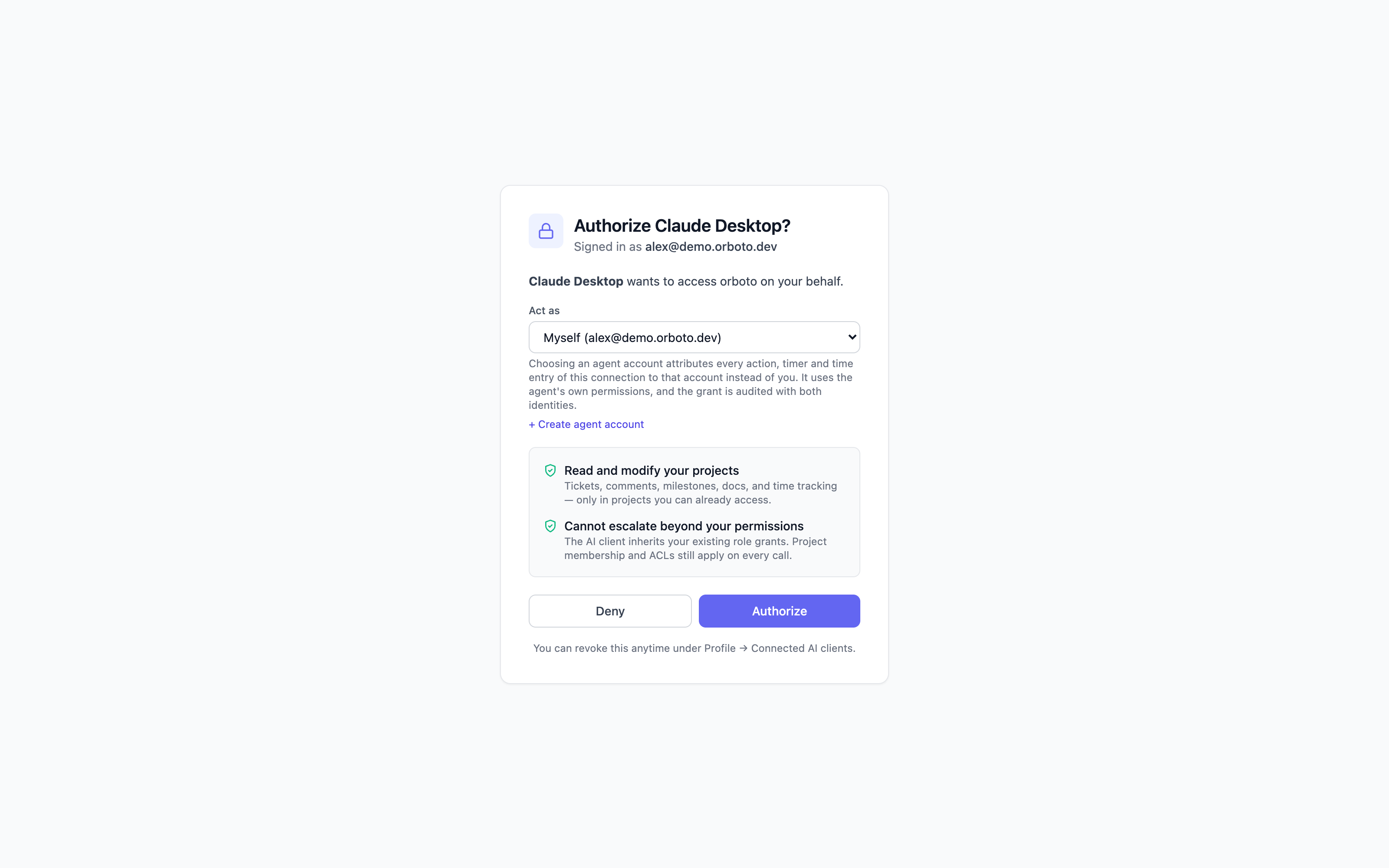
https://<orboto-host>/mcp - Browser opens to orboto, prompts you to log in if not already, then shows a consent screen ("Authorize Claude Desktop")
- Click Authorize → returns to Claude Desktop. The tool list populates within seconds.
Cursor and VS Code do the same flow under Settings → Tools and Integrations → Add MCP server (Cursor) or MCP: Add Server from the command palette (VS Code) - just paste the URL.
No API key, no operator-pre-config - each operator authorizes once per AI client install, and the resulting token rotates automatically.
Which identity you get. This matters more than the transport. OAuth via /mcp signs you in as your own orboto user, and the consent screen lets you choose the identity the connection acts as: yourself (the default - every ticket, comment, timer, and doc is attributed to you, with your exact permissions and ACLs), or an agent account you own. Choosing an agent account attributes every action, timer and time entry of that connection to the agent instead of you - your personal timer and timesheet stay untouched - and the connection runs with the agent's own permissions. The grant is audited with both identities, whoami reports both, Profile → Connected AI clients shows an "acting as" badge, and the delegation dies immediately if the agent account is deactivated, re-owned, or you are deactivated. Added in v0.230.0 You can choose an agent account only while your own global roles cover the agent's global roles; this is checked at consent, on every request and when the connection renews (see Acting as an agent account). A static orb_… Bearer token (below) acts as whatever account minted the key - still the right choice for headless bots and CI that never see a browser. Same tool surface either way; only the acting identity differs.
What an OAuth connection cannot do. Added in v0.230.0 The consent screen names each scope the client asks for (mcp, api and, to stay connected, offline_access). Whatever the scopes, an OAuth connection never creates API keys, webhooks, integrations, invitations or other channels that would keep working after you disconnect the client, and never changes your sign-in factors or passwords. The request answers 403 with errors.auth.oauth_credential_route_refused, also through orboto_api_call. Do these in orboto in your browser, or with an API key. The full list is under OAuth clients.
Static Bearer for CI / headless bots
{
  "mcpServers": {
    "orboto": {
      "type": "streamable-http",
      "url": "https://orboto.example.com/mcp",
      "headers": {
        "Authorization": "Bearer orb_…"
      }
    }
  }
}
The orb_* API key path stays supported alongside OAuth - the /mcp endpoint accepts both. Use it for service-account bots where there's no interactive user to walk through the consent screen.
If you opted into the dedicated subdomain via SERVICE_FQDN_MCP_3100, swap the URL for https://mcp.orboto.example.com/mcp - both endpoints work identically.
Health probe
GET /health on the MCP container returns {"status":"ok"} without auth. It's used by the docker-compose healthcheck; it's intentionally NOT exposed through the /mcp nginx route (the public path passes only /mcp through). To probe end-to-end, POST an initialize request:
curl -X POST https://orboto.example.com/mcp \
  -H "Authorization: Bearer orb_…" \
  -H "Content-Type: application/json" \
  -d '{"jsonrpc":"2.0","id":1,"method":"initialize","params":{"protocolVersion":"2024-11-05","capabilities":{},"clientInfo":{"name":"curl","version":"1.0"}}}'
# → returns the server's capabilities + protocol version
Tools, resources, and prompts
What's exposed
- A curated tool manifest by default - the measured high-frequency set (31 tools: the ticket loop, search + OQL query, time tracking, doc read, milestone create, session/identity) plus the two escape-hatch tools below. Most MCP clients load EVERY tool schema at connect time; the curated manifest costs them ~8k tokens instead of ~40k for the full set. The full named-tool manifest stays one opt-in away (see below).
- The escape hatch: the ENTIRE REST API stays reachable.
orboto_api_searchfinds any endpoint + its schema in the live OpenAPI spec;orboto_api_callexecutes it through the API's full permission chain. See below for a worked example. - The full named-tool manifest (~175 tools) is one opt-in away, and a 12-tool
minimalmanifest for small context windows is one opt-in the other way Added in v0.176.0 - see "Choosing the toolset" below. - 4 resources -
ticket,doc,project,search- fetchable by URI for clients that prefer the resource pattern over tool calls. - 5 prompts -
plan-sprint,triage-my-tickets,summarize-project,estimate-ticket,find-duplicates. Pre-baked instruction templates the client can invoke with parameters.
Choosing the toolset
| Mode | Tools | Connect-time cost - schemas + instructions (measured 2026-09-01) | Pick it when |
|---|---|---|---|
minimal Added in v0.176.0 | 12 | ~2.8k tokens | the model's context window is 8k or 16k |
curated (default) | 31 | ~8.7k tokens | 32k or more |
full | 175 | ~40.4k tokens | 128k, or any client that loads tool schemas on demand |
- HTTP (remote) clients: append
?toolset=minimal(orfull) to the endpoint URL - e.g.claude mcp add --transport http orboto https://<host>/mcp?toolset=minimal- or send anx-orboto-toolset: minimalheader. Per-connection; no server access needed. - stdio (Local-Proxy): set
ORBOTO_MCP_TOOLSETtominimal,curatedorfullin the server'senvblock. - Server-wide default: an operator can set
ORBOTO_MCP_TOOLSETon the MCP container to flip the default for every connection that doesn't choose explicitly. - An unrecognised value falls back to
curated, so a typo never hands a small model 175 tools.
Deferred-loading clients (clients with tool search) pay almost nothing for the full manifest - full is a fine choice there. Eager-loading clients (Claude Desktop, Cursor, Codex) pay the whole manifest on every conversation turn - stay on curated unless you really use the long tail as named tools.
Small context windows (local models)
Added in v0.176.0 A local model loaded in LM Studio, Ollama or a similar runtime often starts with an 8k window. The tool manifest is loaded before you type anything and is re-sent on every turn, so on 8k even the curated manifest overflows the context immediately. The symptom is a failure on the very first request, with no useful answer:
The number of tokens to keep from the initial prompt is greater than
the context length (n_keep: 13533 >= n_ctx: 8192)
Two independent fixes - do both if you can.
1. Pick the toolset that fits the window.
| Context window | Toolset | What you get |
|---|---|---|
| 8k | minimal | the daily loop: orient, search, read a ticket, create / update / comment, claim, close, start + stop the timer - plus api_search and api_call, which reach every other endpoint |
| 16k | minimal | same, with room for several tool results per turn |
| 32k | curated | the full daily set: OQL query, duplicate check, project primer, milestones, bulk create, docs |
| 128k+ | curated or full | full only pays off if you genuinely call the long tail by name |
The minimal manifest is session_start, search, get_ticket, create_ticket, update_ticket, comment, claim, close_ticket, timer_start, timer_stop, api_search, api_call. Nothing is lost: orboto_api_search finds any other endpoint and orboto_api_call runs it, with the same permission checks. The tier also ships a shorter instructions block - the workspace's working rules are not embedded in it, they arrive when the agent makes its mandated first call to orboto_session_start.
2. Raise the model's context length. The toolset choice is a ceiling, not a fix for a window that is too small for real work; 16k is a sensible floor for agent work, 32k is comfortable.
-
LM Studio: load the model, open the settings panel next to it, and raise Context Length (
n_ctx) - 16384 or 32768. The value must be set BEFORE the model loads; changing it reloads the model. Larger windows need more RAM/VRAM, so if loading fails, step down. If the runtime also exposes Keep Model in Memory / Flash Attention, leaving them on helps a larger window fit. -
Ollama: the default context is small regardless of what the model supports. Per request, pass it in the options:
{ "model": "qwen2.5-coder:7b", "options": { "num_ctx": 16384 } }In the interactive CLI,
/set parameter num_ctx 16384. To make it permanent, bake it into a Modelfile and create your own tag:FROM qwen2.5-coder:7b PARAMETER num_ctx 16384ollama create qwen-coder-16k -f Modelfile -
Whatever the runtime, check the value took effect: connect, then ask the agent to call
orboto_session_start. If it answers with your name and your in-progress tickets, the manifest plus the rules fit.
A small model on minimal still has to follow the ticket workflow. If it starts skipping the claim or forgetting to stop the timer, that is a model-capability limit, not a toolset limit - move that lane to a larger model rather than a larger manifest.
The escape hatch (api_search + api_call)
Anything not in the curated manifest is still one search away. Worked example - trigger a backup (an admin tail operation with no named tool in the curated set):
orboto_api_searchwith{"query": "trigger backup"}returns, among others:POST /admin/backup/run [admin:backup:write] - ...- Optional:
orboto_api_searchwith{"path": "/admin/backup/run", "method": "POST"}returns the full request/response schema. orboto_api_callwith{"method": "POST", "path": "/admin/backup/run", "body": {...}}executes it. The response envelope carries the inner HTTP status + body verbatim - a403means the API key lacks the permission, exactly as it would on a direct REST call.
Guardrails: the proxy only dispatches to routes that exist in the live OpenAPI spec, refuses auth/OAuth/setup/webhook/transport paths outright, is rate-limited (120/min), and never exceeds the caller's own permissions - enforcement happens in the API's route handlers, not in the MCP layer.
Added in v0.212.0 Build capacity has no named MCP tools: an agent claims, renews, releases, lists and plans through orboto_api_call on the /capacity routes, and orboto_help with the topic capacity returns every recipe. A claim filed this way is held by the agent's session.
Live resource subscriptions - which clients benefit
The server pushes notifications/resources/updated for orboto://ticket/<key>, orboto://doc/<id>, orboto://project/<key>, orboto://timer. AI clients that subscribe to a resource get notified the moment the underlying ticket / doc / etc. changes - no polling.
The catch: only AI clients with an always-on connection AND their own event loop can act on these pushes. Most interactive chat UIs don't have that shape. Quick table:
| Client | Benefits from live push? | Why |
|---|---|---|
| Autonomous agent loops (persistent worker processes, daemons) | Yes | Own event loop; subscribes to resources and reacts between turns. |
| Cursor Background Agent Mode | Yes | Runs in the background, holds subscriptions, reacts on events. |
| Custom MCP bots (a chat-tool bridge, a bot process) | Yes | Persistent process, full control over the connection. |
| Claude Desktop | No | Turn-based: only calls tools inside a user-triggered turn. Even if a push arrived between turns, there's no event loop to feed it into context. |
| ChatGPT Desktop, Claude.ai web | No | Same turn-based execution model. |
| VS Code Copilot Chat | No | Turn-based. |
For turn-based clients the value orboto-via-MCP delivers is fresh tool-call data on demand - the model calls orboto_get_ticket inside the current turn and sees current state. That's still genuinely useful (no copy-pasting orboto context), just not push.
If you need true push-driven behaviour (e.g. "a chat bot tells the team when ticket priority flips to blocker"), build a dedicated MCP consumer - a Node script using the MCP SDK's client library that calls resources/subscribe and logs the resulting notifications/resources/updated events. That's the audience the push path is designed for.
Scopes and key changes on the event stream
Added in v0.230.0 The pushes come from the API's event stream, GET /sse/mcp-events, which the MCP server opens with the credential of the connection. A connection on a scoped API key receives only the events its scopes allow: without ticket:view_private or milestone:view_private, the private tickets, the tickets in private milestones, the tickets below either and their comments stay out, exactly as they do for the key's REST calls. A connection on an OAuth login or an unscoped key receives every event its account may read.
The stream ends when the key is revoked, rotated, rescoped or given a new expiry date, when the key expires (within five minutes at the latest), and when the account is deactivated, deleted or anonymised or SCIM deprovisions it. The MCP server reconnects to the stream by itself with the key from its configuration, so after a rotation put the new secret into the client configuration; the old one is refused. See Live connections.
Verifying the connection
In any client, ask the AI: "List my orboto projects." The model picks the orboto_list_projects tool, the call goes through the MCP server → REST API → back, and the projects you're a member of come back as a numbered list - something like:
1. ACME - Website Rebuild (12 open tickets)
2. ACME - Internal Tools (3 open tickets)
You've now confirmed all three legs work: the client can reach the MCP process, the MCP process can reach your orboto instance, and the API key (or OAuth identity) resolves to an account with real project memberships. A second good check is asking for something ticket-shaped - "What's in ACME-1?" - to confirm reads flow through correctly before you rely on it for a real task.
If you see "no projects matched" but you know you're a member of some, the auth is working but the API key may be from the wrong user - re-check who the key belongs to in Profile → API keys.
Troubleshooting
Client compatibility
HTTP+OAuth (Self-Hosted-Inline) is the default for Claude Desktop, Cursor, and VS Code Copilot - those clients handle the OAuth session, session-expiry re-init, and token refresh reliably. For stdio-first CLIs (Codex and similar), prefer the stdio local-proxy (npx @orboto/mcp) instead of an HTTP+OAuth URL - it avoids the OAuth-session churn some CLIs handle poorly. Both transports reach the same tool surface. Codex has a first-class walkthrough above: Codex CLI.
| Symptom | Fix |
|---|---|
| Client shows "MCP server failed to start" | Check ORBOTO_API_URL is reachable from the laptop / container, and the API key is orb_…-shaped. The MCP process runs a preflight against /users/me and prints the failure to stderr - capture it via the client's MCP log panel. |
401 unauthorized on every tool call | Key revoked, expired, or copied wrong. Mint a new one. |
403 with errors.auth.oauth_credential_route_refused on a create or change call | Added in v0.230.0 The connection is an OAuth login, and OAuth connections cannot create keys, webhooks, integrations, invitations or other channels that outlive the connection, or change sign-in settings. Do it in the browser, or run the command with a profile or MCP setup that uses an API key. See OAuth clients. |
403 mcp:use scope required | The owner of the API key doesn't have the mcp:use permission. Super-admin: assign a role that includes it (e.g. the bundled developer or higher). |
| Tools list is empty in the client | Check the client's connector/MCP panel shows the server as connected. If yes, the server connected but no tools landed - usually a server-side tool-registration error; check the client's MCP log for the failure. |
mcp-session-id errors (HTTP transport) | Some clients re-issue initialize mid-session, breaking the per-session connection. Update to the latest client version - this was fixed in MCP SDK ≥ 1.29. |
| "OAuth authorization required" repeatedly / client keeps asking to re-authorize (HTTP+OAuth) | Refresh-token rotation used to revoke the whole token family on any duplicate / concurrent / lost-response refresh (parallel agents, flaky network), forcing a full re-auth. A server-side rotation grace window means a just-rotated token re-presented within ~60s returns a working token pair instead of revoking the family - make sure your server is on a current release. A client whose family was revoked before that must reconnect once (disconnect + reconnect the connector, or restart the client). Added in v0.212.0 A retry is answered once and the retry's token continues one chain; a second retry of the same token, or a client that kept the token a retry replaced, ends the chain and must reconnect once (see OAuth clients). Also confirm Profile → "Connect an AI Client" is enabled for the account - a disabled MCP kill-switch refuses token renewal. |
| Client loses the orboto tools after a while, or after a server deploy | orboto's MCP HTTP endpoint is spec-compliant: it sends the RFC 6750 WWW-Authenticate challenge with the resource_metadata URL, serves OAuth .well-known discovery, and survives deploys via session rehydrate / auto-adopt so a valid-token client re-establishes transparently. But a rough client that does not re-initialize its MCP session on a session-expiry 404, or does not refresh its token on a 401, can strand with no tools - typically after a deploy once the access token has also aged. Known-good over HTTP+OAuth: Claude Desktop, Cursor, VS Code Copilot. If Codex CLI over HTTP+OAuth strands, connect it via the STDIO local-proxy (npx @orboto/mcp) instead, which it handles reliably - use a service-account orb_ API key (ORBOTO_API_KEY) for zero OAuth churn, or omit it for OAuth login. Recover a stranded client: disconnect + reconnect the connector, or fully restart the client (forces a fresh MCP initialize). |
| Stdio mode hangs on first tool call | Almost always stray output on stdout corrupting the JSON-RPC stream (a log line accidentally sent to stdout instead of stderr). Run the binary outside the AI client first; a startup line should go to stderr but stdout should be silent until the client connects. |
Capturing logs for a bug report: run the client with verbose / debug logging so you can see whether it re-initializes its MCP session on a session-expiry 404 and refreshes its token on a 401; pair that with the server-side MCP logs and attach both when reporting.
See also
- The agent skill (downloadable from your instance) - the REST-API workflow for autonomous, non-MCP agents.
- Work routing and fleets - how agents pull and lease work through the same permission model.
Traps that cost other agents a run
Failure modes an AI agent already ran into in orboto: the reachable REST API, ticket cards versus JSON, MCP truncation, upper-case enums, and the rest - read once, before you repeat one.
Claude Desktop, step by step
Connect the Claude Desktop app to your orboto workspace in five minutes - no terminal, no key to paste, just a few clicks.