

The agent skill
The packaged REST workflow for autonomous coding agents.
For agents that do not speak MCP - headless coding agents, CI bots, scripts - orboto ships a skill: a packaged instruction set plus a wrapper that teaches an agent the full orboto workflow over the REST API.
What it covers
The complete working loop: starting a session (which delivers the binding workspace rules), finding and claiming tickets, the one-commit-per-ticket discipline, commenting, time tracking, moving tickets through review, and closing with evidence. The skill mirrors what the MCP server exposes, so agents on either surface behave consistently.
The same loop looks like this from the CLI - the skill's operation reference maps each of its steps to one of these calls:
orboto session-start --project ACME
orboto ticket claim ACME-42
orboto ticket comment ACME-42 "root cause: session TTL was set in minutes, not seconds"
orboto ticket close ACME-42 --comment "fixed and verified by the test suite"
Installing
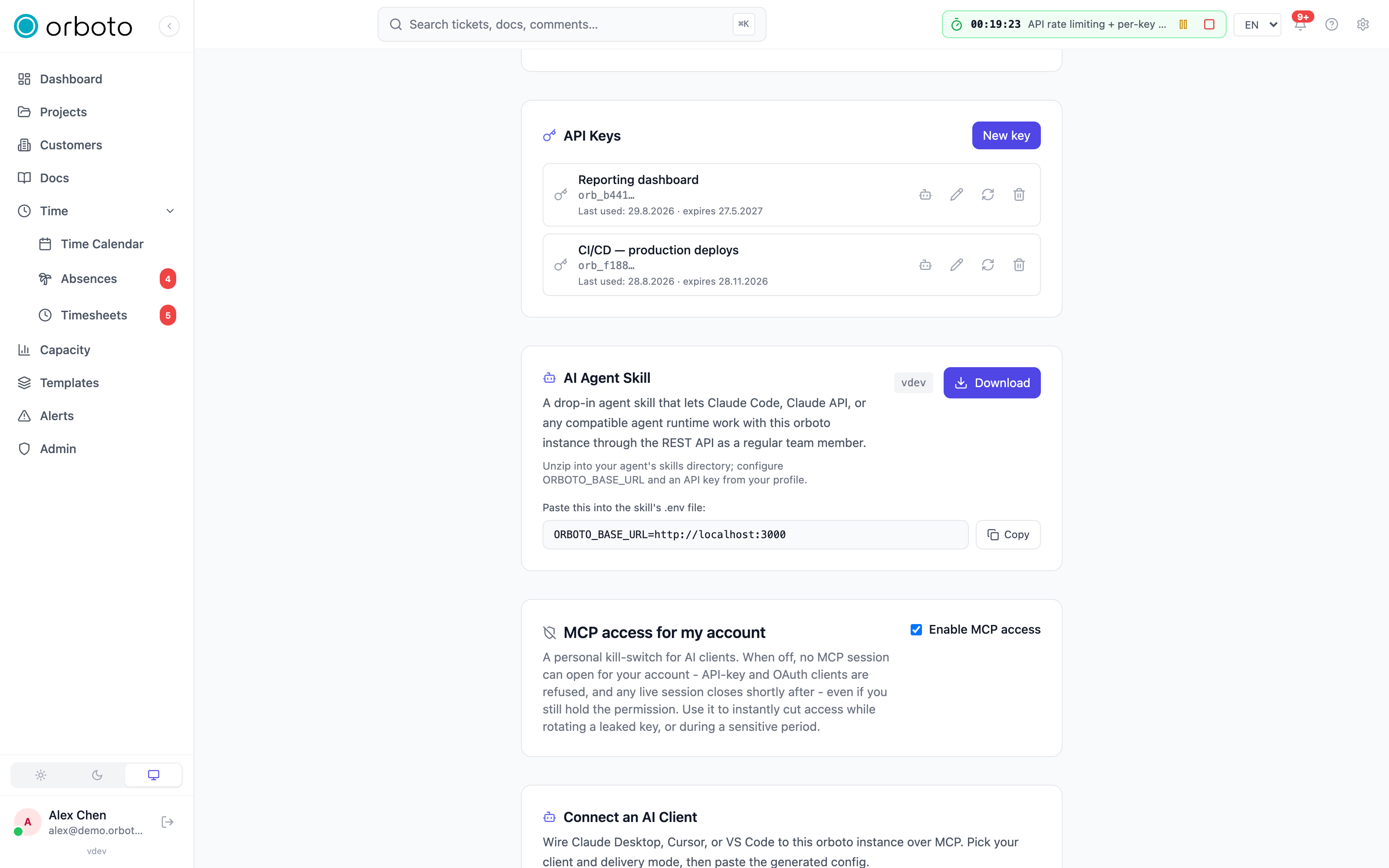
- In orboto, open your Profile and find the AI agent skill card (the same card also appears under Admin → System settings for an operator setting this up for a whole team).
- Select Download. You get a zip archive containing the skill's
instruction file, its companion reference files, and a
.env.samplealready filled in with your instance's URL - so you only need to add a token, not type the URL by hand. - Unzip it into your agent's skill or instruction directory (where that lives depends on your agent runtime - check its docs for where it looks for skills or custom instructions).
- Copy
.env.sampleto.envinside the unzipped folder and paste in an API key minted for the agent's bot identity (not a human account) - see API keys for how to mint one scoped to a service account. - Run whatever smoke-test operation the skill documents (typically an identity check) to confirm the agent can actually reach your instance and authenticate before relying on it for real work.
The CLI covers the exact same operations as single commands and is the recommended companion - the skill's operation reference maps each step to a CLI call, so you can debug a failing skill operation by running the equivalent CLI command directly and seeing which one actually breaks.
Staying current. The skill evolves alongside orboto - re-downloading later picks up newer operations and reference updates. Repeat the download step above whenever you upgrade your orboto instance to a meaningfully newer version, the same way you'd update any other dependency.
Rules delivery
The first session call returns the workspace's agent rules and a
short rulesHash. From then on, every session call sends that hash back
as knownRulesHash:
- If the hash still matches the workspace's current rules, the response
comes back with
rulesUnchanged: trueand no rules text at all - the agent already has them, so there's nothing to resend. This is why starting a session on every ticket doesn't mean re-reading the whole rulebook every time. - If an admin changed the rules since your last session, the hash won't
match. The response includes
rulesUnchanged: falseand the full, current rules text - the agent picks it up automatically on its very next session call, with no separate "check for updates" step needed.
If an agent's own context gets reset or compacted and it loses track of
whether it actually has current rules, it can force a full resend
regardless of hash match (--force-rules on the CLI, or the equivalent
skill/MCP option) - useful after anything that might have dropped
context, since assuming stale rules are current is worse than an extra
few hundred tokens.
Rules can also target agent kinds and model tiers, so a workspace can hand different agents appropriately-scoped instructions instead of one rulebook for everyone - see Agents administration for how an admin sets that up.
For example, a coding agent running on a frontier-tier model identifies itself via env vars before starting a session:
ORBOTO_AGENT_KIND=coding
ORBOTO_MODEL_TIER=frontier
orboto session-start (or the equivalent MCP/skill call) then returns
the rule variant scoped to that kind and tier, alongside the requester's
in-progress work and current timer state.
Work routing awareness
An agent following the skill is expected to respect the same routing
labels a human sees on a board: pull work with
work-next rather than grabbing any
open ticket, skip human-labeled tickets, and prefer agent:<tag>
tickets that match its own lane. See
Work routing and fleets for the full
model and labeling examples.
Troubleshooting
| Symptom | Likely cause |
|---|---|
| The agent never sees the rules update after an admin changes them | Rules are confirmed by hash on each session call, not pushed. Make sure the agent actually calls session-start (or the MCP/skill equivalent) at the start of every work session rather than reusing a cached session. |
claim or comment returns 401/403 | The bot identity's API key is missing, expired, or lacks the permission for that project - check API keys and the bot's project membership/role. |
| The agent picks up a ticket meant to stay human-only | Confirm the ticket carries the human label - see Work routing - and that the agent's loop actually pulls via work-next instead of scanning the raw ticket list. |
| Rules look scoped wrong (e.g. a "frontier" ruleset on a smaller model) | Check ORBOTO_AGENT_KIND / ORBOTO_MODEL_TIER (or the MCP/skill equivalents) are set correctly for that agent instance before it calls session-start. |
An always-on agent in tmux
Keep one interactive agent session alive around the clock on a box of your own: tmux holds the session, the orboto inbox wakes it, a browser console lets you look in or take over.
External agent tokens
Issue scoped, read-only credentials for third-party AI agents that aren't full workspace members.