

Run an agent fleet
Deploy orboto's pi-runner supervisor on your own server, then drive the whole fleet from orboto - assign projects, roles and models to a running lane without touching the box.
New to agents? Start with Connect your agent for the first one on your own machine, or Your first AI worker - a guided, one-command setup that gets a single agent (or an implement + review duo) running in ten minutes. This page is the scale-up path.
One interactive agent that stays up around the clock and is woken by its inbox is a different shape: An always-on agent in tmux. How a message reaches a running agent at all - the wake channel, followers, bridges - is Agent inbox and wake-up delivery.
Work routing and fleets explains how orboto lets agents pull work safely - leases, routing labels, review lanes, pause switches. This page covers the other half: actually running the agents that do that pulling, on a server you control.
What pi-runner is
orboto pi-runner is a small supervisor process, built into the orboto
CLI, that keeps one coding-agent session alive and feeds
it work. Concretely, it:
- starts and supervises a
picoding-agent session (the integrated coding-agent runtime orboto's fleet tooling drives), - delivers messages from that identity's orboto agent inbox to the session as it works (steering it if it's mid-turn, prompting it if it's idle),
- self-tasks the session: once it has sat idle, pi-runner injects a prompt
that tells it to pull its next ticket with
work-next- the same pull Work routing and fleets describes, just triggered by a timer instead of a human, - automatically switches to a fallback model when the current one hits a provider rate limit or quota error, so a fleet running overnight doesn't just stall on a 429,
- clones and refreshes the working copies the agent needs, and resumes its session on restart instead of starting over.
One running pi-runner process is one lane: a single agent identity,
working in a single role (implementer, reviewer, and so on). A fleet is
simply several lanes running side by side.
The lane registry: configuration lives in orboto, not on the box
Added in v0.176.0 A lane no longer carries its own configuration. It
starts with nothing but an identity - your orboto URL, its API key, its
lane name - registers itself, and asks orboto what to do. Which projects
it serves, in what order, in which role, with which model, how urgent a
ticket it may take, how many tickets a day, which repositories it works in,
what its idle prompt says, whether it is paused - all of that lives in the
workspace, on the Admin → Agent Lanes page or behind orboto lanes assign.
That inversion is what makes a fleet manageable. Changing what a lane does is a two-click act in the UI that reaches the running process within one heartbeat (30 seconds at worst). Nobody logs into the server, nobody edits a file, nothing restarts:
- A lane that is idle switches immediately.
- A lane that is mid-ticket is told to finish the ticket it holds cleanly - post its summary, close its work session - and only then picks up the new assignment. Work in flight is never abandoned to a config change.
The older model, where every knob sat in the lane's environment file and every change meant an ssh session and a restart, is still fully supported as pinned mode - useful when a box must not depend on the registry at all. Everything else on this page assumes the default.
Prerequisites
- A Linux server you control - any VM, dedicated box, or container host. No specific provider is required; this page is written to work anywhere.
- The orboto CLI installed on that server.
- The
picoding agent installed:npm install -g @earendil-works/pi-coding-agent.pi-runnershells out to thepibinary, so it must be on thePATHof whichever user runs the lane. - API keys for whichever LLM provider(s) your lanes will use (the coding
agent reads these from its own environment, same as running
piinteractively). - An orboto account with the agent-lane admin permissions
(
admin:agent_lanes:readto see the fleet page,:writeto assign,:deleteto remove a lane). Super-admins have them already.
Step 1: create one bot identity per lane
Every lane authenticates to orboto as its own bot identity - a user account created for automation rather than a person. A lane will not register under a human account at all; the registration is refused. Give each lane its own identity rather than sharing one across lanes:
- Activity, comments, and commits stay attributable to the specific lane that did the work.
- You can pause or revoke one lane without touching any other.
- Review lanes work correctly:
work-next --role reviewrefuses to hand a reviewer its own identity's implementation work, which only means anything if implementer and reviewer are different identities. - A lane name binds to the identity that first registered it, so one lane's key can never quietly take over another lane's slot.
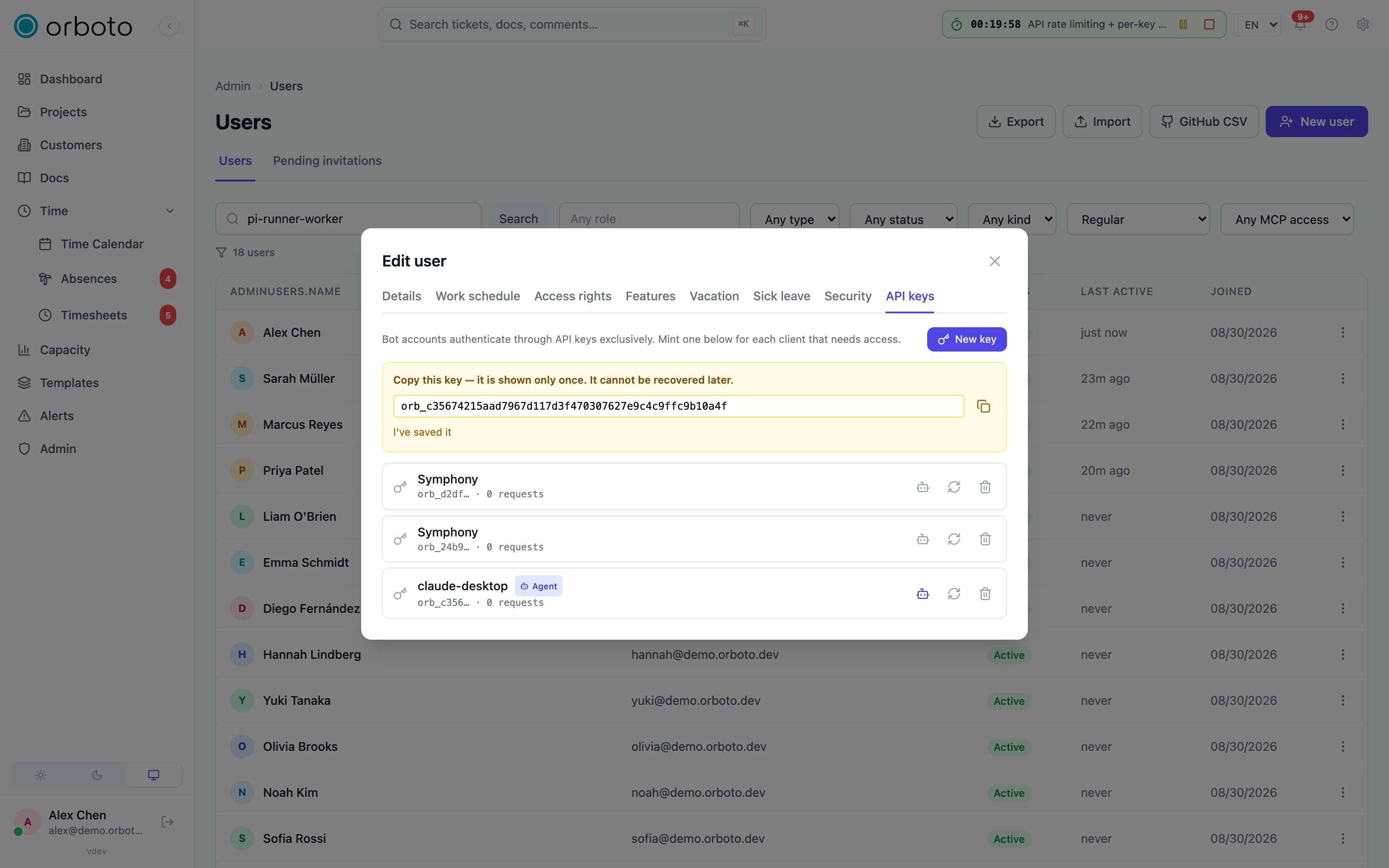
For each lane: create a bot user (or service account), give it project membership with the role it needs (implementer, reviewer, and so on), and mint an API key for it from that user's profile. Keep the key somewhere you can paste it into the lane's environment file in Step 4.
Step 2: smoke-test one lane by hand
Before wiring up a systemd fleet, run one lane in a terminal to confirm the pieces fit together:
export ORBOTO_BASE_URL=https://your-orboto-host.example.com/api
export ORBOTO_TOKEN=orb_xxxxxxxxxxxxxxxxxxxxx   # the bot's API key

orboto pi-runner --remote --lane worker-1
You should see timestamped status lines on stderr: the runner registers the lane, reports the assignment version it applied, and - because a brand-new lane has no assignment yet - settles into
[pi-runner] lane worker-1 v0 idle (lane has no project assignment) - heartbeating, waiting for an assignmentThat is the correct, healthy starting state, not an error. Leave it running and give it something to do in Step 3; the same process will pick it up.
Step 3: assign the lane
Open Admin → Agent Lanes. A lane that has registered itself is already listed; you can also create one in advance with New lane and start the runner afterwards. Press Reassign and fill in:
| Field | What it controls |
|---|---|
| Role | Implementation (pulls open tickets and does the work), Review (pulls tickets waiting for review, never its own identity's work), Docs, Admin. See worker vs. review lanes. |
| Model | The model the coding agent runs on, as provider/modelId. Leave empty to use the runner's own default. |
| Fallback models | Comma-separated provider/modelId chain the lane switches through when the current model hits a rate limit or quota error. |
| Projects | The projects this lane serves, in walk order: it tries the first, moves to the next when that one has nothing ready, and idles when all are dry. A lane with no project has nothing to pull and stays idle by design. |
| Priority ceiling (per project) | The most urgent priority the lane may take. Set it to High and a Blocker ticket stays untouched for a human or a stronger lane. |
| Daily limit (per project) | How many work sessions the lane may start per UTC day in that project. Empty means unlimited. |
| Repository URL + Branch (per project) | The working copy the lane needs. The runner clones it, keeps it in sync, and never asks the agent to remember to pull. Credentials do not go in this field - see Checkout lifecycle. |
| Pause | The lane keeps heartbeating and stays visibly online, but pulls no work. The safe state during a migration or a maintenance window. |
The same assignment from the command line:
orboto lanes assign worker-1 --role implementation \
  --model your-provider/your-model \
  --fallback-models your-provider/your-model,your-other-provider/their-model \
  --project ACME:high --repo https://git.example.com/acme/acme.git --ref main
--project is repeatable and replaces the lane's whole project list, in
the order you pass it - a partial list unassigns the rest. Omit it entirely
to leave the projects untouched (so orboto lanes assign worker-1 --model X
changes only the model); pass --no-projects to clear them. --repo and
--ref are positional companions: the n-th --repo belongs to the n-th
--project. Add --paused or --resume to flip the lane switch.
orboto lanes list prints every lane with its state, current ticket,
projects and applied assignment version; orboto lanes show worker-1 prints
one lane's full assignment.
Back in the terminal from Step 2, the running process applies the new assignment on its own:
[pi-runner] assignment changed (v0 -> v1) - applying
[pi-runner] lane worker-1 v1 applied: role implementation, 1 project(s) [ACME], model your-provider/your-model
[pi-runner] lane worker-1 up - session "orboto-lane-worker-1", heartbeat every 30s
A browser for a lane
Added in v0.205.1 A lane can have its own browser. Switch it on in Admin -> Agent lanes, or leave it on automatic and orboto turns it on for lanes that work on a web app. orboto lanes compose <lane> writes the lane's compose file with a headless Chrome next to the runner. That browser may open only your orboto instance and the lane's preview address; every refused attempt is recorded. The runner reports whether the browser is running with each heartbeat, and orboto lanes list shows it.
Step 4: worker vs. review lanes
The role a lane pulls with decides what kind of ticket it sees:
implementation(the default) - pulls open, unclaimed tickets and does the actual work: it's the role that produces the commit.review- pulls tickets waiting for review instead of open ones, and never a ticket its own identity implemented (see Review lanes). Always run review lanes under a separate bot identity from the implementer lanes they check, and ideally on a different model - the cross-check is the point.preflightandintegration- attach to a ticket without reassigning it or moving its status, for lanes that validate or integrate work alongside the implementer rather than owning the ticket themselves.
A fleet commonly runs more implementer lanes than review lanes, since review
work is faster per ticket. Use routing labels
(agent:<tag>) when you want finer
steering than role alone provides.
Step 5: deploy under systemd (or as containers)
Container alternative Added in v0.176.1: the product repo ships a
ready-made runner image (deploy/pi-fleet/Dockerfile) - one container per
lane, started with only the three identity variables plus your model
provider keys, checkouts on a named volume. On a platform like Coolify
that makes the entire lane lifecycle remote: reassignment through orboto
as always, and even runner updates become an image rebuild instead of a
binary swap on the box. If you run containers, skip the rest of this step.
Web search inside the lanes Added in v0.177.0: the runner image also
carries web_search and fetch_content tools backed by a SearXNG instance
you point at with SEARXNG_URL. Run that SearXNG LAN-only (no public
hostname, port bound to an internal address) - the lanes reach it from
inside the network, and nothing else should. The tools are always present;
without the variable they fall back to http://localhost:8080 and every
call fails, so set it wherever the image runs.
orboto ships a generic systemd template unit plus an example environment file. Because the configuration lives in orboto, the unit and the env file are now nearly identical for every lane - only the lane name and the key differ.
-
Create the service user the lanes run as:
sudo useradd -r -m -d /var/lib/orboto-agents -s /usr/sbin/nologin orboto-agent -
Install the binary at
/usr/local/bin/orboto(however you normally install the orboto CLI on this host). -
Create the template unit at
/etc/systemd/system/orboto-agent@.service. It's a systemd template unit: the@lets you start any number of instances (orboto-agent@worker-1,orboto-agent@review-1, ...), each reading its own environment file at/etc/orboto/agents/<lane>.env:# orboto pi-agent lane - one lane = one bot identity = one env file. # The env file holds the lane's IDENTITY only; everything the lane does # comes from orboto. Logs: journalctl -u orboto-agent@<lane> -f [Unit] Description=orboto pi agent lane %i After=network-online.target Wants=network-online.target [Service] Type=simple User=orboto-agent EnvironmentFile=/etc/orboto/agents/%i.env # Remote mode manages its own checkouts under the lane root # ($HOME/.orboto-lanes/<lane>), so this is only the starting cwd. WorkingDirectory=/var/lib/orboto-agents ExecStart=/usr/local/bin/orboto pi-runner --remote $ORBOTO_AGENT_EXTRA_ARGS Restart=on-failure RestartSec=10 # A wedged provider call must not hold the lane forever on stop. TimeoutStopSec=30 # Hygiene - the lane needs exactly: its workdir, the network, and /tmp. NoNewPrivileges=true PrivateTmp=true ProtectSystem=full ReadWritePaths=/var/lib/orboto-agents [Install] WantedBy=multi-user.target -
Write one environment file per lane at
/etc/orboto/agents/<lane>.env. Three identity variables, plus the credentials the box needs:# --- lane identity - the whole contract --- ORBOTO_BASE_URL=https://your-orboto-host.example.com/api ORBOTO_TOKEN=orb_xxxxxxxxxxxxxxxxxxxxx # the lane's bot key ORBOTO_AGENT_LANE=worker-1 # matches the systemd instance name # --- provider key(s) for the model this lane is assigned --- YOUR_PROVIDER_API_KEY=... # --- git credentials for private repositories (optional) --- ORBOTO_AGENT_GIT_USER=x-access-token ORBOTO_AGENT_GIT_TOKEN=...Lock the file down - it holds an API key and, if you use one, a repo token:
sudo chmod 600 /etc/orboto/agents/<lane>.envand confirm it's owned byroot.The lane name must match the part after the
@in the unit instance, sojournalctl, the file and the lane registry all read the same way. -
Reload systemd and start each lane:
sudo systemctl daemon-reload
sudo systemctl enable --now orboto-agent@worker-1
sudo systemctl enable --now orboto-agent@review-1
From here on, that box is done. Adding a project to a lane, swapping its model, tightening its priority ceiling, moving it to a different repository - all of it happens in orboto.
Retargeting a running lane
Added in v0.176.0 This is the day-to-day operation of a fleet, so it is worth stating plainly what happens when you press Apply assignment:
- orboto stores the new assignment and bumps the lane's version.
- The runner notices - either from the version echoed in its next heartbeat (30 seconds at worst) or, usually sooner, from the notification orboto sends the lane.
- If the lane is idle, it tears down its session and applies the new assignment straight away. If it is working a ticket, it is told to finish that ticket cleanly first and only then switches; a session that wedges is given 30 minutes before the switch is forced and the abandoned lease is reclaimed server-side.
- Working copies follow: a repository the new assignment no longer names is parked, not deleted, and the trees the new assignment does name are cloned or re-synced before the agent gets going.
The lane list shows the applied version, so you can see at a glance whether every lane has caught up with what you assigned.
Checkout lifecycle
Added in v0.176.0 A lane owns its working trees; you only name a
repository and a branch in the assignment. Under the lane's root
(~/.orboto-lanes/<lane> by default) the runner keeps one directory per
assigned repository, plus its own state directory.
- Every wake verifies the base: fetch, check out the assigned branch, hard-reset to the remote. The agent never has to remember to pull.
- Nothing is reused blindly, and nothing is deleted in anger. A tree that cannot safely be reused - uncommitted changes, commits that exist nowhere else, not a git checkout at all, or a repository the assignment no longer names - is renamed to a timestamped sibling and replaced with a fresh clone. The log line says why; the parked copy keeps the evidence.
- Parked trees are cleaned up on a schedule: they are dropped once they pass a grace period (7 days by default) or when the lane's checkout directory exceeds its disk budget (10 GB by default), oldest first. Active trees are never pruned - if the budget cannot be met without deleting live work, that is reported rather than done.
- Credentials never travel in the assignment. Set
ORBOTO_AGENT_GIT_TOKEN(andORBOTO_AGENT_GIT_USER, defaultx-access-token) in the lane's environment file and the runner supplies it through a git credential helper - it reaches neither the process list nor the repository's config. Without it, whatever the host already has (a credential helper, an ssh agent) stays in charge. Every log line is scrubbed of embedded URL credentials, so a token cannot leak through git's own error text either. - Each lane keeps its own state, so several lanes on one box never cross-report which ticket they are working on.
Watching lanes
- The fleet page: Admin → Agent Lanes shows every lane - online or offline, idle, working or paused, the ticket it currently holds, its assigned projects with their caps, its model, and the assignment version it has applied. A lane counts as online while its last heartbeat is recent.
- Logs:
journalctl -u orboto-agent@<lane> -f- the runner prefixes every status line with a timestamp, and echoes a condensed view of what the agent said and which tools it called, so you can follow a lane's progress without attaching to the session directly. - Active leases:
orboto work-sessions --mine(run as, or with the token of, the lane's own identity) shows exactly what that lane currently holds;orboto work-sessions --ticket ACME-42shows who - if anyone - holds a specific ticket. - The workspace UI: tickets a lane is actively working show its identity as assignee, same as a human's would.
Sessions, scope and the wake ledger
A fleet is many sessions, often under few identities, so the question "who should this message wake?" stops being academic. The rules are one page of their own - Sessions, scope and the wake ledger - and these are the four points a fleet operator needs:
- Every lane declares a scope. A session says which role it plays and which
projects and tickets it is responsible for, with
orboto session-start --role <role> --scope-projects ACMEororboto agent-heartbeat --role ... --scope-projects .... It is then woken by mail addressed to it, by mail inside those projects and tickets, and by broadcasts - and not by a sibling lane's conversations. - You can write to one session, not just one account. Every rendered message
prints the sender's short session id;
orboto agent-notify <email> "..." --session <short id>Added in v0.200.0 reaches exactly that running lane, and is refused rather than guessed when the reference is ambiguous. - A channel session without a declared scope receives less on purpose. Added in v0.200.0 A session that announced a wake channel pays a model turn per event, so until it declares a scope the channel delivers only mail addressed to it and broadcasts, plus one reminder per connection. Its ordinary message list still shows the whole account, so nothing goes unseen.
- The wake ledger says whether the wakes were worth it.
orboto agent-wakesAdded in v0.200.0 lists every message that woke one of your sessions with the rule that delivered it, the outcome and the context tokens it cost;orboto agent-wakes --statsreduces that to a precision per session and per sender. In the UI it is the Wakes (24 h) column and the Wake ledger drawer of Admin → Agents → Live; a session whose 24-hour precision falls below 80 percent over at least ten wakes raises one operator notification per day naming the sender and rule that misrouted most of them.
Pausing
Three switches, from narrowest to widest:
- The lane switch Added in v0.176.0 - Pause on the lane's
assignment (or
orboto lanes assign <lane> --paused). The runner keeps heartbeating, so the lane stays visible in the fleet page, but it pulls nothing. Resume with--resume; the lane picks work up again within one heartbeat. - The per-bot toggle and the workspace-wide switch in Admin →
Multi-Agent, described under pausing.
These are identity-level, so they work the same whether the identity is
connected through
pi-runner, the MCP server, or anything else.
You never need to stop the systemd service to pause a lane, and stopping it is the worse option: a stopped lane also disappears from the fleet page, so you lose the one place that would have told you it was off.
Pinned mode: configuration on the box
The original model - every knob in the lane's environment file, a restart for every change - is still supported, unchanged. Use it when a box must run without depending on the registry, or when a lane's behaviour is deliberately frozen.
Override the unit's start command with a systemd drop-in
(sudo systemctl edit orboto-agent@worker-1):
[Service]
ExecStart=
ExecStart=/usr/local/bin/orboto pi-runner --project ${ORBOTO_AGENT_PROJECT} --session-name %i $ORBOTO_AGENT_EXTRA_ARGS
and put the lane's configuration in its environment file instead of in orboto:
| Flag | Env var | What it controls |
|---|---|---|
--project | ORBOTO_AGENT_PROJECT | The project key this lane works. Required in pinned mode. |
--work-role | ORBOTO_AGENT_ROLE | implementation (default), review, preflight, or integration. |
--agent-tag | ORBOTO_AGENT_TAG | The routing tag this lane prefers, e.g. backend - matches the agent:backend label from Work routing. |
--workdir | ORBOTO_AGENT_WORKDIR | Directory pi is spawned in, independent of wherever the supervisor process itself runs. Created if missing. |
--repo | ORBOTO_AGENT_REPO | A git URL to clone into --workdir on first start, and fetch + fast-forward on every restart. Requires --workdir. |
--idle-prompt | ORBOTO_AGENT_IDLE_PROMPT | The self-tasking prompt injected once the session has been idle this long. Leave unset to run a lane that only reacts to inbox messages and never self-tasks. |
--idle-after | ORBOTO_AGENT_IDLE_AFTER | Minutes of idle time before --idle-prompt fires (default 30). |
--model | ORBOTO_AGENT_MODEL | The model the pi child uses, as provider/modelId. |
--fallback-models | ORBOTO_AGENT_FALLBACK_MODELS | Comma-separated provider/modelId chain to switch through automatically on a rate limit or quota error. |
--poll | - | Poll interval in seconds, used only as a fallback while the live event stream reconnects (default 15). |
--session-name | - | The pi session id, used to create-or-resume a session per working directory across restarts. |
--bootstrap | - | A one-time prompt delivered when the lane first starts. |
--ref | ORBOTO_SENDER_REF | Identifies this lane as a message sender, so it never wakes itself up from its own outbound replies. Defaults to a generated value. |
The same variables double as single-knob overrides on a remote lane: an
ORBOTO_AGENT_* value set on the box still beats what orboto says - but
never silently. Each override writes a warning to the log naming the server
value it is shadowing, so a forgotten leftover is visible in journalctl
instead of quietly steering the lane. Pin one knob to debug something, then
delete the line.
Troubleshooting
| Symptom | Likely cause |
|---|---|
pi-runner exits immediately with "is pi installed?" | The pi binary isn't on the PATH of the user running the service. Confirm sudo -u orboto-agent pi --version works. |
| The lane exits with "register refused" | The token belongs to a human account rather than a bot, the key has been revoked, or the lane name is already bound to a different identity. None of those heal by retrying, so the runner exits instead of looping. |
| The lane logs "idle (lane has no project assignment)" forever | It registered fine but nothing is assigned to it - open Admin → Agent Lanes and give it a project. |
| The lane logs "idle (lane is paused by the operator)" | Its lane switch is on. Resume it in the fleet page or with orboto lanes assign <lane> --resume. |
| A reassignment doesn't seem to take effect | Check the applied version in the fleet page. A lane mid-ticket finishes that ticket first by design; a lane whose heartbeat is stale isn't running at all - check systemctl status orboto-agent@<lane>. |
| The log warns that an env var "shadows the server" value | A pinned ORBOTO_AGENT_* variable is overriding the assignment. Remove it from the environment file unless you meant it. |
| The lane keeps working the same ticket status forever | Check journalctl for repeated work-next calls returning all-blocked or all-leased - see the reason table in Work routing. |
| The lane hits a provider limit and never recovers | Set a fallback chain on the assignment. Without one, a limit error is only logged - the lane doesn't switch on its own. |
| Fresh checkout fails on first start | git clone failed - check the repository URL on the assignment, and that the lane's user can reach the git host with the credentials in its environment file. A failed clone is treated as fatal so a lane never silently works on an empty directory. |
A lane's working copy vanished and reappeared as parked-... | Expected: the tree could not be reused safely (local changes, unpushed commits, or a repository the assignment no longer names). The parked copy still holds the evidence; it is cleaned up after its grace period. |
Your first AI worker
A step-by-step guide anyone can follow: put an autonomous AI agent on your project in about ten minutes - alone, or as an implement + review duo.
Watch and steer live agent sessions
Follow a running agent session as it happens, answer its questions and approvals, take over and type into it, and sign its harness in from your phone.