

Inbound email
Four ways to land email in orboto as tickets - pick the one that matches your deployment.
Four ways to land email in orboto as tickets. Pick the one that matches your deployment constraints.
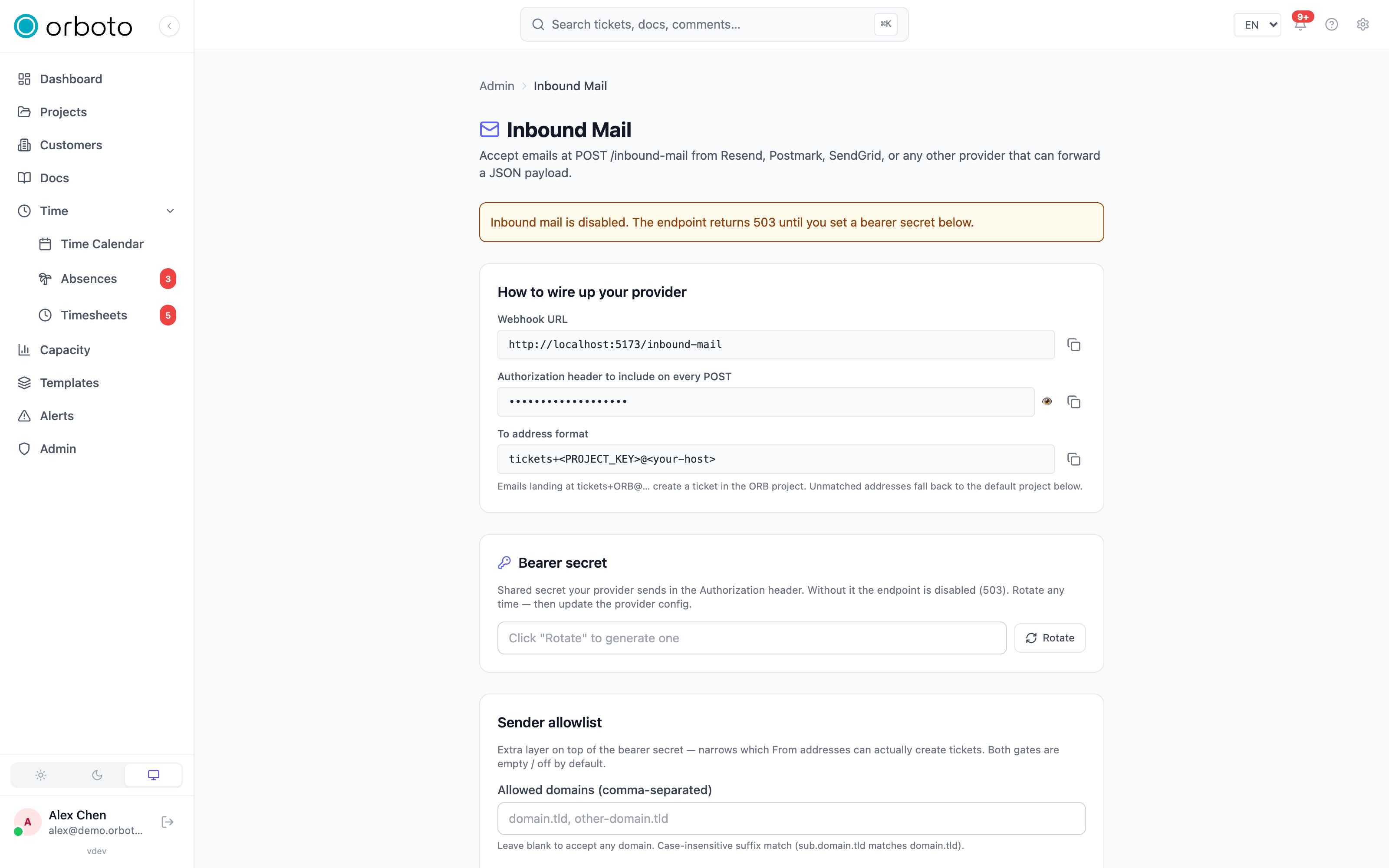
Which path do I want?
| Path | Latency | DNS work | Port 25 needed | Best for |
|---|---|---|---|---|
| Provider webhook (UseSend / Resend / Postmark / SendGrid) | seconds | none | no | Easiest setup, managed spam handling, needs a third-party email-receive account. UseSend is the EU / DSGVO-clean pick (open-source, self-hostable, AWS SES eu-central-1 underneath). |
| IMAP polling | up to 5 min | none | no | You already have a mailbox you want orboto to read |
| Self-hosted SMTP | seconds | MX + A + SPF + DMARC | yes | Per-project addresses, no third party in the loop; Added in v0.230.0 the server verifies SPF, DKIM and DMARC itself, see Sender checks on your own SMTP server |
| Cloudflare Email Routing → webhook | seconds | MX (Cloudflare) | no | Self-hosted SMTP isn't viable (port 25 blocked) but you still want Cloudflare to receive mail at your domain |
All four paths share the same back-end: every message runs the
auth-policy gate, the sender allowlist, the known-user check, the
project-routing chain (per-project address → tickets+KEY@host regex →
semantic embedding vote → catchall → default), AI cleanup, and ticket
creation. The only difference between paths is how the message reaches
that pipeline.
Provider webhook
Admin → Inbound mail shows a cheat sheet with the webhook URL and the bearer-secret header to paste into your provider's inbound-webhook config
- generate the secret there first, then wire up Resend / Postmark / SendGrid / UseSend to POST to that URL. The same page holds the sender allowlist, the "require known orboto user" toggle, the SPF/DKIM/DMARC authentication policy, and the default fallback project.
Added in v0.212.5 orboto stores the bearer secret sealed and never
shows it again: the cheat sheet masks it, and so does the system
configuration endpoint. Copy the secret into your provider when you
generate it with Rotate and save it; to change it later, rotate it and
update the provider. A secret saved by an earlier version keeps working and
is sealed at the next start. The webhook answers 401 when the bearer does
not match or the stored secret cannot be opened, and 503 while the
encryption key is not available (and while no secret is set); it never
answers with a 500 for these cases.
Self-hosted SMTP
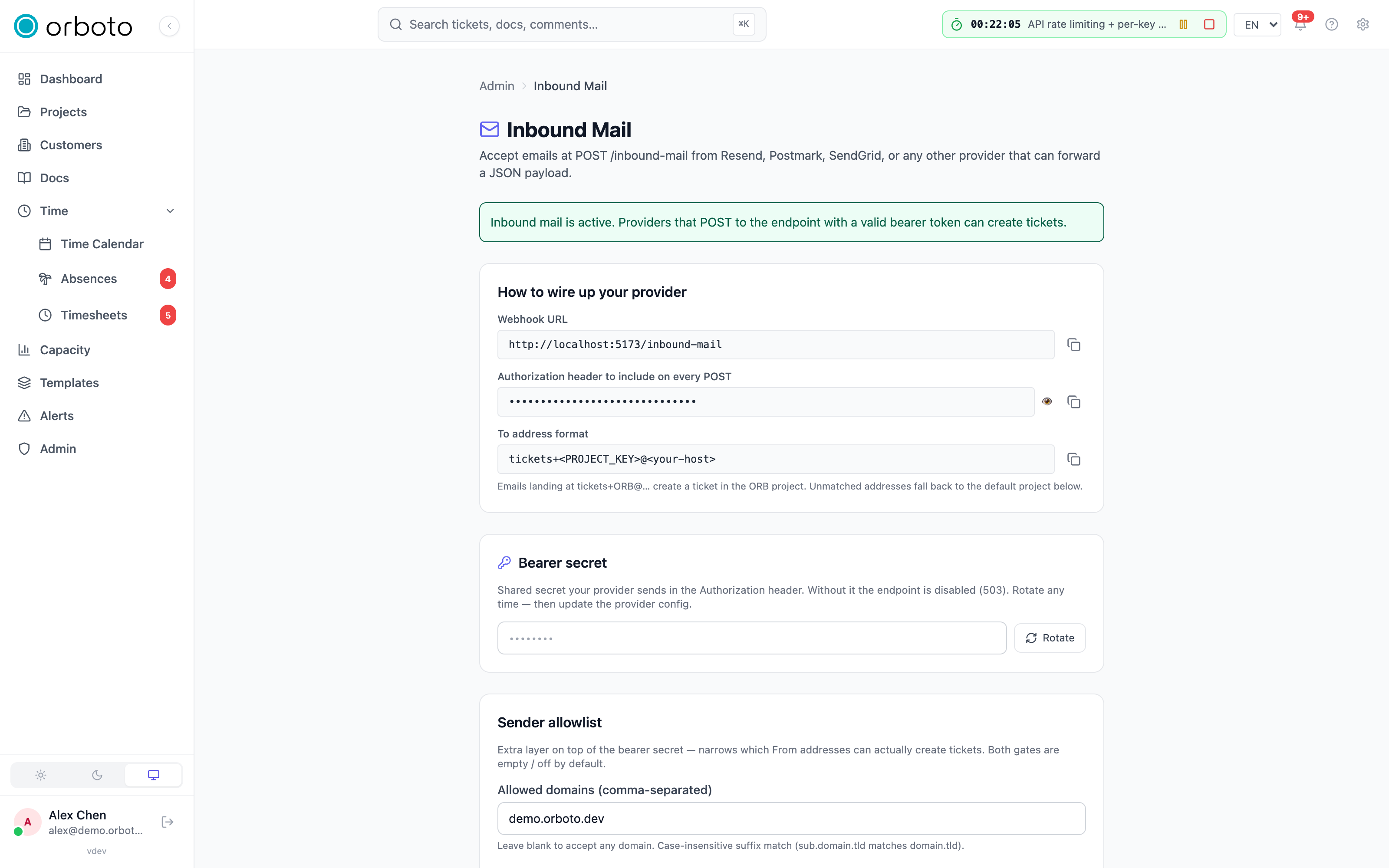
Bind orboto's built-in SMTP server to port 25 (or any port) and let external MTAs deliver mail directly.
VPS / host requirements
- Port 25 must be open outbound AND inbound. AWS, GCP, and DigitalOcean block port 25 by default and require a support ticket to lift. Hetzner, OVH, Vultr, and most bare-metal hosts allow it.
- A static public IPv4 address (or IPv6 with proper PTR).
- A DNS zone you control for the email domain.
Configure orboto
Admin → Inbound SMTP:
-
Hostname:
mail.example.com- what orboto announces in the SMTP banner and what your MX record will point to. -
Listen host / port:
0.0.0.0/25for production.127.0.0.1- a high port works for local testing.
-
TLS mode:
proxy- Caddy or Traefik terminates TLS in front; orboto speaks plaintext on the bound port. Cleanest for Coolify deploys.in_process- orboto terminates TLS itself. Provide cert + key paths; you own renewal.off- no STARTTLS. Only for trusted private networks.
-
Catchall project - fallback project when no per-project address matches and no
tickets+KEYalias is present. Leave empty to hard- reject unknown recipients with550. -
Rate limit - per-IP requests per 5 minutes. Default 20 is generous for legitimate MTAs, low enough to throttle abuse.
-
Refuse mail whose envelope sender fails SPF - Added in v0.230.0 turns away a message whose SPF result is not a pass, before it reaches orboto. See Sender checks on your own SMTP server.
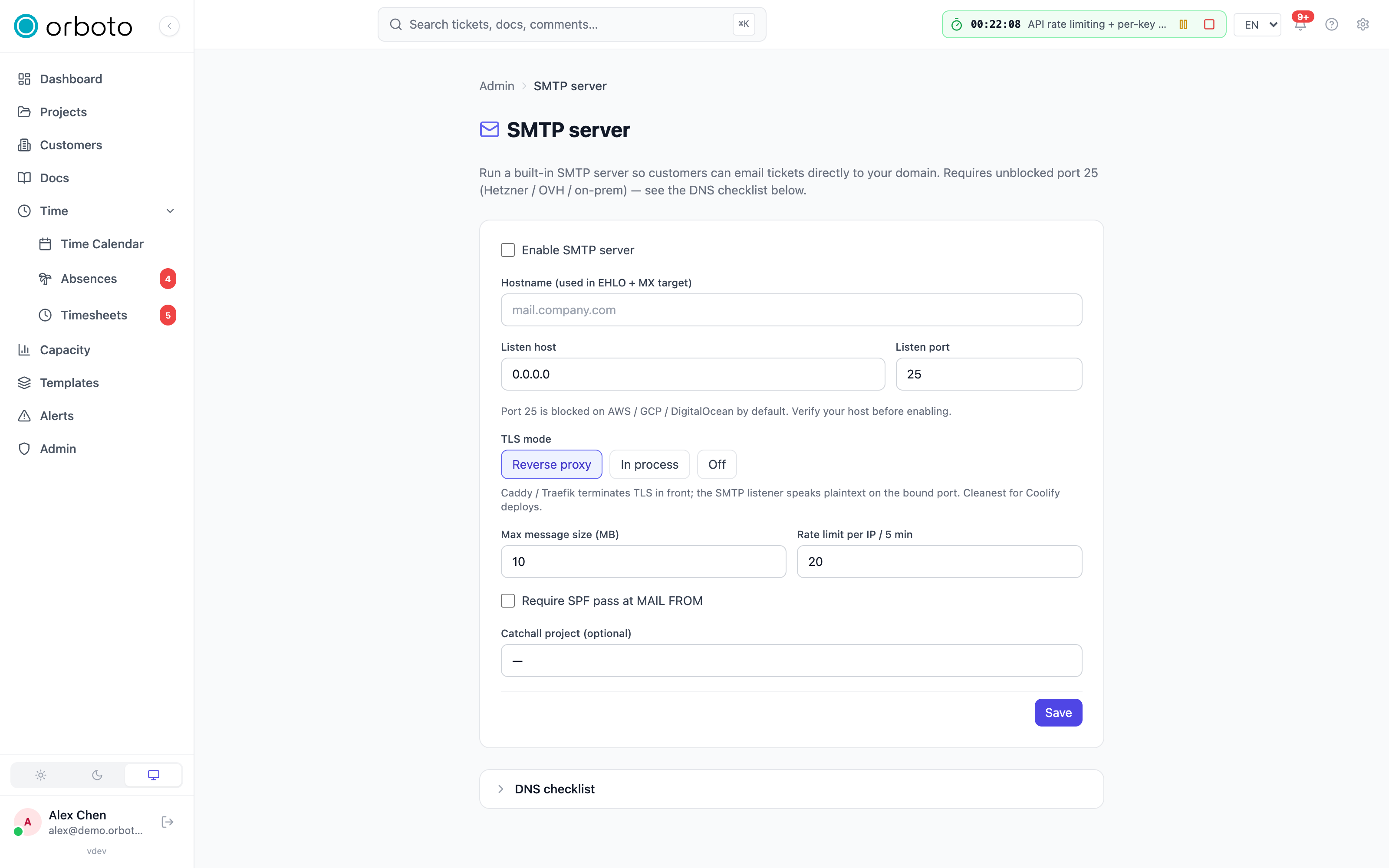
Saving restarts the listener in-process - no redeploy needed.
Sender checks on your own SMTP server
Added in v0.230.0 On this path orboto is the verifying mail server. It checks every message itself, with the SMTP hostname you configured as the name it writes into the verdict:
- SPF - may the connecting server send for the domain of the envelope
sender (
MAIL FROM)? TheHELOname is part of the check. - DKIM - is the message signed by the domain it claims?
- DMARC - do those results match the domain in the
Fromaddress?
The verdict is orboto's own. It removes every Authentication-Results and
ARC-Authentication-Results header the sender wrote before it reads the message,
so a sender cannot supply a result. Your authentication policy (Admin -> Inbound
mail) therefore works for direct SMTP like for every other path:
Permissive needs a DMARC pass, Strict needs an SPF pass and a DMARC pass.
Who counts as one of your users. Whatever the policy, a From address acts
as an orboto user only when the server could authenticate its domain: DMARC
passes, or the domain publishes no DMARC record and an SPF or DKIM pass is
aligned with it (relaxed alignment, which compares organisational domains). A
message from a From domain the server cannot authenticate:
- never acts as the user the
Fromaddress names. A new ticket is still created if your routing allows it, but by the workspace bot (or the fallback super-admin when the workspace has none), and its description quotes the sender's address. - is refused with the reason
sender_not_authenticated(see the inbound log) when it needs an identity: a reply into an existing ticket, a#timebooking in a reply, the known users only check, the sender domain allowlist, and the sender allowlist of a wiki space.
Refuse mail whose envelope sender fails SPF (Admin -> Inbound SMTP, off
by default; requireSpfPass on PATCH /admin/inbound-smtp/config) rejects a
message at the end of the SMTP transaction. The answer is 550 when SPF is
anything but a pass, and 451 when the DNS lookup failed, so the sending server
tries again later. A message refused there never reaches the inbound log.
DNS access. The checks need outbound DNS (UDP and TCP port 53) from the
container that runs the SMTP listener, which is the one with API_ROLE=all or
worker. The DNS work for one message is bounded, and a lookup that hits a
bound counts as a temporary error, never as a pass:
| Bound | Value | What happens when it is reached |
|---|---|---|
DKIM-Signature fields | 8 | A message with more is refused with 550 before any lookup. |
| One DNS lookup | 3 seconds | The lookup fails as a temporary error. |
| DKIM and DMARC lookups per message | 30 | Every further one fails as a temporary error. SPF keeps its own limits from RFC 7208 (10 DNS mechanisms, 2 void lookups), so a sender with 8 signatures and an SPF record at its limit still passes. |
| Time per message | 15 seconds | No lookup starts after it, so the check ends at most one lookup timeout later. |
| Concurrent connections | 50 | The next connection is greeted with 421. |
If mail from a partner suddenly shows sender_not_authenticated, ask them to
publish an SPF record that covers their sending servers, or to sign their mail
with DKIM for their From domain.
DNS records
Replace mail.example.com and 203.0.113.10 with the real host /
IP. The DNS checklist in the admin UI surfaces these with copy-to-
clipboard buttons.
; A record - pin the SMTP hostname to the IP
mail.example.com.  IN  A     203.0.113.10

; MX record - tell senders to deliver mail for example.com here
example.com.       IN  MX    10  mail.example.com.

; SPF - authorise the host to send for the domain (matters when you
; later send notifications from the same hostname)
example.com.       IN  TXT   "v=spf1 ip4:203.0.113.10 -all"

; DMARC - enable reporting + authentication policy
_dmarc.example.com. IN TXT   "v=DMARC1; p=quarantine; rua=mailto:postmaster@example.com"
Reverse DNS (PTR)
Most major receivers (Gmail, Outlook, Yahoo) reject mail from hosts
without a PTR record. Set 203.0.113.10 → mail.example.com via your
hoster's control panel. Without this, your outbound notifications
will likely land in spam.
Reverse proxy (TLS mode = proxy)
Add a stream block to Caddy or Traefik so external connections to port 25 reach the orboto container's bound port internally - see the reverse-proxy examples in the self-hosting guide.
Per-project addresses
Once SMTP is enabled workspace-wide, a new Inbound Email tab
appears in Project Settings. Project admins register addresses like
support@mail.example.com (the local-part plus the SMTP hostname). Mail
to that address routes to that project as a new ticket.
The tickets+KEY@mail.example.com alias is always accepted in addition:
it routes by project key (tickets+ACME@mail.example.com posts to
project ACME).
Testing
# swaks (apt install swaks) - full SMTP transaction.
swaks --to support@mail.example.com --from you@gmail.com \
      --header "Subject: Hello from swaks" --body "Test body"

# Confirm the MX record resolves
dig mx example.com +short
# Confirm the host accepts on port 25
nc -zv mail.example.com 25
Cloudflare Email Routing → webhook
Free workaround when port 25 is blocked. Cloudflare receives mail at
your domain and forwards it to a Worker that POSTs to orboto's
/inbound-mail webhook.
Cloudflare setup
- Cloudflare dashboard → your domain → Email → Email Routing. Click Get started and verify the destination address (your personal inbox - required even though it isn't used for anything).
- Email Routing automatically writes the MX records into your zone.
- Add a catch-all rule that runs an Email Worker.
Email Worker
In Cloudflare dashboard → Workers & Pages → Create → Email Worker, paste:
export default {
  async email(message, env) {
    const raw = await new Response(message.raw).text();

    // Pull a few headers we need before re-encoding the body.
    const headers = [];
    for (const [name, value] of message.headers.entries()) {
      headers.push({ name, value });
    }

    const payload = {
      from: message.from,
      to: [message.to],
      subject: message.headers.get('subject') ?? '',
      text: raw,                        // raw MIME - the ingest service parses it
      html: null,
      headers,
    };

    const res = await fetch(`${env.ORBOTO_URL}/inbound-mail`, {
      method: 'POST',
      headers: {
        'Content-Type': 'application/json',
        'Authorization': `Bearer ${env.ORBOTO_INBOUND_SECRET}`,
      },
      body: JSON.stringify(payload),
    });

    if (!res.ok) {
      const body = await res.text();
      // Bouncing back to sender is rude in this flow - Cloudflare
      // already accepted the mail. Log + drop instead.
      console.error('orboto forward failed', res.status, body);
    }
  },
};
Set the Worker's environment variables:
ORBOTO_URL=https://orboto.example.comORBOTO_INBOUND_SECRET= the bearer secret you set underAdmin → Inbound mail. Added in v0.212.5 It is not shown again after saving, so keep the value you generated.
Pros / cons vs self-hosted SMTP
| Cloudflare → webhook | Self-hosted SMTP | |
|---|---|---|
| Latency | seconds | seconds |
| Spam filtering | Cloudflare's | orboto's gates only |
| DKIM / SPF check | Cloudflare passes verdicts via headers | Added in v0.230.0 orboto checks SPF, DKIM and DMARC itself; headers the sender wrote are removed |
| Cost | free | VPS + monitoring |
| Port 25 needed | no | yes |
IMAP polling
Best when you already have a mailbox (a Gmail group, an M365 shared inbox) and don't want to change DNS or run an SMTP server.
Add an account
Admin → Inbound IMAP → New account:
- Label - operator-facing name only.
- Host / port / TLS -
imap.gmail.com/993/ on for Gmail and most providers. - Username - full email address.
- Password - see provider-specific section below.
- Folder -
INBOXis the default; useInbox/orbototo partition. - Poll interval - default 5 minutes. Lower to 1 minute on hosts that allow it; some providers throttle aggressive polling.
- Use IMAP IDLE - push notifications instead of polling. Falls back to polling on failure.
- Authserv-id - Added in v0.213.0 the first token of the
Authentication-Resultsheader your mailbox's mail server writes. Required forpermissiveandstrict: an account without one has its mail rejected withauth_policy_failedunder those policies (see Reading Authentication-Results headers).
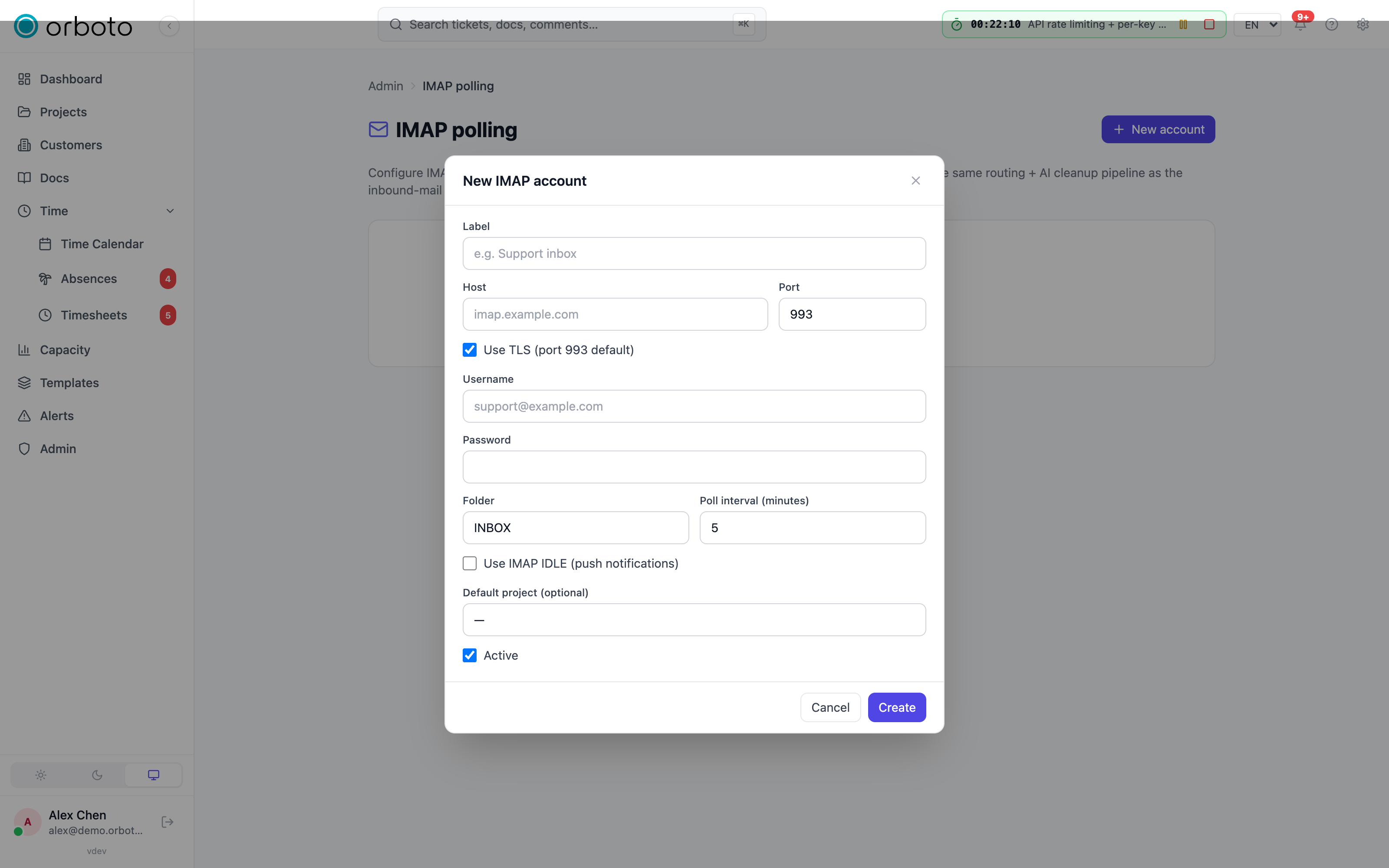
Test connection connects, selects the folder, and returns the message count. Poll now runs the same fetch logic the cron uses - useful to verify a fix without waiting for the next interval.
Gmail / Google Workspace
Gmail no longer accepts plain account passwords for IMAP; you need an App Password:
- Google account → Security → 2-Step Verification (must be on).
- App passwords, generate one for "Mail".
- Use that 16-character password in orboto.
Outlook / Microsoft 365
Microsoft is migrating off basic IMAP auth. For now:
- Account → Security → Advanced security options → App passwords (only available when 2FA is on).
- Use the generated app password.
Generic IMAP
Whatever your provider's IMAP settings page says. Standard ports: 143
STARTTLS, 993 implicit TLS (recommended). Passwords are
AES-256-GCM-encrypted at rest and never written or returned in plaintext.
Message size
Added in v0.230.0 orboto never downloads a message larger than the maximum
message size of inbound mail (the system setting inbound_max_size_mb, default
10 MB). The poller asks the mail server for unread messages up to that size,
checks the size the server reports again, and caps the bytes it reads, so a
server that reports a wrong size cannot push more than the limit into memory.
A message above the limit is not fetched. It stays unread in the mailbox
for a person to handle, and orboto marks it with the IMAP keyword
$OrbotoTooLarge so later polls skip it. It is reported once, as oversized in
the result of Poll now, and counted on the account's row under Admin ->
Inbound IMAP ("3 messages skipped as too large"). Open such a message in the
mailbox, or raise the limit and clear the keyword so the next poll takes it. One
poll fetches at most 200 messages; the rest follow with the next poll.
Change the limit with
orboto patch /system/admin/config '{"key":"inbound_max_size_mb","value":"25"}'.
See Import and sync limits.
Troubleshooting
"Email not received"
Open Admin → Inbound log first - every accepted, rejected, or duplicate
message lands there with the reason.
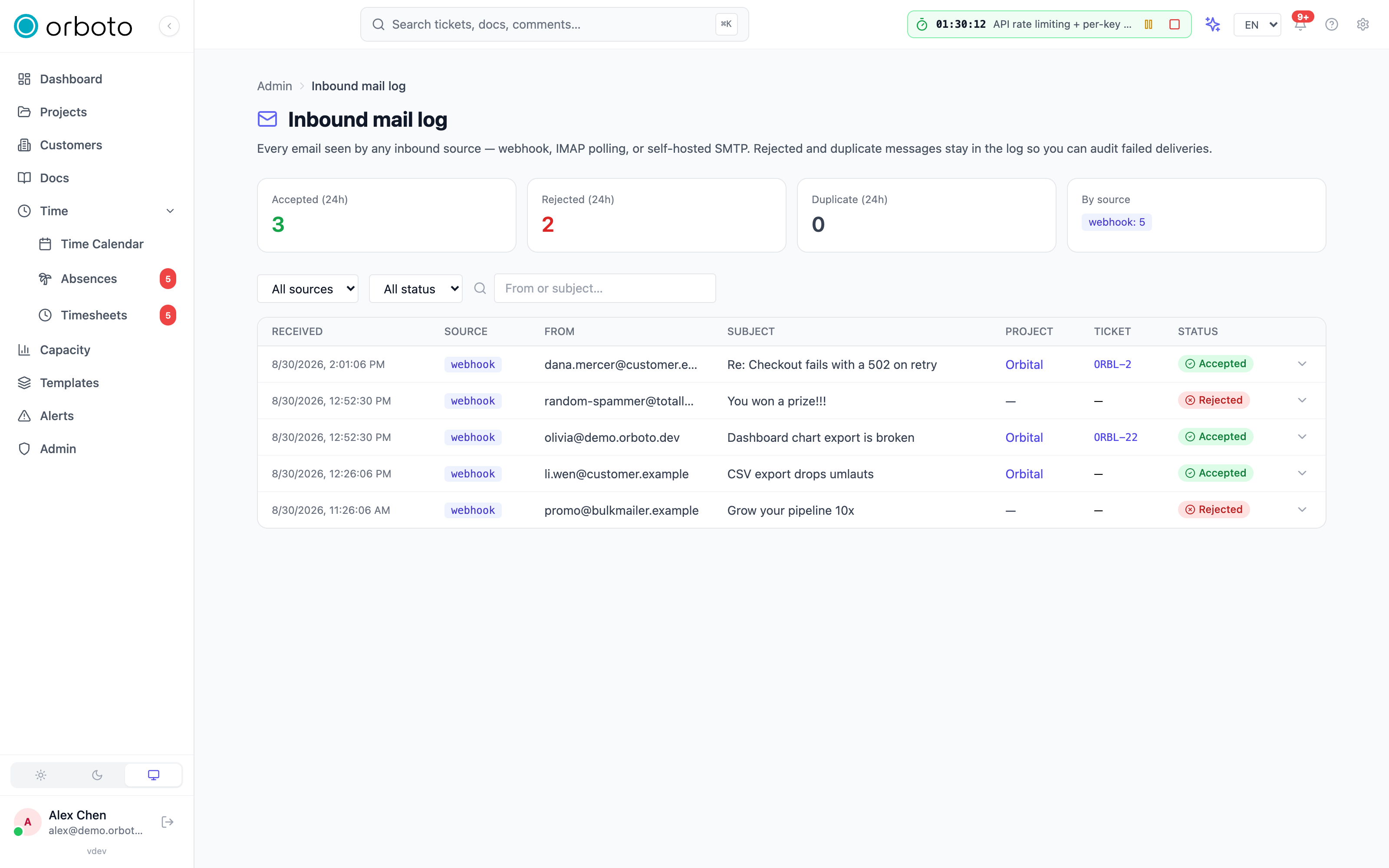
- No row at all - the message never reached the ingest pipeline. For
SMTP: check the listener is running (admin SMTP page +
/ready). For webhook: confirm the bearer secret is set and the provider isn't throwing 401s on its side. For IMAP: the account row'slast_errorcolumn carries the most recent fetcher error. Added in v0.230.0 For IMAP, also check whether the message is larger than the maximum message size: such a message is left unread in the mailbox and counted on the account's row (see Message size). - Accepted, but the ticket isn't where you expect - check the project routing chain. The log row links to the ticket; click through.
- Rejected - the reason appears as a chip:
auth_policy_failed- the SPF/DKIM/DMARC gate. Check the authentication policy, that the source has an authserv-id, and the inbound headers (see below).sender_domain_not_allowed- the sender's domain isn't on the allowlist. Add it, or clear the allowlist to accept any domain.sender_not_known- "require known user" is on and the sender's email isn't an orboto user.sender_not_authenticated- Added in v0.230.0 direct SMTP only: the server could not authenticate theFromdomain (no DMARC pass, and no aligned SPF or DKIM pass on a domain without a DMARC record), and the mail needed an identity - a reply into a ticket, the known-user check, the domain allowlist or a wiki space. Ask the sender to publish an SPF record that covers its sending servers, or to sign its mail with DKIM for itsFromdomain. See Sender checks on your own SMTP server.reply_not_authorized- Added in v0.211.3 the mail answers an existing ticket (a notification reply or a[KEY-N]subject token), but the sender may not write into it. An orboto user must be a member of the ticket's project, be able to read the ticket (private ticket and private milestone rules apply) and holdcomment:createthere. An address that is not an orboto user (possible only while "require known user" is off) may only continue a thread it opened by mail or already replied to. Nothing is written.no_project_routing- none of the routing steps matched. Add a per-project address, set a catchall, or set a default project.duplicate- the same Message-ID was already processed. Replies in an existing thread route via the In-Reply-To map, not the dedup index.
For SMTP specifically, also check your hoster hasn't quietly blocked port
25 (telnet your-host 25 from outside).
Reading Authentication-Results headers
The header line looks like:
Authentication-Results: example.com;
  spf=pass smtp.mailfrom=sender@gmail.com;
  dkim=pass header.d=gmail.com;
  dmarc=pass action=none header.from=gmail.com
Each mechanism reports pass / fail / none. orboto's policies:
off- no enforcement.permissive-dmarc=passrequired.strict-spf=passANDdmarc=passrequired.
DKIM is informational; orboto does not gate on DKIM alone.
Added in v0.213.0 Every provider webhook and every IMAP mailbox has its own
authserv-id: the host name the verifying mail server writes as the first
token of its Authentication-Results header (example.com in the sample
above, RFC 8601). orboto takes the SPF, DKIM and DMARC verdict only from a
header whose authserv-id equals the one set for the source, compared without
regard to case. If several headers match, the topmost one wins; a header with
any other authserv-id, such as one a sender wrote into the message, is ignored.
| Source | Where the authserv-id is set |
|---|---|
| Provider webhook (Resend, Postmark, UseSend, a Cloudflare Worker) | Admin -> Inbound mail, field Webhook authserv-id |
| IMAP account | Admin -> Inbound IMAP, field Authserv-id of each account |
| Direct SMTP | Nothing to set: Added in v0.230.0 the built-in server is the verifying host and uses its own verdict |
A source without an authserv-id carries no verdict: under permissive or
strict its mail is rejected with auth_policy_failed, under off it passes.
To find the value, open the full headers of a message that reached the mailbox
or the provider and copy the first token after Authentication-Results:. The
protection still depends on the mailbox host: it must remove headers with its
own authserv-id that arrive from outside before it writes its own. A mailbox
behind a mail server that writes no such header must run off.
Added in v0.230.0 The built-in SMTP server is the verifying host itself:
it evaluates SPF, DKIM and DMARC for every message, writes its own verdict and
removes every Authentication-Results header the sender wrote, so a sender
cannot supply its own. With permissive or strict, a directly delivered
message passes when its checks pass; a message that fails is rejected with
auth_policy_failed. There is nothing to configure for this path. See
Sender checks on your own SMTP server.
Outbound deliverability
Notifications landing in spam is a SEND problem, not a receive problem - see your provider's (UseSend / Resend / SMTP) sending configuration, set up SPF + DKIM for the sending domain, and consider warming a fresh IP.