

Bring your own key (BYOK)
Wrap every at-rest secret with a customer-controlled encryption key, from what envelope encryption is to setup, rotation and recovery caveats.
Bring your own key (BYOK) is an Enterprise feature
(Admin -> Encryption) that lets you control the
encryption key protecting orboto's stored secrets, instead of relying
solely on the key orboto generates for you. This page starts from the
underlying concept - envelope encryption - then walks through
configuring, testing, rotating, and (if it's ever needed) recovering
from a revoked key.
It's on a single Docker image: BYOK works the same way on every orboto edition. Without an active Enterprise license it still runs, but the standard soft-warn banner appears on the License page once you activate a customer-managed key.
The concept: envelope encryption
Every secret orboto stores at rest - a Git access token, an SSO client secret, an MFA TOTP seed, and more (full list below) - needs to be encrypted before it touches the database. The naive approach is one key that encrypts everything directly; the problem with that is rotating the key means re-encrypting every single secret in one atomic operation, and if the key ever leaks, every secret it protected is exposed at once.
Envelope encryption solves this with two layers of key instead of one:
- Each individual secret gets its own randomly-generated data key (DEK), used once to encrypt just that secret.
- The DEK itself - a small, 32-byte value - is then encrypted ("wrapped") by a separate key-encryption key (KEK), and it's the wrapped DEK that's stored alongside the encrypted secret, never the DEK in plaintext.
The KEK is the only key you ever need to protect, rotate, or revoke - and because it never encrypts the secret data directly (only the small DEKs), rotating it means re-wrapping thousands of small DEKs, not re-encrypting the underlying secrets themselves. Revoking the KEK at your key-management system makes every secret it wrapped unreadable, instantly and without touching the database at all - orboto's server never persists an unwrapped KEK, so there's nothing on the orboto side that could still decrypt it.
BYOK is what it sounds like: you choose and control that KEK, instead of using the server-derived one orboto uses by default.
What gets wrapped
Every at-rest secret in orboto routes through the same envelope-encryption seam, so switching KEK provider protects all of them at once:
- Git connection access tokens and OAuth refresh tokens, GitHub App private key and webhook secret
- SSO provider config (OIDC client secret, SAML certificate and SP private key)
- MFA TOTP secrets
- SIEM audit-forwarder HMAC secret
- Federation outgoing tokens
- Inbound IMAP passwords
- Backup destination S3 secret keys
- Assorted
system_configsecret slots - every*_encryptedkey, the SCIM outbound webhook secret, and the mail-service API key
Reads stay format-aware: a value wrapped under the envelope scheme is opened with the provider named inside it, while an older (pre-BYOK) value is still read correctly with the legacy key and silently re-wrapped into an envelope the next time it's written. There's no migration step to adopt BYOK - existing data keeps working from the moment you activate a provider, and each secret upgrades to the new scheme lazily as it's next touched.
Providers
| Provider | Where the KEK lives | Config you provide |
|---|---|---|
| Built-in server key (default) | Derived from orboto's own server secret | None |
| AWS KMS | Amazon Key Management Service | KMS key ID, AWS region |
| Customer key file | A file on the API host's filesystem (self-hosted / air-gapped) | Path to the key file |
| External KMS (HTTP) | Any HTTP-reachable key service - HashiCorp Vault, or a thin adapter in front of GCP/Azure KMS | Base URL, bearer token |
Added in v0.203.0 Which provider where. A key file is read from the server, so it is only offered when you run orboto yourself; on orboto Cloud the picker hides it. AWS KMS is called with the AWS identity of the orboto process (an instance role or AWS credentials in its environment), so it works where you give the process such an identity - that is, self-hosted. On orboto Cloud use the external KMS; AWS KMS in your own account for orboto Cloud is being built.
For AWS KMS, the identity orboto runs as needs kms:Encrypt, kms:Decrypt and kms:DescribeKey on the key. kms:GenerateDataKey is not needed: orboto creates each data key itself and asks your key only to wrap and unwrap it, so your key never sees content.
AWS KMS with a role in another AWS account
Added in v0.204.0 The key can live in a different AWS account than the one orboto runs in - typically yours, while someone else operates the instance. orboto never gets the key. You create a role in the account that owns the key, and orboto takes that role on before it talks to the key, with an external ID your role has to require, so nobody else who happens to know the role can get in.
Admin -> Encryption, provider AWS KMS, shows everything you need:
- The identity orboto calls AWS with - the only identity your role has to trust. If orboto itself runs under a role, the page shows that role (a role created with a path has to be written out by hand).
- The external ID. orboto creates it once and always sends it along. You cannot choose it yourself - that is what makes it work.
- Two policies, filled in and ready to copy: the trust policy for your role (who may take it on, with which external ID) and the permissions policy (wrap a data key, unwrap it, read the key's description - nothing else; orboto never asks AWS to create a key for it).
Enter the role's ARN under Role in your AWS account and save. Saving tries the whole chain and, if something refuses, names which part: orboto's own AWS identity, taking the role on, or the key itself. Leave the field empty and orboto calls the key with its own AWS identity, as before.
Taking the role away, deleting its trust or switching the key off are all a revoke - see What you see while the key is revoked.
This works today wherever the orboto process has an AWS identity, that is self-hosted on AWS or with AWS credentials in its environment. On orboto Cloud your instance first needs an AWS identity from us; that part is being built, and until it exists the page says "this instance has no AWS identity" instead of offering fields that could not work.
The external-KMS option speaks a minimal HTTP contract: your endpoint
must accept POST {baseUrl}/wrap with {"dek": "<base64>"} and return
{"result": "<base64>"}, and the mirror POST {baseUrl}/unwrap with
{"wrapped": "<base64>"} returning {"result": "<base64>"}, optionally
behind an Authorization: Bearer <token> header. This is a thin,
implementable-in-an-afternoon contract in front of whatever KMS you
actually run.
One important distinction: the provider configuration values
themselves (the AWS key ID, the external KMS URL and token, the key-file
path) are your infrastructure credentials, not BYOK-sealed secrets -
they're stored as-is (masked on read) rather than run through the
envelope scheme, because the external-KMS token is what bootstraps the
very provider that would otherwise need to unseal it. Protect these
values the way you protect any other deployment credential, such as
JWT_SECRET.
Configure
- Go to Admin -> Encryption.
- Pick a provider and fill in its configuration fields.
- Click Test connection first. This performs a real wrap/unwrap round-trip against the provider you just configured and reports the exact failure if something's wrong (a bad key ID, an unreachable endpoint, a missing key file) - so a misconfiguration surfaces here, not on the next production read that happens to need it.
- Click Save & activate. Added in v0.203.0 Saving runs the same round-trip again by itself: a provider that does not answer is not saved, and your previous key stays active. The provider is registered and switched live for the running process immediately - no restart required. Every new secret from this point on is sealed under it; secrets already sealed under a different provider keep reading correctly through their own provider until they're next rotated or rewritten.
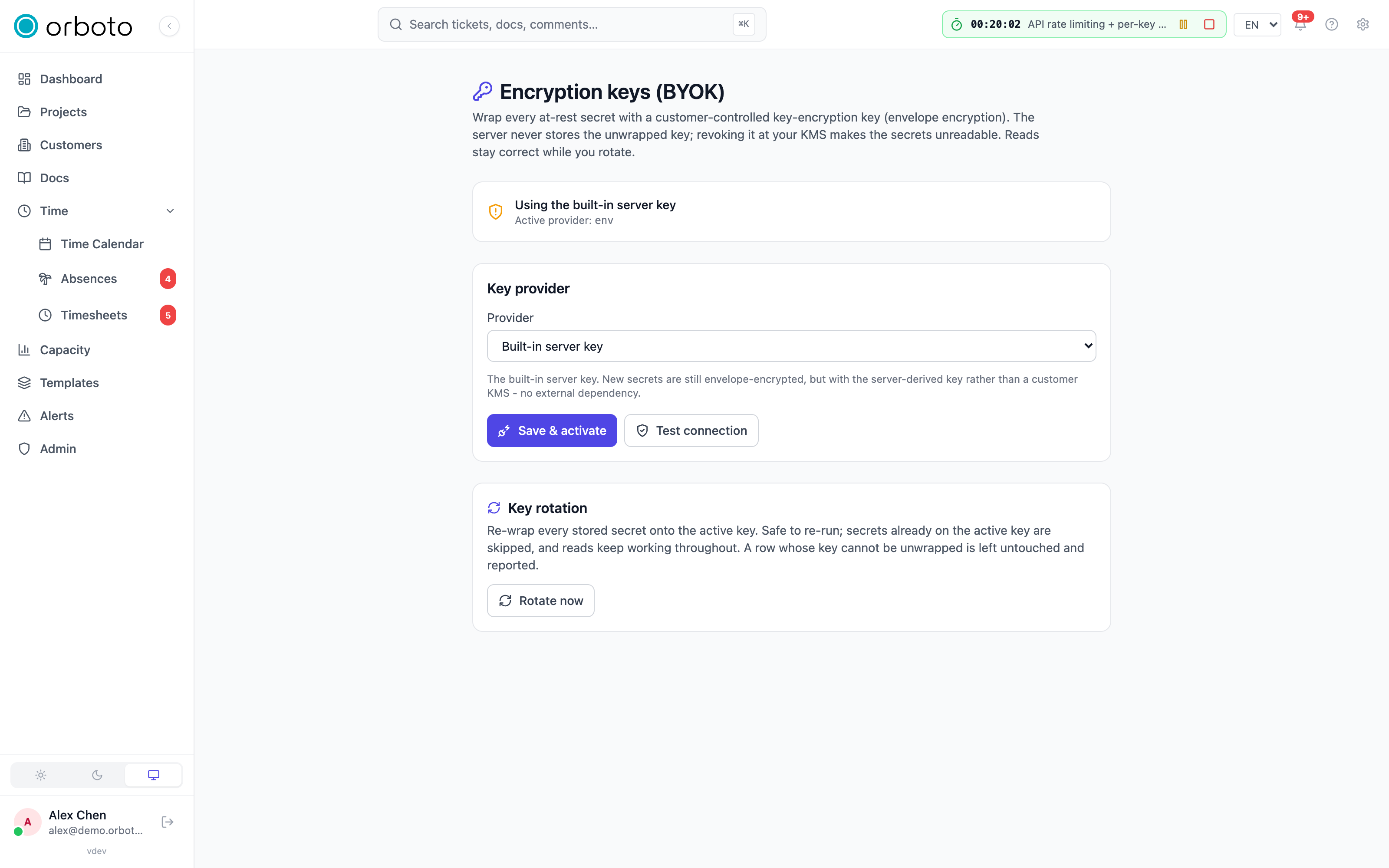
On the next server boot, the configured provider re-activates automatically - you don't need to repeat this setup after a restart or deploy.
Rotate
Added in v0.203.0 One rotation now covers everything the key protects: stored secrets, encrypted files and the backup archives orboto holds. The button is Move everything to the current key, the status shows the three groups separately and stays on the page until the next run. Archives sealed with a passphrase of your own stay on their passphrase. From the command line: orboto encryption rotate. Added in v0.230.0 A "Files only" backup job does not leave encrypted copies on the old key: on its next run it uploads again every copy in your bucket whose header still names the old key (see Encrypted file mirror).
Rotation re-wraps every stored secret's data key onto whichever KEK is currently active - the standard operational hygiene step after a scheduled key change, or after any event that makes you want a fresh key in play.
- Activate the new KEK first (the Configure steps above).
- On the same page, under Key rotation, click Rotate now, then confirm.
- A summary reports counts per outcome: re-wrapped, already-current (already on the active provider, nothing to do), legacy-skipped (an old plaintext or pre-BYOK value with no DEK to re-wrap yet - it upgrades on its own next write instead), and failed.
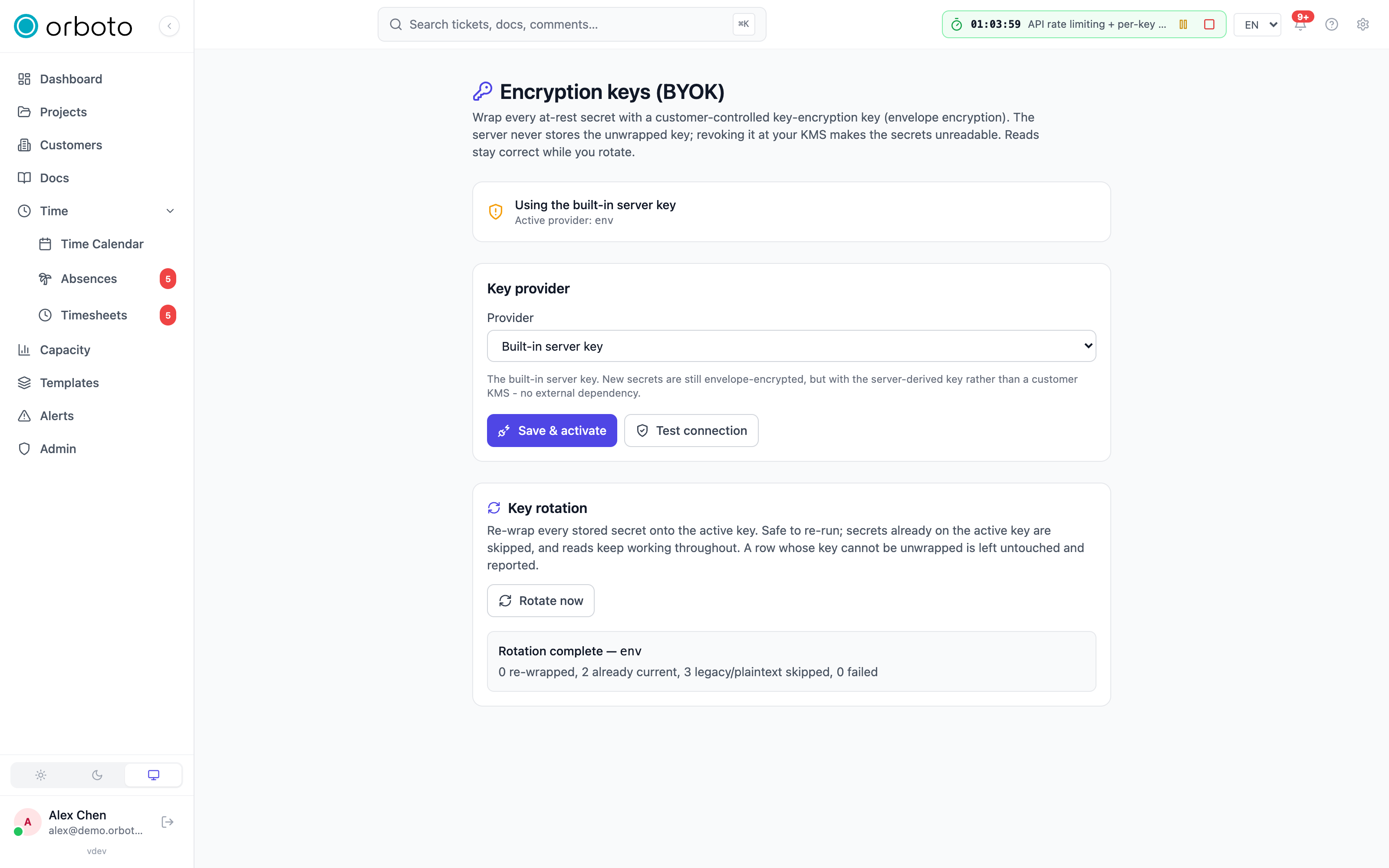
Rotation is idempotent and resumable - re-running it after a partial pass only finishes whatever's left, since anything already on the active provider is skipped. It's also safe to run during live traffic: each secret is read through whichever provider it's actually wrapped under at read time, so a half-rotated table has old-provider and new-provider blobs side by side, and both decrypt correctly, the whole time. A row that fails to rotate (for example its old KEK was revoked mid-rotation, so it can no longer be unwrapped to re-wrap) is logged, counted as failed, and left untouched rather than corrupted - fix the underlying KMS issue and re-run; only the still-failing rows are touched on the next pass.
Revoke
There is deliberately no "revoke" button in orboto. True revocation happens on the KMS side: disable or delete the KEK at AWS KMS, in Vault, or at your external KMS. The instant you do that, every secret wrapped by that key becomes fail-closed unreadable - the unwrap operation throws, and orboto never falls back to reading the value as plaintext.
The practical effect of a revocation:
- Any feature that needs a revoked secret to function - Git sync, SSO, MFA, the SIEM forwarder, inbound IMAP, federation, backups - stops working outright (no valid token/signature/connection) rather than silently exposing anything.
- Switching the provider back to the built-in default in the admin UI only changes which key new secrets get sealed under going forward. It cannot un-revoke or re-read secrets that were already sealed under the now-revoked KEK - that data is genuinely gone unless the KEK is restored at the KMS. To recover, either restore the KEK at your KMS (if your KMS supports un-revoking), or re-enter the affected credentials by hand (reconnect the Git integration, reconfigure SSO, and so on).
What you see while the key is revoked
Added in v0.203.0 Revoking the key does not take orboto down.
| Where | What happens |
|---|---|
| The instance | Keeps running. No restart, nothing is deleted. |
| Login, tickets, docs, search | Work as before. |
| Opening an encrypted file or attachment | A clear error ("the encryption key is not available"), never an empty or broken file. |
| Admin -> Encryption | A red banner: since when the key has not answered, and what your key service said. |
orboto encryption status | The same three facts. |
| Features that need a stored credential (Git sync, SSO, mail) | Fail with their own error and expose nothing. |
| You restore the key | Access returns with the next file that is opened. No restart, no support ticket. |
How fast it takes effect. orboto keeps an unlocked file key in memory for up to five minutes, so that a busy instance does not call your key service for every read. A revoke therefore reaches a file that was just opened within five minutes, and every other file at once; the first refusal from your key service empties that memory completely. If you run orboto yourself you can change the window with BYOK_DEK_CACHE_TTL_SECONDS (default 300; 0 means every read asks your key service) and BYOK_DEK_CACHE_MAX_ENTRIES (default 512).
Rehearse losing the key
Added in v0.203.0 Admin -> Encryption -> Rehearse losing the key (or orboto encryption drill) plays the whole table through on a test file of its own: it encrypts the file, reads it, makes the key refuse, checks that the read fails with the named error, lets the key answer again, reads once more without a restart, and deletes the file. Nothing is revoked at your key service and none of your data is touched. For the few seconds it runs, encrypted files do not open - that is what it proves. The result stays on the page and is written to the audit log.
What orboto reports about your key
Added in v0.203.0 Your instance tells the operator of orboto Cloud (or, self-hosted with a licence, the licence check) who holds the key, which kind of key service it is, a fingerprint of the key and which areas are encrypted. It never sends the key, its address, an account or a token.
Fail-closed contract
If the active provider - or any provider a stored value names - can't wrap or unwrap (the KMS is unreachable, the key was revoked, the key file is missing), the operation throws. There is never a silent plaintext fallback, at any point in the read or write path. This is exactly why Test connection exists as a separate, non-destructive step before Save & activate: it lets you catch a misconfigured provider with a deliberate round-trip check, rather than discovering it the first time a real production read needs the key and fails.
Troubleshooting
- Test connection fails - read the reported error; it names the specific cause (unreachable endpoint, bad key ID, missing file) rather than a generic failure, so start there before re-checking the whole configuration.
- A feature stopped working right after a KMS-side change - check whether the KEK it depends on was revoked or disabled at the KMS; this is the expected fail-closed behavior, not a bug, and the fix is either to restore the key at the KMS or re-enter the affected credential.
- Rotation reports failures - each failure names the site and record id; the most common cause is a KEK that stopped being valid partway through the rotation (revoked, expired, or a permissions change on the KMS side). Fix the underlying KMS access and re-run rotation - only the still-failing rows are retried.
- I switched the provider back to the built-in key, but old secrets still won't read - this is expected if the KEK they were sealed under has been revoked; switching the active provider only affects new seals, it can't retroactively decrypt values already sealed under a now-unavailable key.