

Risk register
Track risks as first-class records with a likelihood x impact matrix, a mitigation owner and plan, and a review cadence that won't let one go stale.
What a risk register is
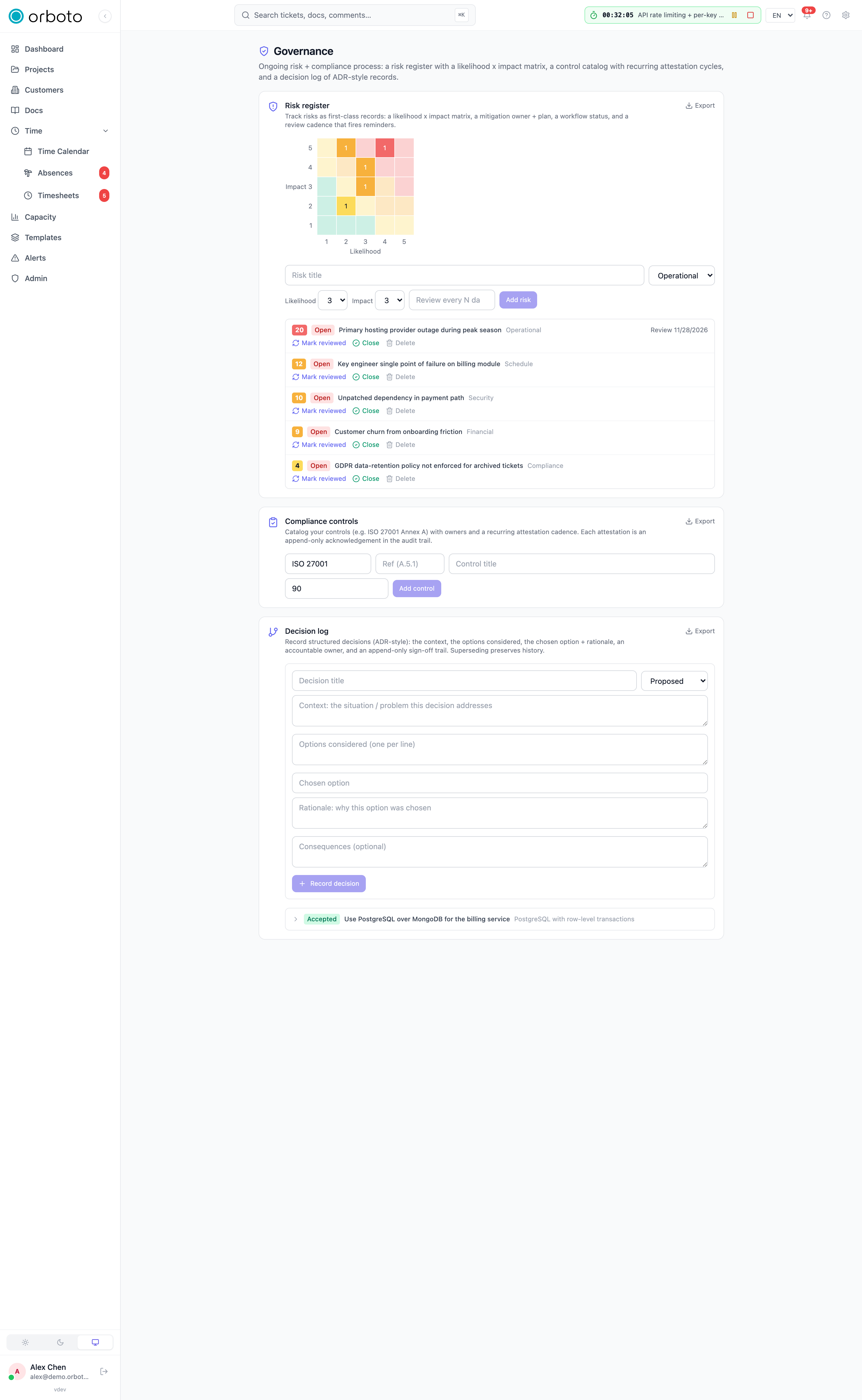
A risk register is a running list of things that could go wrong - for a project, a team, or a whole organization - tracked deliberately instead of living only in people's heads until one of them actually happens. Each entry records what the risk is, how likely it is, how bad it would be if it happened, who owns watching it, and what the plan is if it starts to materialize. The value isn't the list itself; it's that writing risks down forces someone to actually decide what to do about each one, and revisiting the list on a schedule catches a risk that's quietly gotten worse before it becomes an incident.
The likelihood x impact matrix
Every risk gets two independent 1-5 ratings:
- Likelihood - how probable is it that this risk actually occurs?
- Impact - if it does occur, how bad is the consequence?
orboto multiplies the two into a score (1-25) automatically - a risk rated 5 likelihood x 5 impact scores 25 (as severe as it gets), while a 1 x 1 scores 1 (barely worth tracking). The register's matrix view plots every open risk on a 5x5 grid so the highest-priority risks (top-right: likely and severe) are visually obvious at a glance rather than buried in a sorted list.
Fields, explained
- Title - a short, specific description of the risk (e.g. "Primary hosting provider outage during peak season").
- Description (optional) - more detail on the risk itself.
- Category - security / schedule / financial / operational / compliance / technical / other.
- Likelihood and Impact - the 1-5 ratings above.
- Status - open / mitigating / monitoring / accepted / closed (see below).
- Owner (optional) - the person responsible for watching this risk and driving its mitigation.
- Mitigation plan (optional) - what you're doing (or would do) to reduce the risk's likelihood or impact.
- Review cadence (optional, in days) - how often this risk should be formally re-assessed. See below.
- Linked project / milestone / ticket (optional) - ties the risk to
the concrete work it relates to. Added in v0.230.0 A link stays
inside the risk's project: the milestone and the ticket must belong to
the linked project. A milestone or ticket of another project is refused
with
404(errors.milestones.not_found,errors.tickets.not_found), as is a milestone or ticket on a risk with no project, and so is changing the project of a risk whose stored milestone or ticket belongs to the old one - clear or change the link in the same save. Links that older versions let through are found and cleared under Data integrity.
Recording a risk
- Open Admin -> Governance and use the Risk register card.
- Enter a title, pick a category, and set the likelihood and impact ratings (1-5 each).
- Optionally set a review cadence in days - how often you want to be reminded to reassess this risk.
- Click Add risk.
Status
| Status | Meaning |
|---|---|
| Open | Identified, not yet being actively mitigated |
| Mitigating | Actively being worked on |
| Monitoring | Under a watch, not currently being actively worked |
| Accepted | A conscious decision to accept the risk as-is, without further mitigation |
| Closed | No longer a live risk |
Accepted deserves a specific note: it isn't "we forgot about this." It's a deliberate record that someone with the authority to do so looked at this risk and decided the cost of mitigating it wasn't worth it relative to its likelihood and impact - which is itself useful evidence that risk was considered, not ignored.
Review cadence
A risk with a review cadence set gets a next review date, and the register flags it once that date is reached or passed - either Review overdue or Review followed by the due date, right on the risk's own row, so a stale risk assessment is visible without hunting for it. Click Mark reviewed to re-assess it: optionally update the likelihood, impact, or status as part of the same action, plus an optional note about what changed (or didn't) since the last review. This resets the next-review clock from the review date, not the original creation date, so the cadence stays consistent going forward.
A risk with no cadence set simply never gets flagged for review - appropriate for something you genuinely just want a record of, not an ongoing watch.
Closing a risk
Close ends a risk's active life once it's genuinely no longer relevant (the underlying condition that created it is gone, or it happened and is now being handled as an incident rather than a risk). Closing records who closed it and when, distinct from Accepted status above - closed means "this is done," accepted means "this is ongoing, and we've chosen to live with it."
Exporting for evidence
Click Export on the Risk register card to download every risk - open and closed, full detail - as a machine-readable file, for the same audit/customer-questionnaire purpose as the Decision log's export.
Permissions
Reading the register requires admin:risk:read; creating, updating,
reviewing, closing, and deleting risks all require admin:risk:write.
Every mutation, including each review, is written to the audit log.
Troubleshooting
- A risk I closed still shows in the matrix view - the matrix typically reflects open risks by default; switch the register's filter to include closed risks if you need to see the full historical picture rather than just what's currently live.
- The review-overdue flag won't clear even though I discussed the risk in a meeting - discussing it isn't the same as recording the review; click Mark reviewed on the risk itself to reset its next-review date, even if you're keeping the likelihood, impact, and status unchanged.
- I can't tell why a risk scored what it did - the score is always likelihood x impact, computed automatically; if the number looks wrong, check the two underlying 1-5 ratings rather than the score field itself, since the score isn't independently editable.
- A risk that should clearly be top-priority isn't showing near the top-right of the matrix - double-check its likelihood and impact values were actually set to reflect that; a risk that reads as severe in its description but was rated 2x2 will plot low regardless of how it sounds in prose.
Decision records
Record significant decisions ADR-style - the context, the options, the choice, the rationale, and a sign-off trail - so the reasoning survives.
On-call and escalations
Who's on duty, and how an automated (agent or system) alert reliably reaches a human - the governance/accountability view of incident response.