

Webhooks
Push orboto events to your own systems, Slack, Teams or Discord - setup, signature verification, and delivery debugging.
Webhooks POST an event payload to your endpoint whenever something happens in the workspace - a ticket created or changed, a comment posted, and more. They're the integration point for anything orboto doesn't already connect to natively.
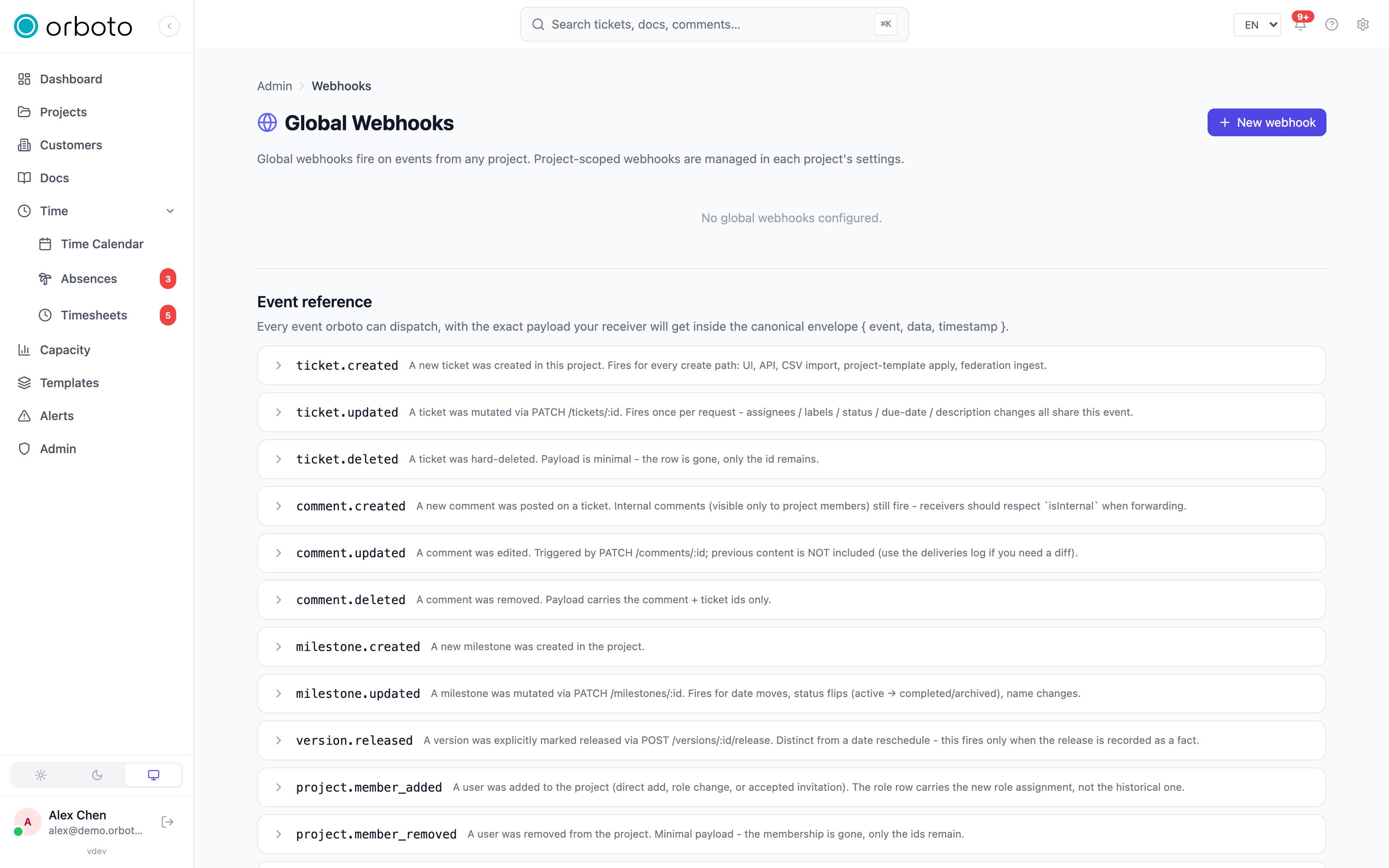
Workspace vs. project scope
Webhooks exist at two levels, managed on two different pages, and you choose the scope by which page you create one on:
- Admin -> Webhooks - a workspace-scoped webhook fires for the event types you picked, across every project in the workspace. Use this for a system that needs to know about everything (a company-wide Slack channel, a central logging pipeline).
- Project Settings -> Webhooks (inside a specific project) - fires only for that one project. Use this when only one team or one integration cares about a specific project's activity.
Both pages have the identical setup form and delivery log described below - only what triggers the webhook differs.
Setting one up
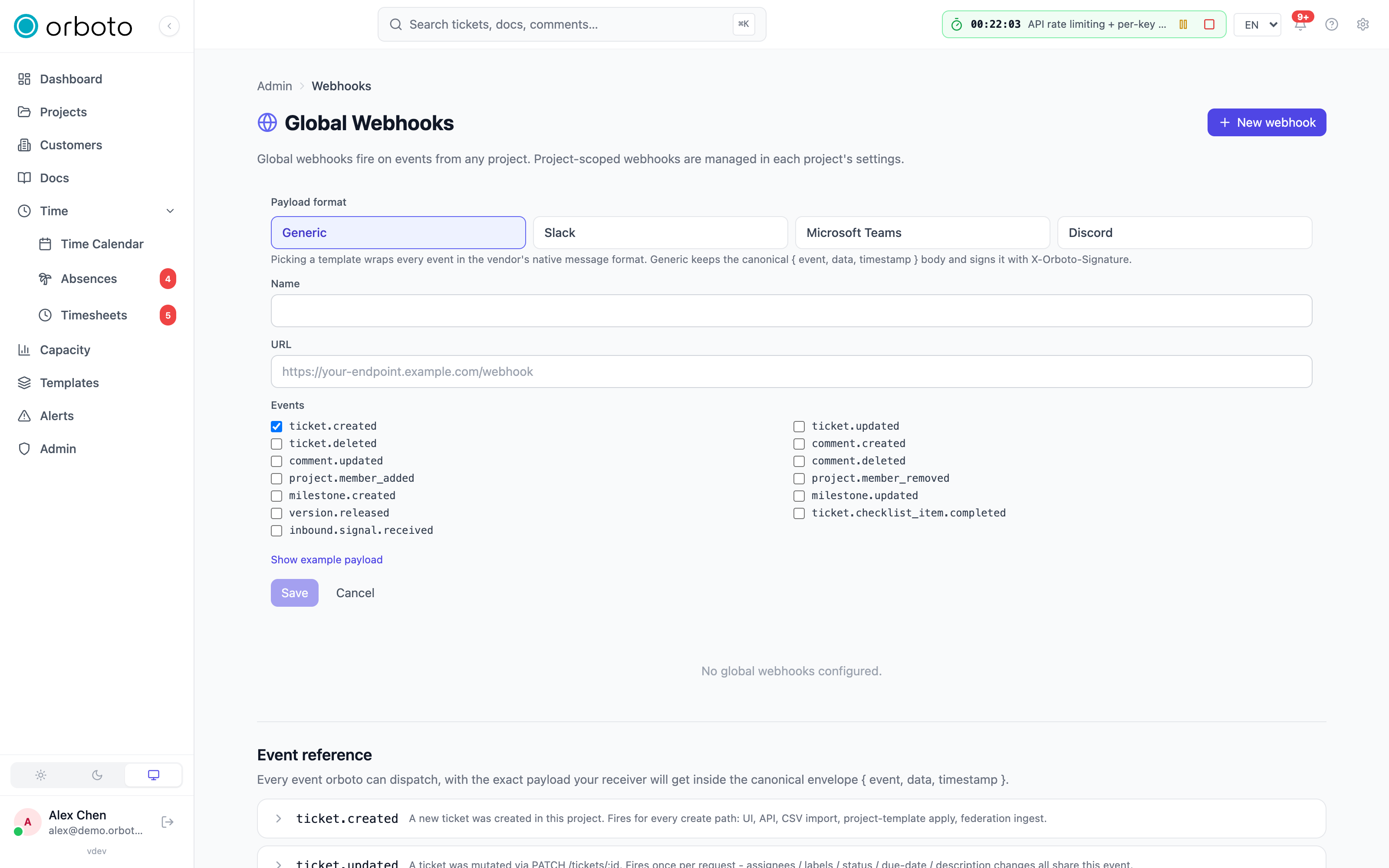
Click New. The form asks for:
- A template (optional first step) - four cards: Generic (a plain JSON envelope you consume however you like), Slack, Microsoft Teams, or Discord. Picking a vendor template pre-fills the payload format, a placeholder for that vendor's webhook URL shape, and a sensible starter set of subscribed events - all still fully editable afterward. Picking Generic (or skipping this step) leaves the payload as the plain JSON envelope.
- Name - your own label for this webhook, shown in the list.
- URL - your receiving endpoint.
- Events - a checklist of every event this webhook can fire for (see the table below). Check only what you actually need; the fewer events, the smaller the log and the less noise on your receiver.
- Optionally expand Show example to see exactly what JSON body the currently-selected template produces, before you save anything.
Click Save. A banner appears once, immediately after creation, showing the webhook's secret in plaintext - copy it now. orboto never displays it again; if you lose it, delete the webhook and create a new one rather than trying to recover the old secret.
Events you can subscribe to
| Event | Fires when |
|---|---|
ticket.created | A new ticket is created |
ticket.updated | Any field on an existing ticket changes |
ticket.deleted | A ticket is deleted |
comment.created / .updated / .deleted | A comment is posted, edited, or removed |
project.member_added / .member_removed | Someone joins or leaves a project |
milestone.created / .updated | A milestone is created or changed |
version.released | A project version is marked released |
ticket.checklist_item.completed | A checklist item flips from unchecked to checked (fires once, on that transition only - not on every edit) |
inbound.signal.received | An inbound-mail message was triaged but didn't match any ticket, so it was forwarded as a standalone signal instead |
Added in v0.230.0 A payload that carries isPrivate for a ticket (ticket.created, ticket.updated, ticket.ready and agent.escalation_raised) also carries hasPrivateAncestor: true when a parent, grandparent or any other ticket above it is private (it looks at private tickets only, not at private milestones). A private ticket hides its whole subtree in orboto, so an integration that forwards ticket content to a wider audience should treat a ticket with isPrivate: true or hasPrivateAncestor: true as private. Webhooks themselves still deliver every event you subscribed to; orboto does not filter the payload for you.
The Event reference panel at the bottom of the Webhooks page lists
every event orboto can dispatch, each in its own collapsible row showing
the description and the exact JSON payload your receiver will get for
it, inside the standard envelope { event, data, timestamp }. Expand a
row and use its Copy button to grab a ready-to-use example straight
into a test script or a Postman request - you never have to guess a
payload's shape from the checkbox label alone.
Verifying deliveries
Every request carries the header:
X-Orboto-Signature: sha256=<hmac-sha256 of the raw body, keyed with your secret>Verify it before trusting the payload:
import { createHmac, timingSafeEqual } from 'node:crypto';

function verify(rawBody, header, secret) {
  const expected = 'sha256=' + createHmac('sha256', secret).update(rawBody).digest('hex');
  return timingSafeEqual(Buffer.from(header), Buffer.from(expected));
}
Reject anything unsigned or mismatched - don't process a payload just because it arrived at the right URL.
Delivery behavior and the delivery log
- Dispatch is asynchronous and fire-and-forget: whatever mutation triggered the event (creating a ticket, posting a comment) completes and returns to the user immediately, regardless of whether your endpoint is fast, slow, or entirely down at that moment.
- Every attempt - success or failure - lands in that webhook's delivery log, viewable from the webhook's row in the list. Each entry shows the event, the timestamp, the HTTP status your endpoint returned (or a timeout/connection error), and, for a failure, the response body or error detail. There's no guesswork required to debug a silent integration - the log tells you exactly what happened on the last N attempts. Added in v0.230.0 orboto reads at most 16 KB of your endpoint's answer and keeps the first 2000 characters of it in the log.
- Disable (rather than delete) on a webhook stops new deliveries immediately while keeping its configuration, secret, and full delivery history intact - use this while you're fixing a broken receiver, then Enable it again once it's ready.
- Deleting a webhook removes it and its delivery history permanently.
Troubleshooting
- Signature never matches on your receiver - HMAC the raw request body bytes exactly as received, before any JSON parsing/re-serialization. Re-stringifying a parsed body (different key order, different whitespace) produces a different hash than the one orboto signed.
- Nothing arrives at all - open the delivery log first. Zero attempts logged means the event you expected isn't among the ones you checked when creating the webhook (or nothing matching has happened yet, in which case trigger a test action - create a ticket - to confirm). Attempts logged as failures mean your endpoint rejected the request or timed out; the log's status code and error detail say exactly why.
- A vendor template's payload doesn't render correctly in Slack / Teams / Discord - each vendor template targets that platform's own message format (Slack blocks, Teams adaptive cards, Discord embeds respectively). If you've customized the receiving channel or app beyond what the default template assumes, switch to Generic and transform the payload yourself downstream instead of fighting the built-in template.
- You lost the signing secret - it's shown exactly once, at creation. There's no recovery flow; delete the webhook and recreate it, which issues a fresh secret you copy immediately this time.
- Wrong scope: getting events from projects you didn't expect - a workspace-level webhook (Admin -> Webhooks) fires for every project by design; if you only want one project's events, delete it there and create the equivalent webhook on that project's own Settings -> Webhooks page instead.