

Data retention and legal holds
Concepts and the operator workflow for automatic data cleanup and litigation holds - full field reference lives on the Compliance page.
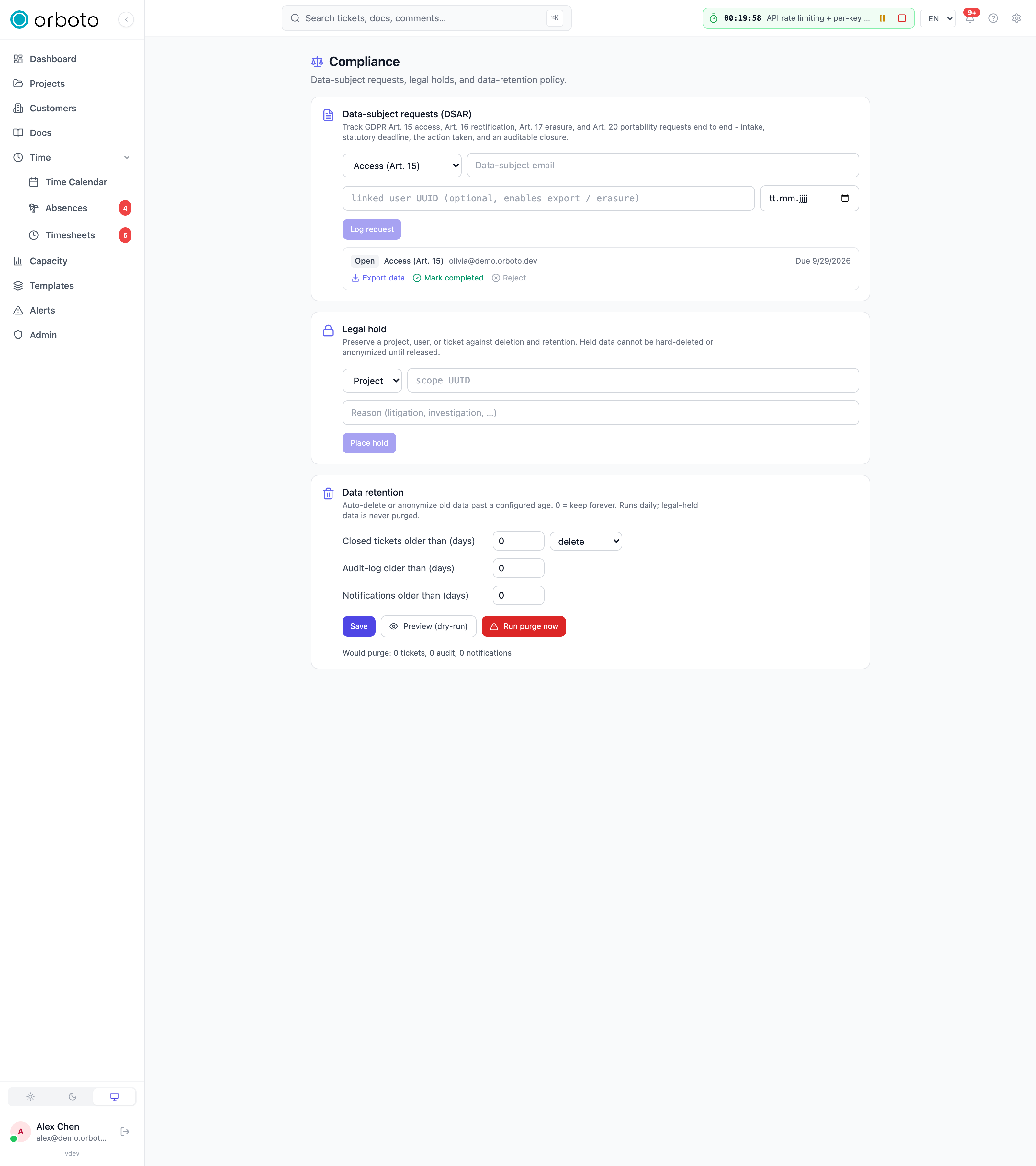
Data retention and legal holds are two sides of the same control: retention automatically gets rid of data past a configured age, and a legal hold is the explicit override that says "not this one, not yet" regardless of age. Both live on Admin -> Compliance, alongside data-subject request (DSAR) handling.
This page explains the two concepts from first principles and walks through the operator actions (preview, run, place, release). For the full field-by-field reference of every setting on the Compliance page - including the DSAR workflow these two features sit next to - see Data protection (GDPR).
What retention is for
Keeping data forever is a liability, not a feature: old closed tickets, years of audit-log rows, and stale notifications accumulate storage cost and expand what a data breach could expose, without adding value to anyone still using the workspace. A retention policy says, per data category, "once this is older than N days, get rid of it automatically"
- so cleanup happens on a schedule instead of depending on someone remembering to do it manually.
orboto's retention policy covers three categories independently, each
with its own age threshold in days (0 means keep forever for that
category, i.e. retention is off for it):
- Closed tickets - past their configured age, either deleted or anonymized (your choice per policy - anonymize keeps the ticket for statistics/reporting but strips the identifying content).
- Audit log - old audit-trail rows.
- Notifications - old in-app notification rows.
A background job applies the policy once a day. You don't have to wait for it, though - see Preview and run manually, below.
What a legal hold is for
A legal hold (sometimes called a litigation hold) is a preservation order: "this specific project / user / ticket must not be deleted or anonymized, for any reason, until I say otherwise" - typically because it's evidence in an active dispute, investigation, or audit. A hold overrides everything that would otherwise remove or anonymize data in its scope: the retention job above, and any manual delete/anonymize action elsewhere in the product (including DSAR erasure requests).
Holds are scoped to exactly one project, user, or ticket at a time (by its UUID) with a required reason - if you need to preserve several things, place several holds.
Preview and run manually
Waiting for tomorrow's scheduled run isn't always convenient - right after tightening a retention policy, you'll usually want to know its effect immediately. Two buttons on the Retention card do this:
- Preview (dry-run) - runs the exact same purge logic as the scheduled job, but deletes nothing. It reports how many tickets, audit-log rows, and notifications would be purged under the current policy, plus how many tickets were skipped because they're under an active legal hold.
- Run purge now - the real, destructive run. Clicking it doesn't purge immediately: a confirmation step appears with an explicit Confirm - delete permanently button, so a single misclick can't trigger an irreversible bulk delete. Once confirmed, it reports the same counts as the preview, except this time the data is actually gone (or anonymized, per the ticket action setting).
Always Preview before you Run, especially the first time you configure a new threshold - it's the only way to see the real numbers before committing to a delete.
Placing and releasing a hold
- On the Legal hold card, pick the scope type (Project / User / Ticket).
- Paste the specific scope UUID you want to preserve.
- Enter a reason - required, and shown in the hold list so anyone reviewing it later (including you, months from now) understands why it exists.
- Click Place hold.
The hold appears in the list below with its scope, a truncated id, and the reason. Click Release on any entry once the hold is no longer needed - release takes effect immediately with no extra confirmation, since releasing a hold doesn't delete anything by itself; it simply re-exposes that scope to the normal retention and manual-deletion rules going forward.
Every place and release is written to the audit log with the actor and the reason, so the history of what was held and when is preserved even after a hold is released.
Troubleshooting
- Something under a legal hold won't delete or anonymize, and there's no error explaining why - this is by design: a hold blocks the action silently from the acting user's point of view unless they know to check here. Look up the exact scope UUID on the Legal hold card.
- Preview shows 0 for a category I expect to have old data -
confirm that category's threshold isn't
0(which means "keep forever," not a bug), and check whether the data you expected is actually under a hold (Preview reports held-tickets-skipped separately from the purge counts). - Run purge now did less than the preview reported - a hold placed between the preview and the run would explain the gap; otherwise the counts should match exactly, since both use the same logic.
- You need to preserve a whole project, not just one ticket - place the hold with scope type Project; every ticket in that project is then covered, you don't need one hold per ticket.
See also
- Data protection (GDPR) - the full Compliance page reference, including data-subject request (DSAR) handling that sits alongside retention and legal holds.
Session, password and network policies
Session lifetimes, password rules, and an IP allowlist for admin routes and writes - all under Admin -> Security.
Bring your own key (BYOK)
Wrap every at-rest secret with a customer-controlled encryption key, from what envelope encryption is to setup, rotation and recovery caveats.