

Data protection (GDPR)
Track data-subject requests end to end, place legal holds, and set automatic retention - all under Admin -> Compliance.
Admin -> Compliance is where GDPR obligations toward individual people (as opposed to the audit-trail evidence covered elsewhere) get tracked and enforced. Three cards, each self-gating on its own permission so you only see what you're allowed to act on.
Data-subject requests (DSAR)
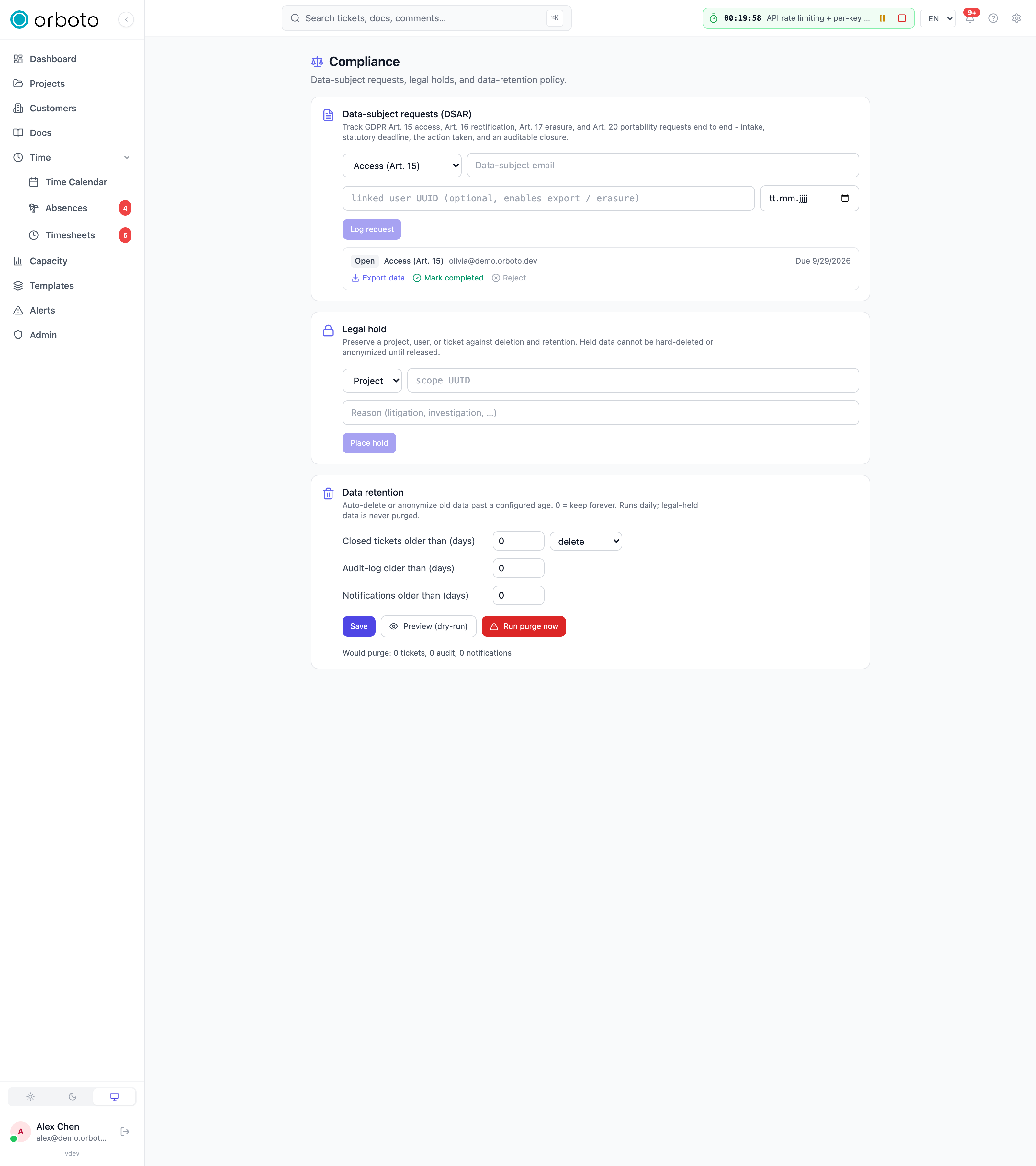
Track every GDPR data-subject request - Art. 15 (access), Art. 16 (rectification), Art. 17 (erasure), Art. 20 (portability) - from intake to an auditable closure, instead of handling them ad hoc over email.
Logging a new request:
- Pick the request type from the dropdown (Access / Rectification / Erasure / Portability).
- Enter the data-subject's email (required).
- Optionally, the linked user UUID - if the request is about someone who has (or had) an orboto account, filling this in is what lets the Export and Anonymize action buttons work directly from this request; without it, you can still track the request but have to handle the actual data action outside this card.
- Optionally, a due date - your own statutory-deadline tracker, not enforced by orboto itself, just displayed so nothing falls through.
- Click Log request.
Working a logged request - each row shows its type, status, and whatever actions your permissions allow:
- Export (needs the DSGVO-export permission) - runs the same machine-readable personal-data export used elsewhere, tied to this request for the audit trail.
- Anonymize (needs the DSGVO-anonymize permission) - a browser
prompt requires you to type
ANONYMIZEbefore it runs; this is irreversible, so the request card requires a deliberate typed confirmation rather than a single click. - Rectify - prompts for a short description of the correction made (for the Art. 16 record); it doesn't perform the edit itself, it records that a correction was made and what it was, since rectification usually means editing a specific field somewhere else in the product.
- Close - marks the request Completed or Rejected, with an optional closure note. This is the step that makes the request auditable end-to-end: intake, the action taken, and a recorded outcome.
Status values you'll see: Open (just logged), In progress, Awaiting subject (you're waiting on the person themselves for something), Completed, or Rejected.
Both Export and Anonymize, whether triggered from a DSAR request or run standalone elsewhere in the admin panel, are themselves audit-logged - the DSAR record and the audit log corroborate each other.
Legal holds
A legal hold preserves a project, a user, or a ticket against deletion and retention - once held, that scope cannot be hard-deleted or anonymized (including via the retention policy below) until the hold is explicitly released.
To place one: pick the scope type (Project / User / Ticket), paste the specific scope UUID, enter a reason (e.g. "litigation", "active investigation" - required, shown in the hold list so anyone looking at it later understands why), and click Place hold. Active holds list below with their scope, truncated id, and reason; click Release on any of them once the hold is no longer needed - release is immediate and simple (no typed confirmation), since releasing a hold doesn't delete anything itself, it just re-exposes that scope to normal deletion/retention rules going forward.
Data retention
Configure automatic cleanup of old data past a configured age, in three independent fields (each in days; 0 means keep forever for that category):
- Closed tickets older than (days)
- Audit log older than (days)
- Notifications older than (days)
The retention job runs daily. Anything covered by an active legal hold above is never purged, regardless of its age against these settings - the hold always wins.
Troubleshooting
- Export/Anonymize buttons don't appear on a DSAR request - either
the request has no linked user UUID (fill it in via edit, if the
request wasn't originally logged with one, or handle the data action
manually outside this card), or your own account lacks the specific
admin:dsgvo:export/admin:dsgvo:anonymizepermission even though you can see and log requests generally. - Anonymize prompt won't accept your input - the confirmation is
case-sensitive and must be typed exactly
ANONYMIZE, not a translation or a close variant. - A user/project/ticket won't delete or anonymize even though nothing looks unusual about it - check for an active legal hold on that exact scope UUID; a hold blocks the action silently from the requester's point of view unless they know to look here.
- Retention doesn't seem to be purging anything - confirm the
relevant field isn't set to
0(which means keep forever for that category by design, not a bug), and remember it runs once daily, not immediately after you save the setting. - A DSAR request's due date passed with no action - resolve it via the appropriate action (export/anonymize/rectify) and Close it with the outcome recorded; an auditor reviewing your DSAR handling will look for the closure trail, not just that the request exists.