

API keys
Minting keys, agent profiles, expiry, live connections, and monitoring key usage.
API keys authenticate programmatic access - scripts, integrations, CLI
sessions and AI agents. A key is shown once at creation; orboto stores
only a hash. Keys have the form orb_... and are sent as
Authorization: Bearer <key>.
Minting a key
- For yourself - from your Profile → API keys section. The key acts with your own permissions.
- For a bot - administrators mint keys on a bot account's behalf from Admin → Users → the bot's row → API keys tab. The key acts with the bot's project memberships and roles, not the admin's.
Every key gets a name (so you can tell integrations apart) and an optional expiry date. Admin-minted keys default their agent flag to the account type - a bot's key is an agent key unless you say otherwise; self-service keys default to off and you opt in explicitly.
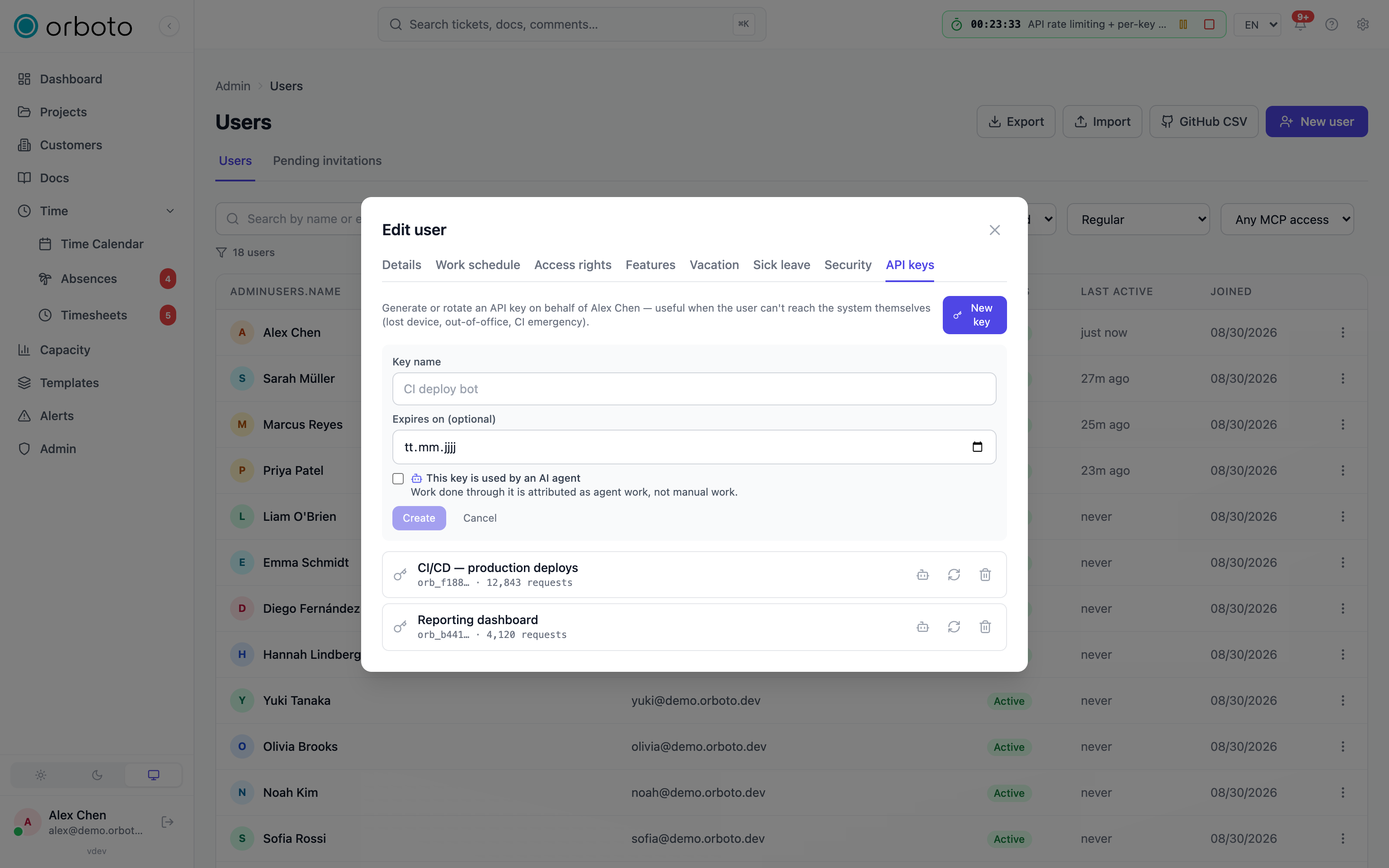
Minting or rotating a key for another user
Added in v0.212.5 Creating a key for another user and rotating another
user's key (the API keys tab on the user's row, or
POST /admin/users/:userId/api-keys and .../:keyId/rotate) asks for a
recent MFA step-up on top of admin:users:write:
- In the web app, an account with a second factor is asked for its
authenticator code or passkey unless it passed one in the last 15 minutes;
the refusal carries
mfaChallengeRequired: trueand the app opens the step-up dialog. - An agent on an API key cannot answer that prompt. It passes only when
the calling key itself lists
admin:users:writein its scopes (an unscoped key does not count) and the key's owner has a confirmed second factor. Otherwise the call is refused with a 403 that names the missing condition: the scope, or the owner's second factor. The rule that a scoped key can only hand out keys inside its own scopes applies first.
Rotating a key you own (your own profile, or orboto doctor --rotate) is
unchanged.
Added in v0.230.0 Creating, editing or rotating a key for another user
also needs your own authority to cover everything that account holds through
global roles. A user administrator cannot mint or rotate a key for a
super-admin, or for an account with a permission the administrator lacks
(403, audited as security.authority_refused; see
Who may grant what).
Deleting another user's key stays possible. A key for a federated ghost user
is refused as well, because a ghost never holds a credential (see
Federation conflicts and user mapping).
Agent profiles
When a key is marked as an agent key, an admin minting it on a bot's behalf can also set:
- Agent kind - a free-text label such as
coding,orchestrator,reviewer,runnerorchat. - Model tier -
frontier,standardorsmall.
Workspace rules for agents can target these attributes, so a lightweight worker gets a different instruction set than an orchestrator - without the agent declaring anything per call. Marking a key as an agent key also makes work-routing policies apply to it: human-reserved tickets are withheld from autonomous pulls, and the workspace's autonomy-pause switches take effect. The agent kind and model tier fields are only available on admin-minted bot keys, not on self-service keys from your own profile.
Rotating and revoking
- Rotate issues a fresh secret for the same key row (same name, same agent profile) and immediately invalidates the old secret - use this instead of creating a new key when you just need a fresh credential.
- Delete removes a key outright; access is cut instantly.
- Deactivating the owning user or bot invalidates all of their keys.
Added in v0.230.0 Revoking or rotating a key, and changing its scopes or its expiry date, also closes the live connections opened with it; see Live connections.
One key per integration or agent lane - never share a key across systems, so a compromised or misbehaving integration can be revoked without affecting the others.
Live connections
Added in v0.230.0 A key's scopes bind the live connections it opens the
same way they bind its REST calls, with no exception for the account behind
the key: a super-admin's key with scopes is held to its scopes on live events
exactly as it is on REST (see
A super-admin's scoped key). The live
connections are the app WebSocket (/ws), the agent WebSocket (/agent/ws)
and the MCP event stream (GET /sse/mcp-events).
What a scoped key receives
The two WebSockets open with a one-time ticket from POST /auth/ws-ticket
that is valid for 30 seconds. The ticket keeps the scopes of the key that
requested it, and every socket opened with it works inside those scopes. The
event stream is authenticated by the key itself and uses the key's scopes the
same way.
- Private tickets and their comments. A key whose scopes lack
ticket:view_privatedoes not receive the events of a private ticket, of its sub-tickets or of their comments. A key whose scopes lackmilestone:view_privatedoes not receive the events of a ticket in a private milestone, of the tickets below it or of their comments. A role the account holds, the super-admin role included, does not open a private ticket for the key unless the scopes carry the permission. What the account reaches by other means still applies, exactly as over REST: a private ticket the account is assigned to or sits on the access list of keeps arriving. - A ticket that turns unreadable. When a ticket becomes private or moves below a private ticket or milestone, a scoped key whose scopes now refuse it still receives the removal event, so a board that shows the ticket drops the row.
- Joins. Joining a project, a document, a live session or a terminal watch on these sockets is checked in the key's scopes as well.
- Not affected. Web app sessions, OAuth connections and unscoped keys
receive every event the account may read. So does a key whose scopes are
only the access scopes
api:useormcp:use, because those restrict nothing.
An integration that reads private tickets over REST with one key and listens with another sees two different views of the same ticket. Request the WebSocket ticket with the key that carries the private scopes.
A super-admin's scoped key
Added in v0.230.0 A super-admin account passes every permission check
with a login session or an unscoped key. A key that lists scopes never
inherits that bypass: it holds exactly the permissions its scopes list, over
REST and on live events alike. A super-admin's key that lacks
ticket:view_private therefore receives no private ticket or comment events,
and one that lacks milestone:view_private receives none from a private
milestone, with the same exceptions as above (a ticket the account is
assigned to or sits on the access list of). List the scope on the key when
the integration needs those events. A key whose scopes are only the access
scopes api:use or mcp:use lists nothing that restricts, so it is not scoped
in this sense.
When a key changes or ends
| What happens | The key's open connections |
|---|---|
| The key is revoked (deleted) | Close at once |
| The key is rotated | Close at once; the old secret is already invalid |
| The key's scopes or expiry date change | Close at once, so the next connection starts under the new scopes |
| The key is renamed | Stay open |
| The key expires | Receive no further events; each closes with the next event that would have reached it, within five minutes at the latest |
| The owning account is deactivated, deleted or anonymised, or SCIM deprovisions it | Every live connection of the account closes, whether it was opened with a login session or with a key |
A WebSocket that closes this way gets close code 4401 with the reason
Access revoked or changed. An event stream has no close code; it simply
ends. A ticket of a key that has already expired opens nothing.
Reconnecting after a 4401
An integration that holds a WebSocket reconnects after a 4401:
- Request a new ticket with
POST /auth/ws-ticketusing the key. A ticket works once, so a socket never reconnects with the old one. - Open the socket with the new ticket. It runs under the key's current scopes.
- If the ticket request answers
401, the key is revoked or expired or its account is deactivated. Stop retrying and mint a new key; a retry loop only repeats the refusal.
The same code also answers a socket opened with a missing, used or expired
ticket (reasons Missing ticket and Invalid or expired ticket). The fix is
the same: request a new ticket.
Monitoring usage
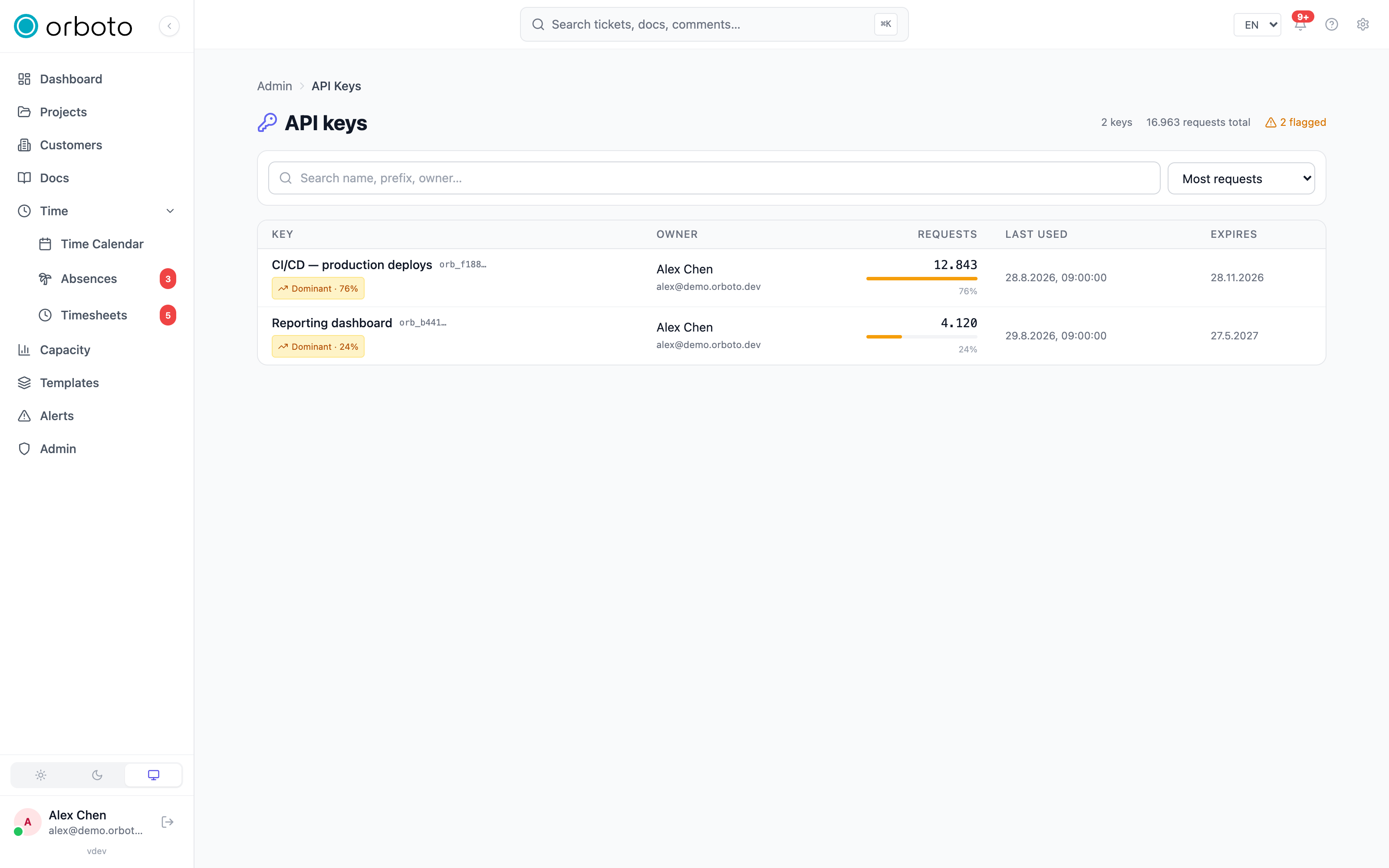
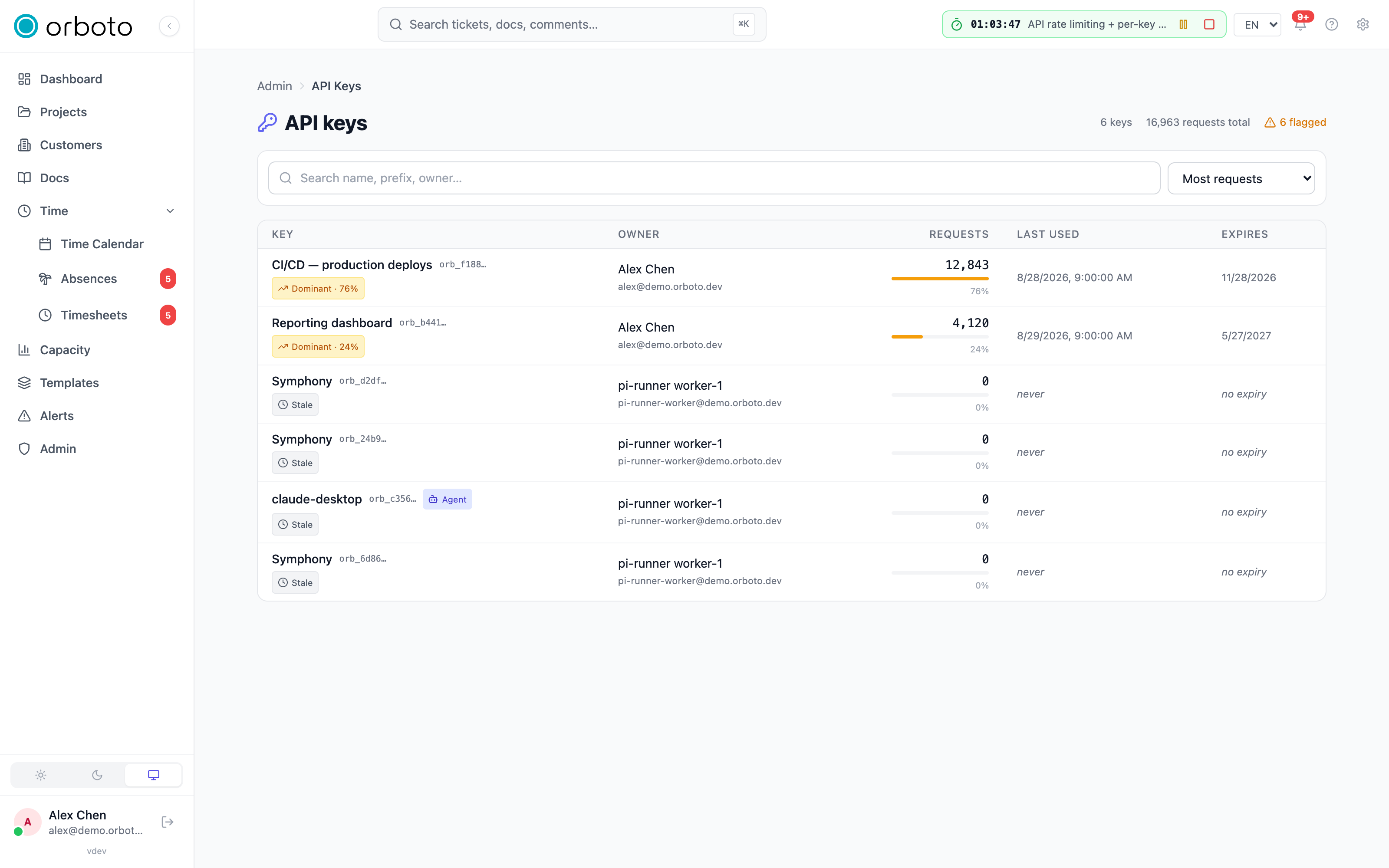
Admin → API keys is a workspace-wide, live-updating dashboard of every key's request volume - not where you create keys. It shows, per key: the owner, total requests, a share-of-traffic bar, last-used time and expiry, searchable and sortable. Keys are flagged automatically:
| Flag | Meaning |
|---|---|
| Dominant | This key accounts for ≥20% of all requests (and >100 requests) - worth checking it's not a runaway loop. |
| Stale | No requests in the last 90 days - a candidate for cleanup. |
| Expired | Past its expiry date. Still shown for visibility even though it no longer authenticates. |
| Suspended | The owning user or bot is deactivated - the key 401s regardless of its own state. |
Troubleshooting
A key stopped working with no visible change to the key itself. Check Admin → API keys for a Suspended or Expired flag - the owning account may have been deactivated, or the expiry date passed.
One key is responsible for most of the traffic. The Dominant flag surfaces this automatically; check whether that's an expected orchestrator key or a misbehaving loop retrying without backoff.
A WebSocket closes with code 4401. Added in v0.230.0 The key behind
it was revoked, rotated, rescoped, given a new expiry date or has expired, or
its account was deactivated or deleted. Request a new ticket and reconnect, or
mint a new key when the ticket request answers 401 (see
Reconnecting after a 4401).
A key reads a private ticket over REST but its live view never shows it.
Added in v0.230.0 The WebSocket ticket was requested with another key, or
with one that lacks ticket:view_private or milestone:view_private. Request
the ticket with the key that carries the scopes (see
What a scoped key receives).
A super-admin's key receives no private tickets live.
Added in v0.230.0 A key with scopes holds only the permissions it lists,
the super-admin role of its account included, so it receives the same events
it can read over REST and no more. Add ticket:view_private or
milestone:view_private to the key, or connect with a login session or an
unscoped key (see
A super-admin's scoped key).
An agent isn't getting the instruction set you expected. Confirm the key's agent kind and model tier match what your workspace rules target - these are set on admin-minted bot keys only, under the user's API keys tab.