

Claude Code: alternatives
Two paths around the default setup: an API key login for an unattended agent account, and driving orboto through the CLI with no MCP server and no wake channel at all.
Two paths that skip part of the step-by-step connection: an API key for an agent account that runs without a person at the keyboard, and running orboto through the CLI with no MCP server and no wake channel at all.
The CLI without MCP
Claude Code runs terminal commands itself, so it can drive the orboto command
directly, with no server entry and no channel. Start it inside the folder you
work in and make the first message this (replace ACME with the key of your
orboto project, the short prefix of your ticket numbers):
claudeRun "orboto session-start --project ACME" and follow the rules it prints. Then show me my open orboto tickets.Claude Code may ask you once to allow running the orboto command; allow it.
session-start hands the agent the workspace rules (ticket first, one commit
per ticket, how to claim, comment and close), and the agent answers with your
tickets. From here on you work as you would in the app:
Which tickets in project ACME are blocked?Claim ACME-42 and start the timer.Add a comment to ACME-42: waiting for the design review.Close ACME-42 with a comment about what changed.
The agent only does what your orboto account may do. If you cannot delete a ticket in the app, it cannot either. This path has no wake channel: nothing reaches an idle session, so pair it with one of the delivery paths on Agent inbox and wake-up delivery.
You can also start a hand-configured session without the orboto CLI at all, once the stdio connector is set up by hand (Local-Proxy setup):
claude --dangerously-load-development-channels server:orboto
claude --dangerously-load-development-channels server:orboto --continue
The name after server: is the key of the server in .mcp.json.
Make it permanent with the skill
So that you do not have to mention the CLI in every session: in orboto open
Profile, find the AI Agent Skill card and click Download. Unzip the
file; you get a folder named orboto. Move that folder into ~/.claude/skills/
(create the skills folder if it does not exist; the result is
~/.claude/skills/orboto/SKILL.md). From then on Claude Code loads the orboto
workflow whenever a task mentions tickets, and you can invoke it directly with
/orboto.
API key for an agent account
An agent account that runs unattended, and any setup where a browser login is
impractical, authenticates with an API key instead. It is a long text starting
with orb_.
- Open your orboto workspace in the browser and log in as that account.
- Click the avatar in the top-right corner, then Profile.
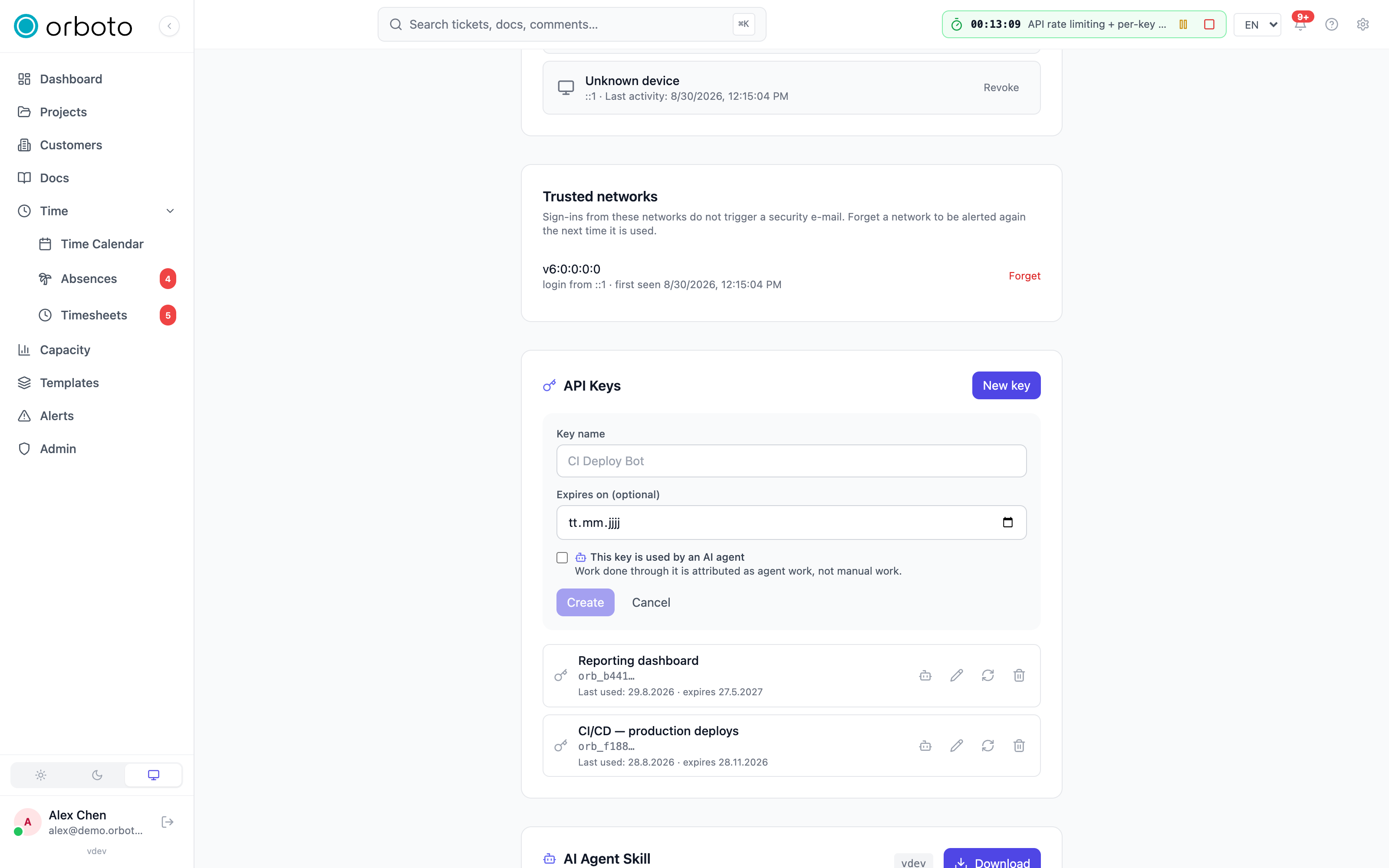
- Scroll to the API Keys card and click New key.
- Name it
claude-code. Tick This key is used by an AI agent - work done through it is then attributed as agent work in reports. - Click Create.
- The key is shown once. Click the copy icon next to it and paste it somewhere safe for the next step. Then click I've saved it.
Then log the CLI in with it, under its own profile:
orboto login --api-key --profile bot --base-url https://YOUR-WORKSPACE
orboto --profile bot whoami
orboto connect --yes --profile bot
The input stays hidden while you paste the key. orboto whoami confirming the
bot's name and email address is the proof that the key works.
Keep the key private
Anyone with this text can act in orboto as that account. Never paste it into a chat, a ticket, or an email. If it ever leaks, delete it in the same API Keys card and create a new one.
See also
- Claude Code, step by step - the default connection walkthrough.
- Claude Code: the wake channel - what
only the MCP connection with
orboto claudegets you. - CLI daily workflow - the complete command set.
The orboto mod for Claude Code
Install the orboto mod to guard edits and commits behind a claimed ticket, put the session's scope into the system prompt, and see wake events, the inbox and your claim in Claude Code itself.
Browser for your agents
Any agent that works with orboto can open and use a web browser through the orboto command line - no AI vendor account, short commands, page contents never leave your machine.