

Backups and destinations
Scheduled backup jobs, what they can contain, and shipping their output to your own S3-compatible bucket.
This page is the self-hosting angle on backups: shipping your scheduled jobs to your own external storage, and how the resulting archives restore onto an instance. For creating a job in the first place - its name, scope (whole workspace or a single project), cron schedule, and retention window - see Backups in the admin guide; that flow is identical whether you're self-hosted or on cloud. This page picks up from the job form's destination field.
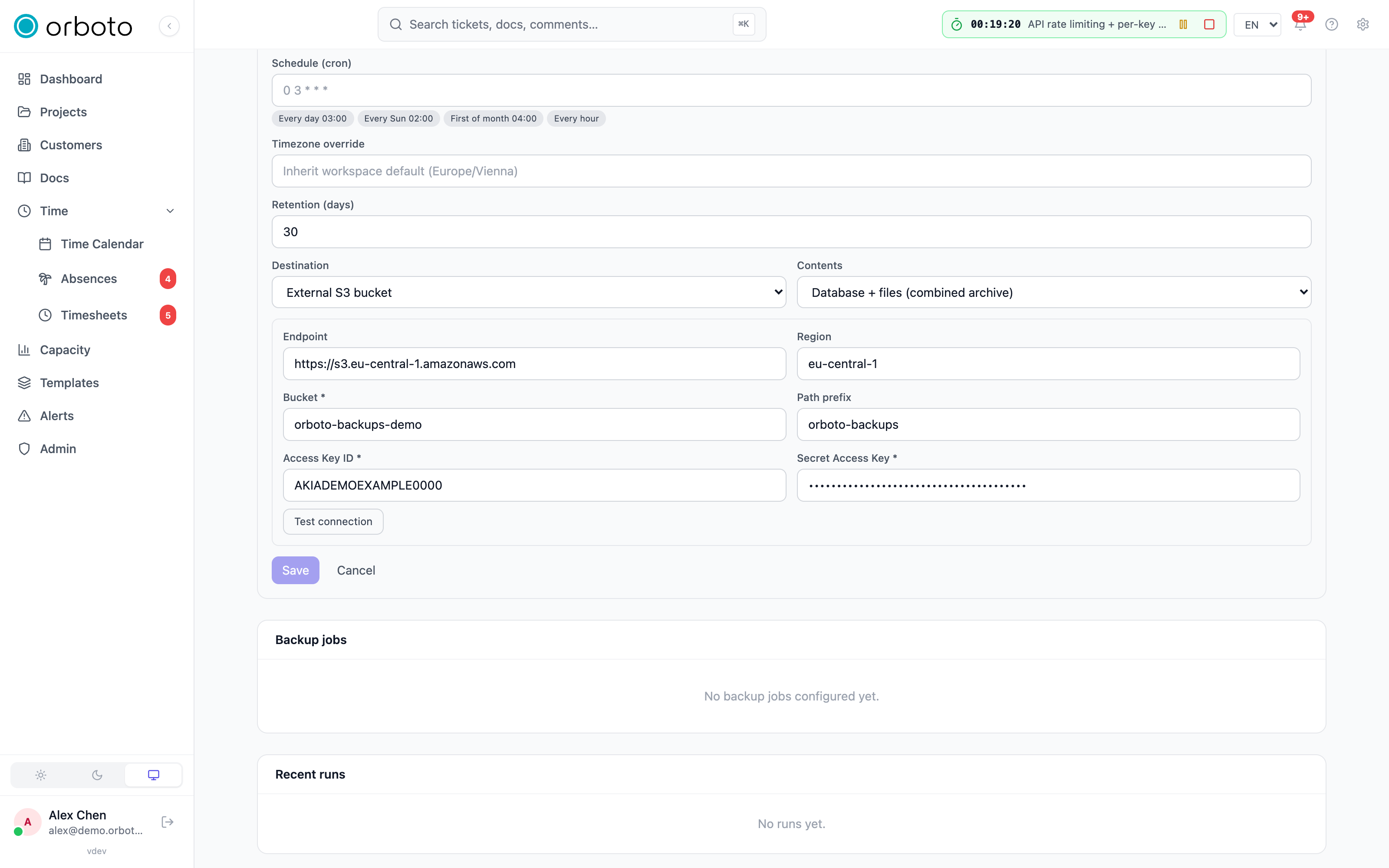
Every job (Admin → Backup) can ship its output to the instance's own storage (the default) or to your own S3 bucket - any S3-compatible service: AWS S3, Cloudflare R2, Backblaze B2, MinIO, Hetzner Object Storage. Each job also chooses what it ships - the content scope below.
Content scopes
| Scope | What lands at the destination |
|---|---|
| Database + files | The classic combined ZIP: every table as NDJSON plus every storage object. Restorable as-is through the setup wizard. |
| Database only | The same ZIP without the storage objects - small, fast, ideal for frequent schedules. Pair it with a "Files only" job so the objects are covered too. |
| Files only (S3 mirror) | No archive. Every owned storage object (attachments, avatars) is mirrored to <prefix>/storage/<key> in your bucket - incremental by key + size, nothing is ever deleted on the remote. External destinations only. Added in v0.230.0 A file orboto keeps encrypted is copied as its ciphertext, and an unencrypted file is encrypted while backup encryption is on; see Encrypted file mirror. |
A sensible offsite setup is two jobs against the same bucket: a daily "Database only" archive plus a daily "Files only" mirror. The mirror only transfers new/changed objects, so daily runs stay cheap even with a large attachment history.
What the full export contains
Added in v0.217.0 Files and folders that agents send with their mail (see Send files and folders to another agent) are ordinary attachments in the backup. The "Database + files" archive carries their attachment rows next to the agent messages, the uploads that no message has claimed yet, and the stored objects by their storage key. The restorability check and the restore treat them like every other attachment, and the files encryption scope seals them like every other file. A "Files only" mirror copies them with the other storage objects.
Configuring an external destination
In the job form, pick External S3 bucket and fill in endpoint
(empty for AWS), region, bucket, access key and secret. Test
connection verifies the credentials against the bucket before you
save. The secret is encrypted at rest with the instance's key envelope
and is never returned by the API - edit forms show ***, which keeps
the stored secret unless you type a new one.
Added in v0.212.3 The access key only needs rights inside the job's
path prefix (orboto-backups when the field is empty): list under the
prefix, and put, delete and abort-multipart on objects under it. Test
connection checks this in three steps (list, write, delete of a probe
object .orboto-destination-probe under the prefix) and names the step
that failed. The full rights table is in
Backups.
Restoring
- An archive in your bucket restores like any other backup: download the ZIP and feed it to the setup wizard (Restore from a backup) - see First-run setup.
- A "Database only" archive plus the mirrored
storage/prefix restore together: import the archive first, then copy the mirrored objects into the instance's storage under their original keys (the keys under<prefix>/storage/ARE the original keys). Added in v0.230.0 Copy them byte for byte and never through an upload API that encrypts on write; encrypted copies open on the instance that holds their key. - Added in v0.230.0 A restore never brings back a credential that was revoked, rotated or used after the backup was taken. Sessions, reset and sign-in links and OAuth tokens are not in archives, so everyone signs in again and OAuth clients authorize again; API keys, SCIM tokens, passwords and second factors stay in the archive and are compared with the running workspace on a wipe restore. Details, and the two cases where that comparison is skipped, are in Credentials after a full restore.
Added in v0.230.0 An archive you upload for a restore is limited in size, in the number of entries and in what it unpacks to, and only one archive is handled at a time. The limits are set under Admin -> Backup -> Import and sync limits; see Import and sync limits.
Restore staging directory
Added in v0.230.0 A restore, an inspection, a project import, the import from another instance and a restore drill write the archive to a temporary file first, so a large archive never sits in memory. Where that file goes is an environment variable of the API:
| Variable | Default | Effect |
|---|---|---|
IMPORT_STAGING_DIR | the operating system's temporary directory | The directory the archives are staged in. Point it at a volume with free space for the largest archive your limit allows (restore_max_archive_mb, 5120 MB by default), and twice that for a sealed archive while it is decrypted. |
Each request writes into its own private folder and removes it when it ends. When the API starts it creates the directory if it is missing, refuses to start when it cannot write to it or when everybody may write to it without the sticky bit, and removes the folders a killed process left behind. Folders younger than 15 minutes are never removed. Details are on Import and sync limits.
Restore drill on a scratch instance
Added in v0.212.0 A preview proves that an archive parses; only a real restore proves that it restores. orboto Cloud runs that proof as a restore drill: it provisions a throwaway scratch instance, hands it a backup archive, and checks that every table and stored file of the archive came back. The drill is operated by the platform, with no admin session on any instance. It is documented here so you know what the two settings do if you run a scratch instance yourself.
| Variable | Default | Effect |
|---|---|---|
ORBOTO_SCRATCH_INSTANCE | unset | 1 marks the instance as a scratch instance. Only then does it answer the drill (POST /api/ops/restore-drill), which wipes the instance's database and object storage and restores the archive into it. Unset or any other value: the route answers 403 before it reads the request. Never set it on an instance that holds data you want to keep. |
RESTORE_DRILL_MAX_ARCHIVE_BYTES | 4294967296 (4 GiB) | The largest archive the drill downloads. A larger one is refused with 413 and leaves no drill record. A positive number of bytes; anything else falls back to 4 GiB. Added in v0.230.0 The drill keeps the downloaded archive on disk and restores it in small batches, so the scratch instance needs free disk space for the archive (twice that for a sealed one; see Restore staging directory), not memory in proportion to its size. |
What a drill does:
- It downloads the archive from a short-lived link and compares its SHA-256 with the one it was given. A mismatch or a failed download is refused and leaves no record.
- It restores the archive on the same path as a full restore.
- It counts every table of the archive again and checks every stored file, and reports each count as expected against restored. The drill passes only when every count matches and every file is there.
Added in v0.213.1 The result of a drill carries its findings as warnings. A restore that the data refuses reads errors.backups.restore_row_rejected: followed by the table, row, column and constraint (the reason is one of missing referenced row, referenced row restored later, null value, missing value, or SQLSTATE <code> (class <xx>) for a refusal by the database), never a row value. A structural defect of the archive keeps the prefix errors.backups.archive_invalid:. What each message means and what to do is on When a backup or a restore is refused.
Only one drill runs at a time; a second one is refused with 409. Added in v0.230.0 A drill is also refused with 409 (errors.system.import_already_running) while a restore, an inspection or an import from another instance runs on the same instance, because they share one lock; the drill claims no record then. The status of a
drill (running, passed or failed) can be read while it runs and after it,
and its result is kept for 90 days.
Every drill is written to the audit log, counted in
orboto_restore_drill_total{status} (see Monitoring)
and a failed one raises an alert on the managed backup path. There is no CLI
command or admin page for it: the caller is the platform, not an operator.
A scratch instance stays silent
Between the restore and the teardown a scratch instance holds a real workspace's
data, including its webhook URLs, chat channels, git and calendar tokens, backup
jobs and license key. With ORBOTO_SCRATCH_INSTANCE=1 every outbound side effect
of that data is switched off before any network call, and the delivery log
records suppressed:scratch where there is one:
- email of every kind, browser push, webhooks and chat channels (Discord, Slack, Microsoft Teams, Telegram, custom webhooks);
- git provider calls, OAuth token refresh and exchange, calendar sync, the Sentry intake, SCIM notifications, audit forwarding, federation and IMAP polling;
- AI completions and embeddings, the training-example relay, customer key management calls and license verification;
- every restored backup job and every external backup destination.
Error reporting to Sentry or GlitchTip is off as well. A route that reaches a
suppressed gate answers 409 errors.ops.scratch_suppressed. Each suppressed
call is counted in orboto_scratch_suppressed_total{path}.
What stays on: the health endpoints, in-app notifications and the realtime connection, the telemetry the platform needs to address the instance, and the local work of the schedulers (reminders, recurring tickets, retention). They run, and whatever they would send goes through the gates above.
An operator sees the mode in two places: admins get a banner in the web app, and
GET /api/version answers "scratch": true. On any other instance the field is
absent. Do not set WEBHOOK_ALLOW_PRIVATE_IPS or SSRF_ALLOWED_HOSTS on a
scratch instance, because they relax the guard on the archive download.
Run results
Every run lands in the run history with the destination path
(s3://bucket/...) and, for mirrors, the new/unchanged object counts.
A mirror run fails (and alerts like any failed backup) when any object
could not be transferred.
Notes
- Retention (
retentionDays) applies to the internal storage cleanup; objects in YOUR bucket are yours - manage lifecycle rules there. - The mirror only ships workspace content (the same owned-keys filter the exports use); internal backup archives never leave the instance through a mirror.
Troubleshooting
Test connection fails when I set up an external destination. Cause: wrong endpoint/region for a non-AWS provider, a bucket that doesn't exist yet, or credentials without list, write or delete rights under the path prefix. Fix: for a non-AWS S3-compatible service, the endpoint field is required (only AWS leaves it empty); confirm the bucket exists and the access key can list, write and delete under the prefix. The message names the step that failed.
A scheduled run shows as failed in the run history. Cause: for a mirror job, at least one object couldn't be transferred - usually a transient network error or a credential that expired mid-run. Fix: open the run's details for the specific object(s) that failed, then re-run the job; it only needs to (re-)transfer what's missing or changed.
Restoring a "Database only" archive leaves attachments broken.
Cause: a database-only archive intentionally excludes storage objects -
you need to also restore the paired "Files only" mirror from the same
bucket.
Fix: after importing the archive, copy the mirrored objects from
<prefix>/storage/ into the instance's storage under their original keys.