

Chat and webhook notifications
Deliver your orboto notifications to Discord, Slack, Microsoft Teams, Telegram, or any HTTPS endpoint.
Beyond in-app and email, every user can route their own notifications to an external channel: Discord, Slack, Microsoft Teams, Telegram, or a custom webhook to any HTTPS endpoint. Channels are per-user - each person connects their own, and picks which notification types go to which channel (for example, only mentions and assignments to chat, everything else staying in-app).
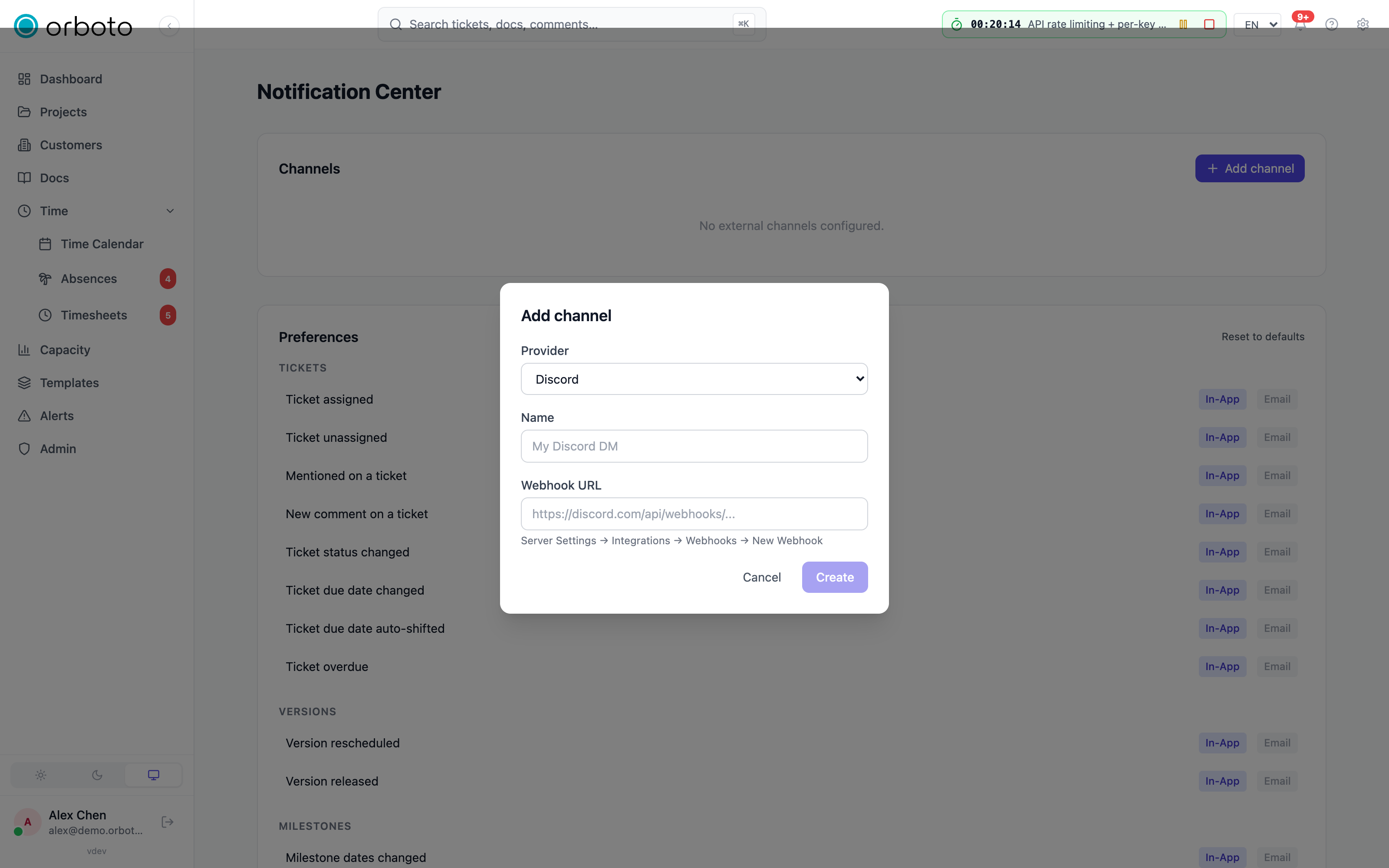
Connecting a channel
Open notification settings (gear icon in the top bar) and add a channel of the type you want.
Discord
- In your Discord server: Server Settings → Integrations → Webhooks → New Webhook.
- Copy the webhook URL and paste it into the channel form.
Slack
- In your Slack workspace: Apps → Incoming Webhooks.
- Add the integration to the channel you want notifications posted in.
- Copy the generated webhook URL and paste it into the channel form.
Microsoft Teams
- In the target Teams channel: ⋯ → Connectors → Incoming Webhook → Configure.
- Name the connector (e.g. "orboto") and optionally upload an icon, then Create.
- Copy the webhook URL and paste it into the channel form.
Telegram
Telegram needs one piece of workspace-level setup before any user can connect it:
- Workspace admin, one-time: create a bot via BotFather and set the resulting bot token under Admin → System settings → Telegram bot token. This enables Telegram as a channel type for the whole workspace.
- Each user: start a chat with the workspace's bot and send
/start- it replies with your chat ID. Paste that chat ID into your notification settings.
Custom webhook
Point notifications at any HTTPS endpoint - useful for Zapier, n8n, Make, Power Automate, or a bot you run yourself. Each notification arrives as a JSON POST.
- Shared secret (optional) - when set, every request carries an
X-Orboto-Signature: sha256=<hmac>header so your endpoint can verify it actually came from orboto. - Custom headers - up to 5 extra HTTP headers on every request.
Reserved keys (
Authorization,X-Orboto-Signature,User-Agent,Content-Type) are stripped server-side, so a header you set can't collide with orboto's own.
Verify the channel
After saving, select Verify to send a test message. A channel stays unverified - and is excluded from delivery, even with its per-event toggle on - until it successfully receives that test. This catches a mistyped URL or an unconfirmed Telegram chat ID before it costs you a missed notification later.
Once verified, pick which notification types go to which channel - see Notifications for the full per-event routing and the notification inbox itself.
Behavior
Delivery is fire-and-forget: a failing channel never blocks orboto, and every attempt lands in a delivery log so you (or an administrator) can diagnose a silent channel.
Troubleshooting
| Symptom | Fix |
|---|---|
| A channel never receives anything | Check its status first - an unverified channel is excluded from delivery even if its per-event toggle is on. Select Verify again. |
| Discord/Slack/Teams channel stopped working after previously verifying fine | The integration was likely deleted or regenerated on that platform's side - all three let you remove or reissue a webhook independently of orboto, which silently breaks delivery until you paste the new URL and re-verify. |
| Telegram option doesn't appear in the channel type picker | An admin hasn't set the workspace's Telegram bot token yet (Admin → System settings) - Telegram only shows up as a choice once that's configured. |
| Telegram messages don't arrive despite a valid chat ID | Send /start to the bot again from the account you expect notifications on - chat IDs are per Telegram account, and a chat that never messaged the bot can't receive a push from it. |
| Custom webhook signature doesn't verify | Compute the HMAC over the raw request body using the shared secret you set, not a re-serialized copy of the parsed JSON. |
Symphony
Connect a Symphony coding-agent orchestrator to orboto so a fleet of AI agents can pick up and work your tickets.
Chat bot for Slack, Microsoft Teams and Discord
Connect your instance to Slack, Microsoft Teams or Discord: agent notices land in your channels, and your team starts, claims, closes and asks from the chat.