

Symphony
Connect a Symphony coding-agent orchestrator to orboto so a fleet of AI agents can pick up and work your tickets.
What Symphony is
Symphony is an open specification for orchestrating fleets of AI coding agents against a ticket tracker: it polls a tracker for workable issues, dispatches them to coding-agent sessions running in parallel, tracks each agent's turns and retries, and gates how far an agent gets before a human (or another check) has to approve. It was originally written against Linear as the tracker.
orboto ships a Symphony adapter: a small set of REST endpoints, shaped exactly to what Symphony's tracker interface expects, plus a setup wizard that provisions everything a Symphony fork needs to point at your orboto workspace instead of Linear. If you're already running (or plan to run) a Symphony-based agent fleet and want it working your orboto backlog, this is the integration for that.
If you instead want orboto's own built-in agent dispatch - no separate orchestrator to run - see Work routing and fleets and Run an agent fleet instead. Symphony is for teams who are already standardized on the Symphony orchestration model and want orboto as its tracker backend.
What it connects
A Symphony fork talks to orboto through a handful of endpoints under
/integrations/symphony/*, each returning data already shaped as Symphony's
normalized "Issue" - priority mapped to its 1-4 integer scale, labels
lower-cased, blockers joined in, and a ready-to-use git branch name computed
server-side:
| Endpoint | Purpose |
|---|---|
GET /integrations/symphony/candidates | The tracker's main poll: every issue in the given active-state categories, for one project or several. |
POST /integrations/symphony/by-states | Fetch issues by status category across one or more projects. |
POST /integrations/symphony/by-ids | Refresh a specific set of issues by ID (Symphony's reconciliation pass). |
GET /integrations/symphony/branch-name/:ticketId | A pure branch-name lookup for workspace-bootstrap hooks that don't need the full issue payload. |
POST /integrations/symphony/agent-tool/query | An optional agent-side tool: lets a running coding-agent turn run an OQL or JQL query against orboto mid-session, without routing back through the orchestrator. |
POST /integrations/symphony/agent-events | Session lifecycle events (started, turn completed, stalled, ...) an orchestrator can push so orboto's ticket view shows what an agent is doing. |
Status is mapped by category, not by a project's per-status display name, since names get renamed ("To Do" → "Backlog") but categories are stable across every project and instance:
| orboto category | Symphony active_states / terminal_states |
|---|---|
todo | active |
in_progress | active |
in_review | active |
done | terminal |
wont_fix | terminal |
Field mapping
| Symphony field | orboto source | Notes |
|---|---|---|
id | Ticket ID (UUID) | |
identifier | Ticket key | e.g. ACME-42. |
title | Ticket title | |
description | Ticket description | Markdown. |
priority | Ticket priority, mapped to an integer | blocker=1, high=2, normal=3, low=4, trivial=4. |
state | Status category, not name | todo / in_progress / in_review / done / wont_fix. |
branch_name | Computed from the ticket key + a slugified title | null if the project has no connected git repository. |
url | Built from the project key and ticket key | |
labels | Ticket labels, lower-cased | |
blocked_by | Open dependency tickets | Includes each blocker's id, key, and status category. |
created_at / updated_at | Ticket timestamps | ISO-8601. |
Setup
Setup lives at Admin → Integrations → Symphony - a five-step guided
wizard that replaces the manual work of creating a service account,
assigning it to projects, minting an API key, and hand-writing a
WORKFLOW.md config block. It's safe to re-run: it reuses an existing
service account and its project memberships rather than creating duplicates.
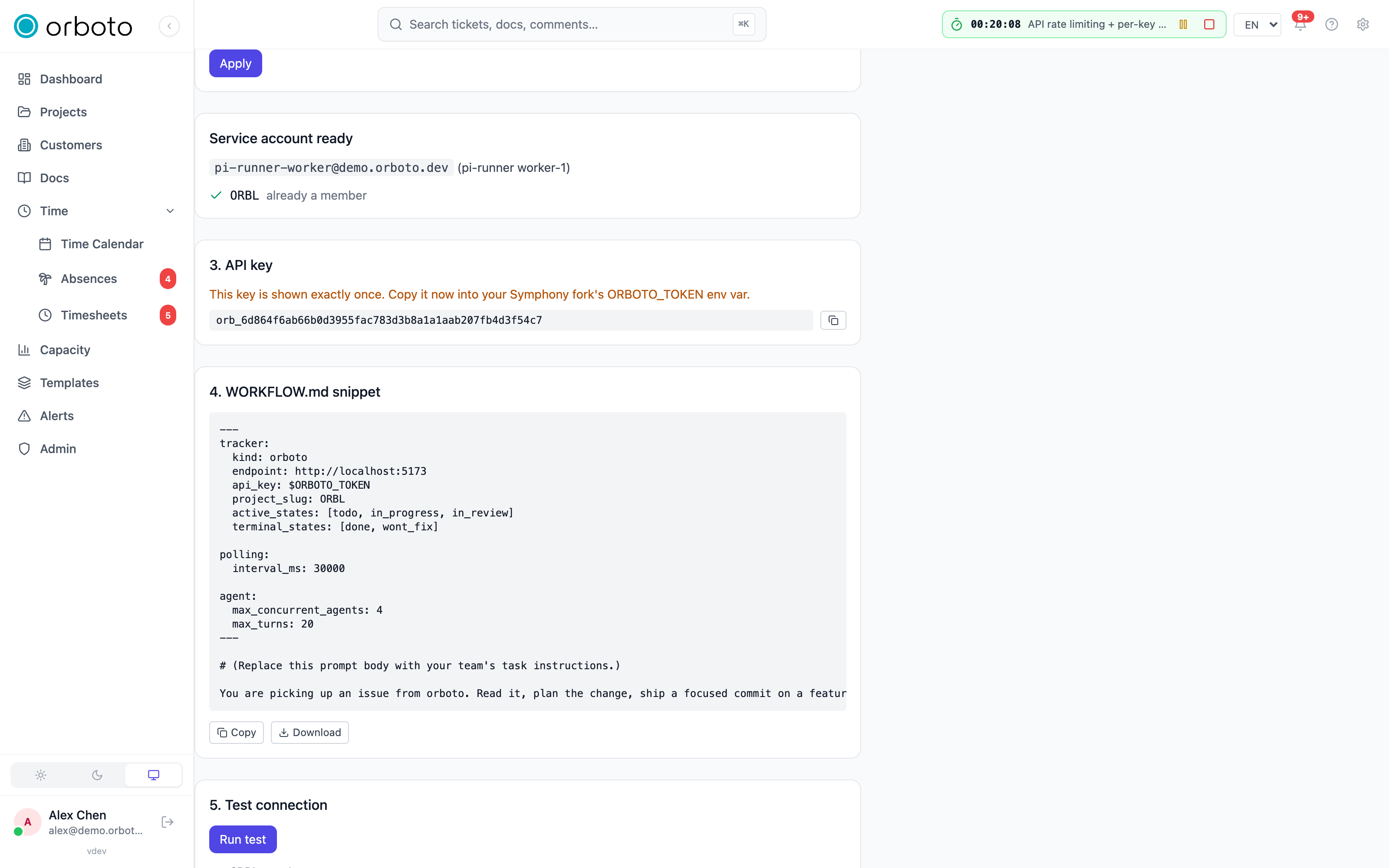
- Service account. Pick an existing bot/service-account user, or create
a new one by entering an email and display name (a sensible default is
something like
symphony-bot@yourcompany.com, "Symphony"). This is the identity every Symphony-dispatched action will be attributed to. - Projects to authorize. Check every project you want Symphony to see. Click Apply - the wizard adds the service account to each checked project (skipping ones it's already a member of) and shows a per-project result.
- API key. Click Mint API key. The key is shown exactly once -
copy it immediately into wherever your Symphony fork's deploy environment
reads
ORBOTO_TOKENfrom. If you navigate away before copying it, mint a new one; the old one still works until you revoke it, but its plaintext is gone for good. - WORKFLOW.md snippet. The wizard assembles a ready-to-use config block
from what you picked in steps 1-3 - your instance's own address, the
ORBOTO_TOKENreference, and the project key(s) you authorized. Copy or Download it asWORKFLOW.mdand drop it into your Symphony fork's repository (wherever your fork's config loader expects it). Replace the placeholder prompt body with your team's actual task instructions - what "done" means, branch naming, PR conventions - before you rely on it. - Test connection. Click Run test to confirm the service account can actually reach each authorized project through the adapter endpoints before you wire up a real Symphony deployment against it.
Choosing a starting configuration
The generated WORKFLOW.md is a reasonable default for a small-to-medium
team: moderate concurrency, a 30-second poll interval, generous per-turn
budgets. Depending on how your team wants to run its fleet, you may want to
tune it toward one of two other shapes once you have the wizard's output as
a starting point:
- Higher concurrency, AI-heavy. More agents running in parallel, longer turn budgets, and the push-triggered re-polling described below turned on so dispatch reacts to changes immediately instead of waiting for the next poll tick.
- Conservative, human-in-the-loop. A single agent at a time, manual approval required on file changes and commands, and a longer turn timeout to absorb the time a human reviewer takes without tripping Symphony's stall detection.
Both are the same WORKFLOW.md shape - the settings your Symphony fork's
config schema exposes for concurrency, approval policy, and timeouts - just
tuned differently. Start from what the wizard generates and adjust from
there.
Usage
Once your Symphony fork is deployed with the generated config:
- On its normal poll interval (30 seconds by default), Symphony fetches
candidate issues from
GET /integrations/symphony/candidatesand dispatches agents against whichever ones fit its concurrency limits. - Push-triggered re-polling (optional): subscribe a webhook to the
symphony.candidates_changedevent (Admin → Webhooks → Add, event filter set to just that event) so your fork can flag its candidate list dirty and re-poll immediately on a status, assignee, or priority change, instead of waiting out the poll interval. This event is also available as an n8n Trigger event if you'd rather react to it from a workflow than build the listener into your fork directly. - As agents work, each ticket they touch shows an Agent tab in its ticket detail view (once at least one lifecycle event has been recorded for it) with the session's activity - started, each turn, and how it ended - so a human glancing at the ticket sees what an agent already did without leaving orboto.
- Symphony's own dispatch loop decides claiming, status moves, comments, and PR links through the coding agent's normal tool use - the adapter only supplies read access to issue data plus the small write surface for activity events above. It never mutates a ticket's status or content directly through these endpoints itself.
Troubleshooting
| Symptom | Likely cause |
|---|---|
| Test connection fails for a project | The service account isn't actually a member of that project - re-run step 2 of the wizard and confirm it's checked, or check the project wasn't renamed/archived since. |
| Candidates endpoint returns nothing | Confirm your fork's active_states uses orboto's category values (todo, in_progress, in_review) and not a project's display names - a category value like todo always matches; a display name like "To Do" only matches if nobody ever renamed the status. |
| Symphony never claims a ticket it should see | Check the ticket isn't private with the service account excluded from its access list, and that its project is checked in the wizard's authorized-projects step. |
| Lost the API key before copying it | Mint a fresh one from the wizard's step 3 - the old key keeps working until you separately revoke it from Admin → API keys. |
symphony.candidates_changed webhook never fires | Confirm the webhook is active under Admin → Webhooks and its event filter includes that event - it's opt-in, so a webhook that doesn't list it is unaffected by ticket changes. |
Branch name comes back null | The ticket's project has no connected git repository - see Git integration. |