

SCIM provisioning
Automatic user lifecycle from your identity provider - joiners get accounts, leavers lose access, automatically.
SCIM keeps orboto's user list in lockstep with your identity provider (IdP): joiners get orboto accounts automatically when IT adds them in the IdP, leavers are deactivated the moment IT disables them there, and profile updates (name, department, manager) flow through without anyone touching orboto directly. It's the natural next step after single sign-on - SSO handles logging in, SCIM handles who exists to log in as.
SCIM is an Enterprise capability, configured entirely under Admin → SCIM provisioning.
What SCIM does, concretely
orboto implements the standard SCIM 2.0 user-provisioning protocol (RFC 7644), which means:
- Your IdP can create a new orboto user the moment someone is assigned the app in the IdP.
- Your IdP can update a user's profile fields (name, email,
department, manager, employee number) whenever they change in the IdP
- orboto stays a mirror, not a second source of truth. Which accounts it may change, and what stays with orboto, is set out in Which accounts SCIM may change.
- Your IdP can deactivate or delete a user the moment they're unassigned or offboarded - see Deprovisioning for the exact difference between those two actions.
- orboto also answers the IdP's discovery calls (what resource types and
schemas it supports) and supports the enterprise-user schema
extension, so fields like
employeeNumber,department, andmanagermap correctly instead of being dropped.
Group provisioning isn't available yet - user provisioning covers the common IdP setups used today; if your IdP workflow depends on group-based assignment specifically, confirm your rollout plan accounts for that gap.
Setup
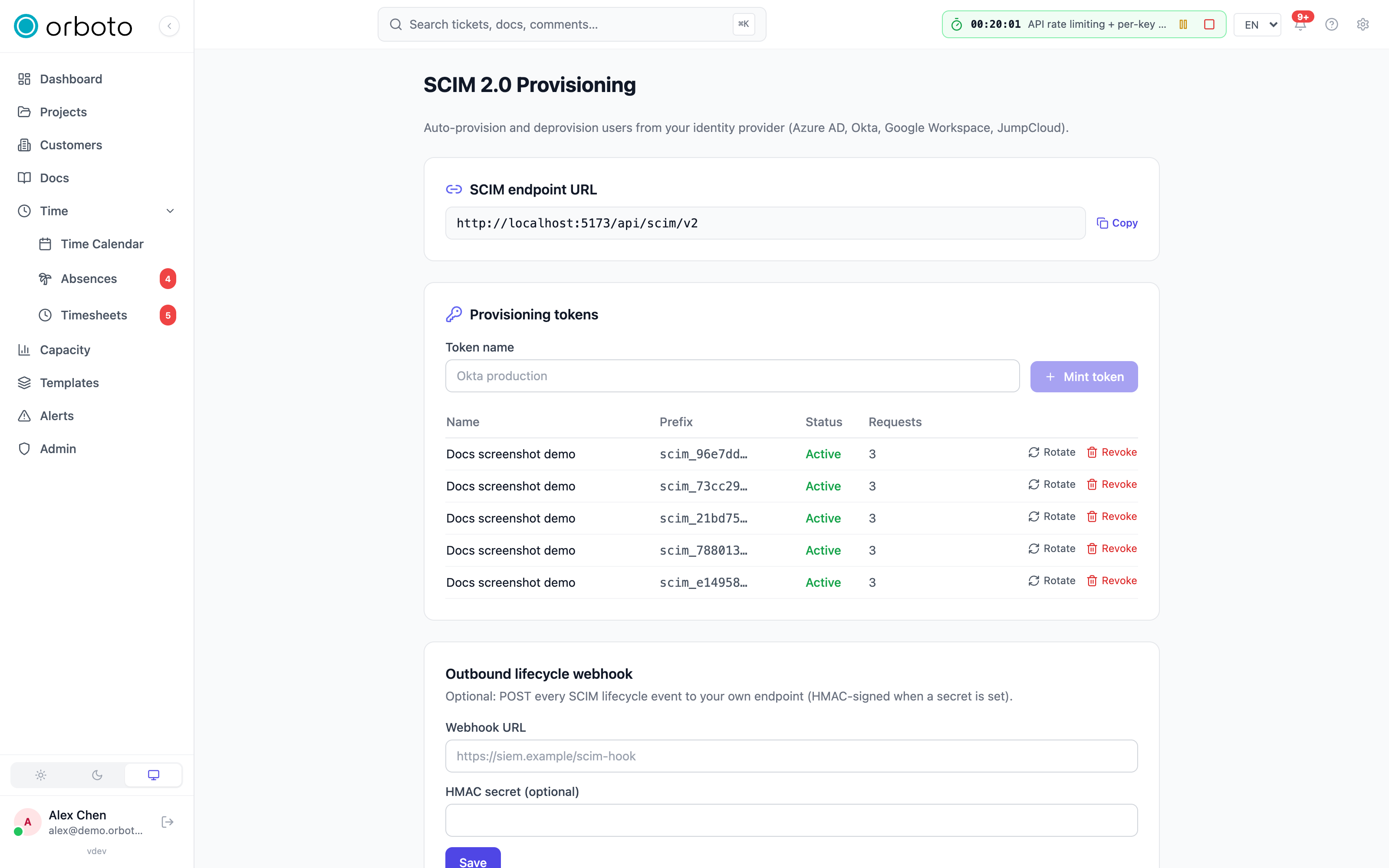
- Under Admin → SCIM provisioning, enable provisioning. orboto
shows the SCIM endpoint URL you'll need
(
https://<your-host>/api/scim/v2). - Select Mint a provisioning token. The bearer token is displayed once - copy it immediately into your IdP's configuration; if you navigate away before pasting it, you'll need to mint a new one (the plaintext is never shown again, only a masked reference).
- In your IdP's provisioning app, set the SCIM base URL and the bearer token from steps 1-2. Every major IdP has a Test connection button at this stage - use it before turning anything on for real users.
- Test with a single user first. Assign one test account in the IdP, confirm it appears correctly in orboto (right name, right email, right department if you're using the enterprise extension), then deactivate that same test user in the IdP and confirm it deactivates in orboto too. Only after both directions check out, assign the full group of users.
Per-IdP setup
The general shape (base URL + bearer token) is the same everywhere; here is exactly where each major IdP asks for it:
| Identity provider | Where to configure it | What goes in the auth field |
|---|---|---|
| Azure AD / Microsoft Entra ID | Enterprise App → Provisioning → Automatic | Tenant URL = the SCIM endpoint URL, Secret Token = the minted token |
| Okta | App → Provisioning → Integration → Enable API integration | Base URL = the SCIM endpoint URL, API Token = the minted token |
| Google Workspace | Apps → Web and mobile apps → Auto-provisioning | SCIM endpoint URL + the minted bearer token |
| JumpCloud | SSO app → Identity Management → Configure | Base URL + the minted bearer token |
orboto is verified against the exact payload quirks of all four -
including Azure AD sending booleans as strings ("true" instead of
true) and Okta's PATCH requests that sometimes omit the path
attribute the spec technically expects. You don't need to work around
either; orboto's endpoint already handles them.
If your IdP isn't one of these four, any standards-compliant SCIM 2.0 client should still work - the endpoint follows RFC 7644 rather than special-casing a fixed vendor list.
Token rotation
Mint, rotate, and revoke tokens from Admin → SCIM provisioning.
- Rotate issues a brand-new token and keeps the old one valid for a 24-hour overlap window. This is the safe way to change tokens: update the IdP with the new token at your own pace within that window, rather than the provisioning breaking the instant you rotate.
- Revoke kills a token immediately, no overlap. Use this when a token has leaked or you're decommissioning an IdP integration for good.
Which accounts SCIM may change
Added in v0.230.0 A SCIM token connects your identity provider to orboto. It holds no role of its own, so orboto limits what it can do to an account:
- Accounts SCIM created are fully managed by your IdP: rename, change the email, deactivate, reactivate and delete all work.
- Existing local accounts - created by invitation, sign-up or an
admin before you connected SCIM - can be read and matched by
userName, so your IdP finds them. A SCIM change to one of them is refused until you allow it under Provisioning safety (below) or hand that one account over on Admin → Users. Accounts that already carried a SCIM external ID, or that SCIM had created or changed successfully before the update to 0.230.0, stay managed; you do not need to adopt them. - Accounts with a global role that carries permissions - super-admins and every other such role (auditor, backup operator, DSGVO operator, ...) - are never re-emailed, deactivated, reactivated or deleted through SCIM, whatever the settings say. Their name and other profile fields still sync as long as SCIM manages the account. Change the email, the active state or the existence of these accounts on Admin → Users, or remove the global role first if the IdP should manage the account.
A leaked SCIM token therefore can neither lock out your administrators nor take over a local account by changing its email.
If you update from an earlier version: after the update, a SCIM change
to a local account that SCIM never created or changed before answers 403
until an admin turns on Let SCIM adopt existing accounts or hands the
account over on Admin → Users. If your IdP reports new 403s after the
update, the sync history names which of the two reasons applies. Turn on
adoption right after the update when your IdP changes local accounts it did
not create.
Provisioning safety
Admin → SCIM provisioning → Provisioning safety holds two switches.
Everyone with admin:scim:read sees them; only admin:scim:write can
change them, and every change is recorded in the audit log
(scim.settings_updated, with the values before and after). An AI client
connected through OAuth cannot change them; use your web login or an API
key.
| Switch | Off (default) | On |
|---|---|---|
| Let SCIM adopt existing accounts | SCIM changes only the accounts it created. | The first SCIM change to a local account adopts it; from then on SCIM manages it. Every adoption is audited (scim.user_adopted). |
| SCIM DELETE removes the account | DELETE deactivates the account and keeps its history. | DELETE removes the account row (irreversible). |
When you connect an IdP to a workspace that already has users: turn on adoption, let the IdP run one full provisioning cycle, then turn it off again. Adopted accounts stay managed.
The same settings are available over the API with GET and
PUT /admin/scim/settings
({ "adoptExistingUsers": true, "hardDelete": false }, either field
optional).
One account at a time
Admin → Users → (account) → Security shows whether SCIM manages the
account. With admin:users:write you can Release from SCIM (no SCIM
token may change it again until it is adopted anew, or until adoption is
on and the IdP writes it again) or Hand over to SCIM without turning
on adoption for everyone. Both are audited (admin.user.scim_release,
admin.user.scim_adopt).
You can only hand over or release an account whose global roles you hold
yourself; otherwise orboto answers 403 and the buttons are not offered.
The reason: an account SCIM manages counts as verified for single
sign-on, so the next SSO sign-in with its email links to it. A hand-over
must therefore never come from someone who could not change that
account's email or deactivate it directly.
Deprovisioning: deactivate vs. delete
SCIM's standard offboarding action, and orboto's own delete route, behave differently - know which one your IdP sends before you rely on either:
PATCHwithactive=false(what a SCIM-compliant IdP sends on offboarding by default) deactivates the orboto user. They can no longer sign in, but every ticket, comment, and history item they ever touched stays intact and correctly attributed to them - nothing is deleted or reassigned.DELETEon a user is a soft-deactivate by default - same effect as the PATCH case above, and the safe choice for most workspaces, since it never destroys history. Added in v0.230.0 To makeDELETEremove the account row instead (irreversible), turn on SCIM DELETE removes the account under Admin → SCIM provisioning → Provisioning safety - only do this if your compliance posture actually requires purging the row rather than deactivating it.
Neither path ever applies to an account with a global role; see Which accounts SCIM may change.
Added in v0.230.0 Either path also closes every live connection the account has open at that moment, both the ones opened with a login session and the ones opened with an API key: the app and agent WebSockets (close code 4401) and the MCP event streams. An agent or a terminal view that was running for the offboarded person stops receiving events at once; it does not wait for its next request to be refused. See Live connections.
Added in v0.230.0 The person's personal calendar feed URL answers 404 and
the external calendars they connected stop syncing while the account is
deactivated; both resume on reactivation. See
A person's calendar feed and connected calendars.
In practice: unless you've deliberately switched on hard deletion, both paths are safe and reversible in effect (you can always reactivate a deactivated user manually in orboto) - what's NOT reversible is losing track of when something changed, which is why every SCIM action is logged (see Security below).
Security
- Tokens are workspace-scoped and stored hashed (SHA-256) - the plaintext only ever exists at the moment you mint or rotate it.
- Each token has per-second and per-day rate budgets. Exceeding
either returns HTTP
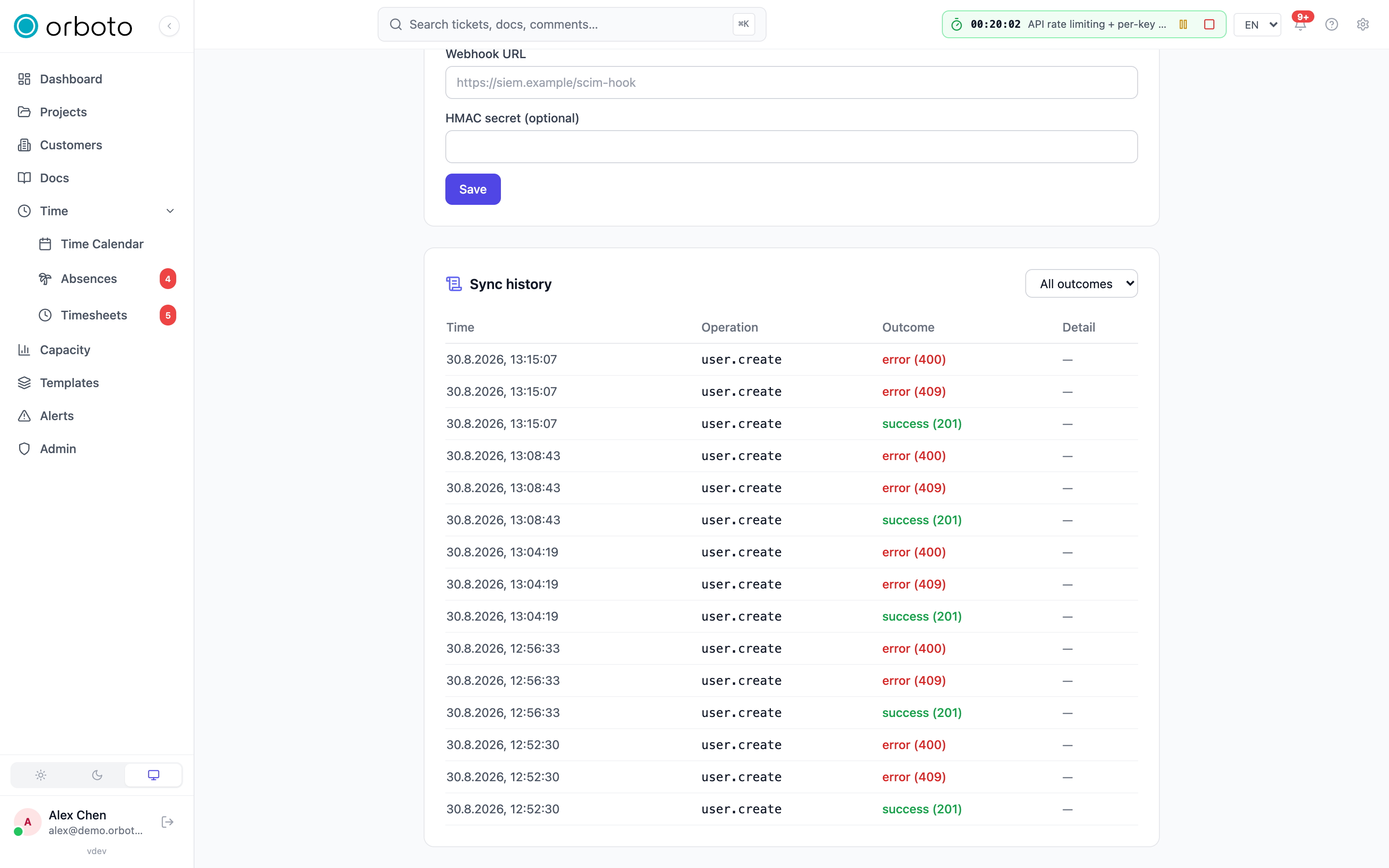
429with aRetry-Afterheader your IdP's provisioning engine should already respect (all four IdPs in the table above back off correctly on this). - Every SCIM operation - create, update, deactivate, delete, and any rejected/failed attempt - is recorded in the sync history under Admin → SCIM provisioning, with timestamp, operation, outcome, and the error detail on failures. This is the trail an auditor asks for when checking identity-management controls (the kind of evidence frameworks like SOC 2 or ISO 27001 expect for user lifecycle management), and it also feeds the workspace's general audit log and compliance export. Added in v0.211.1 For ISO 27001:2022 the sync history is evidence for control 5.16 (identity management) and control 5.18 (access rights).
- Added in v0.230.0 A refused change (an account SCIM may not change)
answers
403with a SCIM error body that names the reason, appears in the sync history with the same text, and is written to the audit log (security.authority_refusedfor an account with a global role,scim.adoption_refusedfor a local account SCIM does not manage yet).
Filtering, sorting, and concurrency
For IdP engineers or anyone debugging a sync directly against the API:
- The endpoint supports RFC 7644 filtering (
eq,ne,co,sw,ew,gt,ge,lt,le,pr, combined withand/or/notand grouping), sorting, and attribute projection (attributes/excludedAttributesto shrink a response to just the fields you need). - Updates use ETag optimistic concurrency: a
PUTorPATCHsendsIf-Matchwith the resource's current ETag, and the request is rejected if the resource changed since you last read it - this stops two concurrent updates from silently clobbering each other, which matters if you're scripting bulk changes outside the IdP's normal provisioning loop.
Outbound lifecycle webhook (optional)
Beyond inbound provisioning, you can set an outbound webhook URL
(same Admin → SCIM provisioning page) so orboto POSTs every
lifecycle event (user.created, user.updated, user.deactivated,
user.deleted) to an endpoint you control - useful for feeding a
downstream audit or SIEM pipeline that wants to know about identity
changes without polling orboto's API. Set a secret alongside the URL and
every delivery carries an X-Orboto-Signature HMAC header you can
verify, the same signing scheme orboto's other webhooks use (see the
API cookbook
for a worked verification example).
Interplay with SSO
SCIM and SSO solve two different problems and are meant to run together, not as alternatives:
- SCIM manages the account lifecycle - who has an orboto account at all, and what their profile fields say.
- SSO manages authentication - how a user proves who they are when signing in.
A user provisioned by SCIM has no orboto password; they sign in only through your IdP via SSO. If you run both, pair them with the "require 2FA for password accounts" policy scoped to just the accounts that genuinely remain on local passwords (service accounts, break-glass admins) - SCIM+SSO users don't need it since they never have a password to protect.
Added in v0.230.0 When someone signs in through SSO with the email of an
existing orboto account, orboto links the two only if that account's
mailbox is proven. An account SCIM manages (created by SCIM, adopted, or
handed over on Admin → Users) counts as proven; an account that merely
carries a SCIM externalId does not. See
SSO setup for the full
list of accounts that count as verified.
Troubleshooting
| Symptom | Likely cause |
|---|---|
| A newly assigned IdP user never appears in orboto | Check the IdP's provisioning job/log first - most "nothing happened" cases are the IdP-side sync not having run yet (some IdPs provision on a schedule, not instantly) or a failed Test connection that was never actually fixed. Then check orboto's sync history for a rejected request with an error detail. |
| Provisioning worked once, then stopped | Check whether the token expired, was rotated without updating the IdP, or was accidentally revoked. The sync history will show 401s once the token stops being valid. |
| Deactivating a user in the IdP doesn't lock them out of orboto | Check the sync history for that user first. Added in v0.230.0 A 403 there means orboto refused the change: either the account was never provisioned by SCIM (see the next rows) or it holds a global role, which SCIM never deactivates - deactivate it on Admin → Users. If nothing arrived at all, confirm the IdP is actually configured to send the deprovisioning action on offboarding (some IdPs need this enabled explicitly, it isn't always the default), and that the PATCH active=false (or DELETE) request was sent. |
The IdP reports 403 with "This account was not provisioned by SCIM" | Added in v0.230.0 The account existed in orboto before SCIM was connected (invitation, sign-up or created by an admin), and SCIM may only change accounts it created or adopted. Turn on Let SCIM adopt existing accounts under Admin → SCIM provisioning → Provisioning safety and re-run the provisioning cycle, or hand over just that account on Admin → Users → (account) → Security. |
The IdP reports 403 with "This account holds global authority" | Added in v0.230.0 The account has a global role (for example super-admin or auditor). SCIM never changes its email or active state and never deletes it. Make that change on Admin → Users, or remove the global role first if the IdP should manage the account. |
The IdP reports 409 with scimType uniqueness on an update | Added in v0.230.0 Another orboto account already uses that email as its userName. Resolve the duplicate on Admin → Users (rename or remove the other account), then let the IdP retry. |
| Department / manager fields aren't syncing | Those come from the SCIM enterprise-user schema extension - confirm your IdP's provisioning app is actually configured to send that extension's attributes, not just the base user schema. |
Getting 429s during a bulk provisioning run | You're exceeding the token's per-second or per-day rate budget. Most IdPs already throttle and retry on 429 automatically; if yours doesn't, space out the bulk assignment instead of assigning hundreds of users at once. |
| A user was hard-deleted and you need their history back | If your workspace uses the default soft-deactivate behavior, nothing was actually destroyed - reactivate the user manually in orboto. If hard deletion was explicitly enabled, the row is genuinely gone; restoring it means restoring from a backup (see Backups). |