

Attachments and storage
See every uploaded file across the workspace, find orphaned storage, and reclaim space - from Admin -> Attachments.
Every file a user uploads in orboto - on a ticket, a doc, or a comment - lands in object storage (S3-compatible; RustFS locally in development) with a matching database row that tracks who uploaded it, its size, and what it's attached to. Admin -> Attachments is the single workspace-wide view across all of that, independent of digging through individual tickets or docs one at a time.
The attachments list
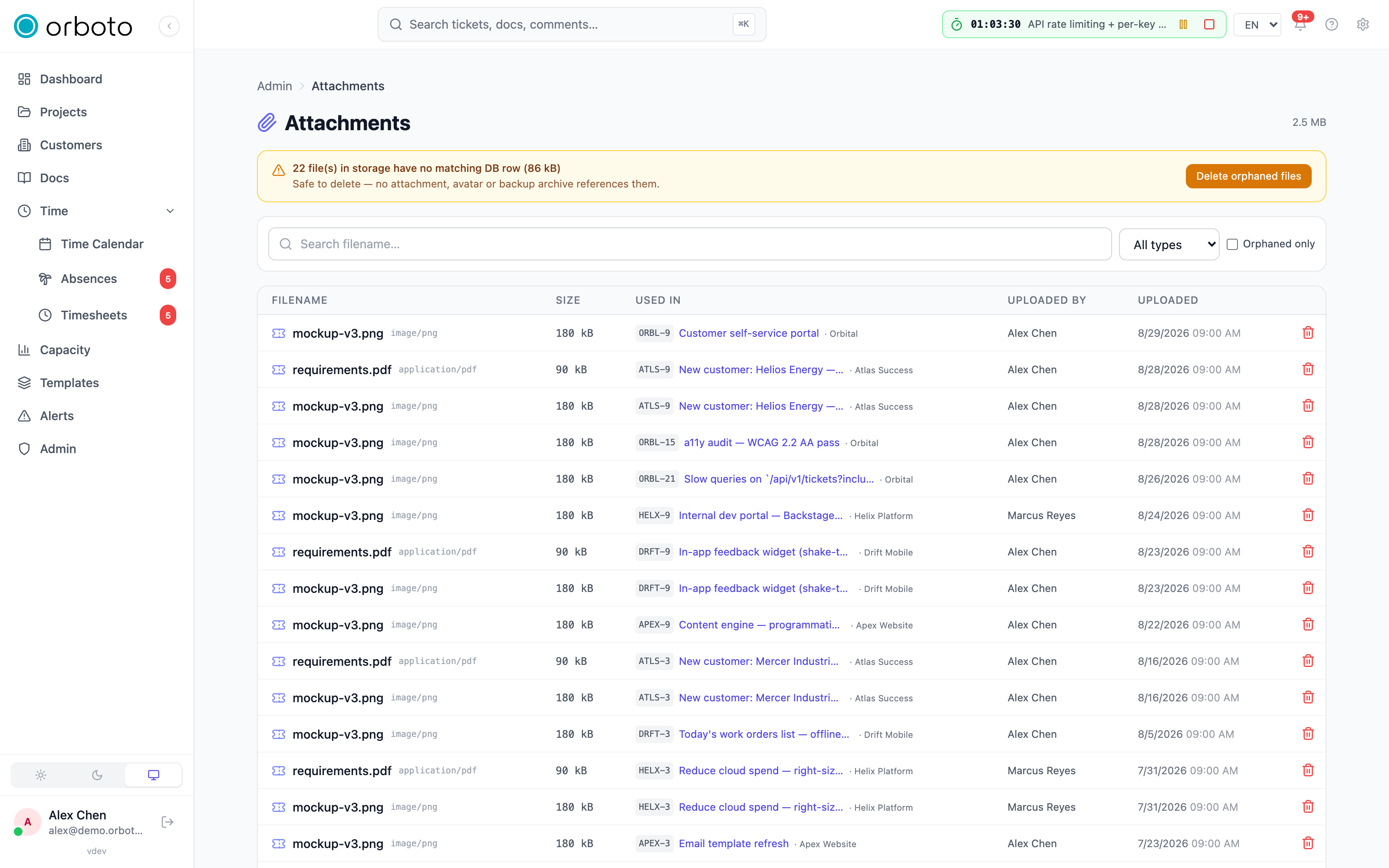
Each row shows the filename (with its content type), size, used in - a link straight to the ticket, doc, or comment it's attached to, with the parent project or doc space named alongside it - uploaded by, and uploaded at. The header shows the total storage size across every attachment currently in the workspace.
Filter by:
- Filename search - free text.
- Type - Tickets / Docs / Comments / all.
- Orphaned only - see below.
Delete any attachment with the trash icon; the confirmation wording differs depending on whether the file is currently in use (deleting it will visibly remove it from wherever it's attached) or already orphaned (nothing else references it, so deleting it is pure cleanup).
What "orphaned" means
An attachment becomes orphaned when the database row that recorded "this file belongs to that ticket/doc/comment" is gone, but the underlying object in storage never got cleaned up alongside it - most commonly the parent ticket, doc, or comment was deleted through a path that didn't (or couldn't, due to a partial failure) also remove the file. An orphaned row still shows up in this table (with an amber warning badge instead of a working "used in" link) but represents storage you're paying for with nothing in the product actually pointing to it.
Toggle orphaned only to see just these - useful for a periodic cleanup pass, or right after a data-import that may have left stray references behind.
Orphaned storage: objects with no database row at all
A second, more subtle category exists one level deeper: storage objects in your S3-compatible bucket that have no attachment row whatsoever - not even an orphaned one. This can happen from an upload that completed in storage but failed to record its database row (a partial failure mid-request), or from an interrupted delete that removed the row but not the object. When orboto detects any of these, a banner appears at the top of the page reporting how many such objects exist and their combined size.
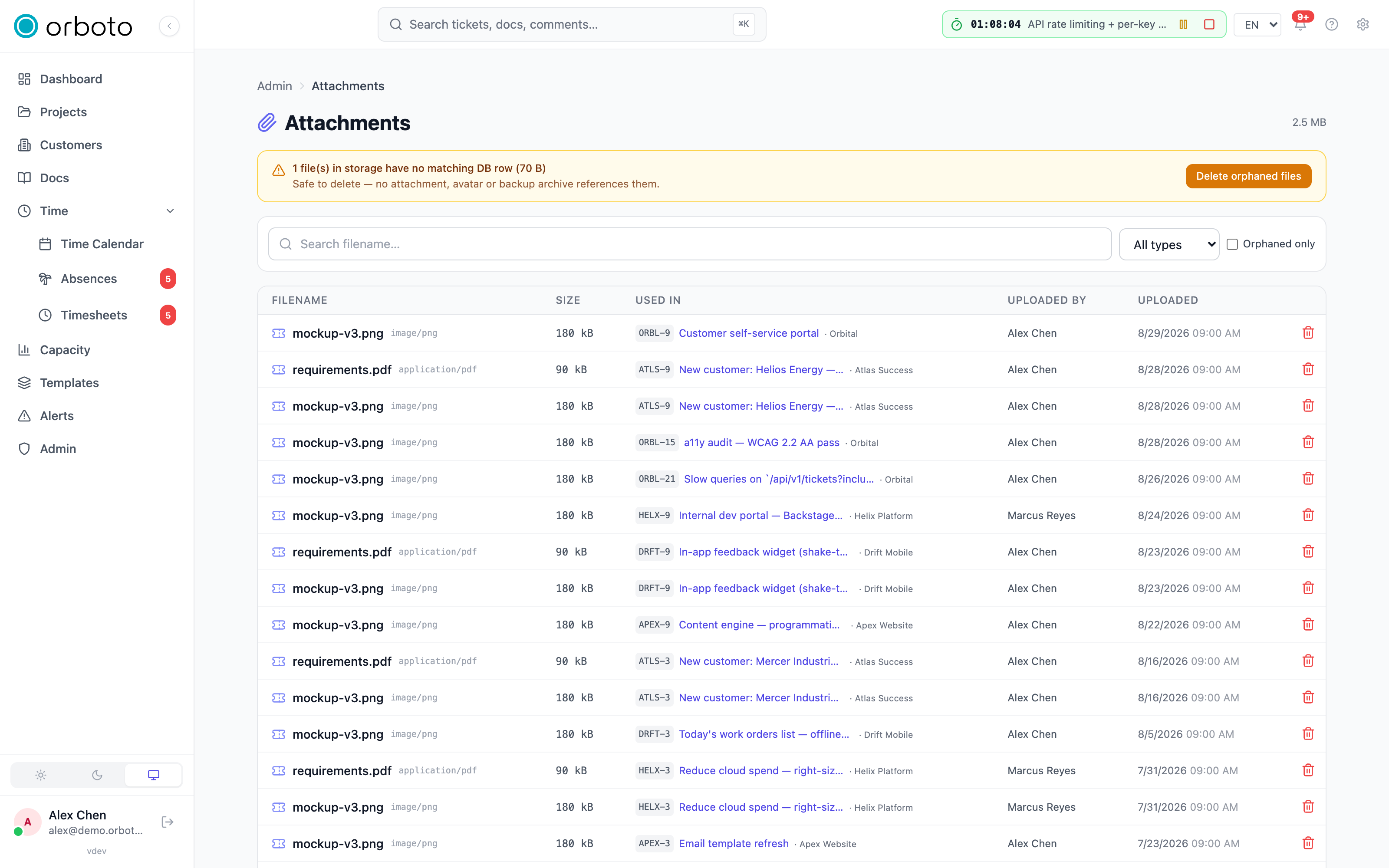
Click Delete orphaned files (with the confirmation naming exactly how many objects will be removed) to delete them from storage. This action only ever touches objects that have zero database reference of any kind - it can never remove a file something in the product still points to, orphaned-row or not.
Added in v0.230.0 What the banner lists, and what the button removes:
- An object is listed only once it is older than 24 hours and nothing references it. Pre-migration snapshots and other system files are never listed or deleted.
- Delete orphaned files removes them in batches of up to 1,000. When more remain, the page says how many, and you run it again until none are left.
- Every run is recorded in the audit log as
admin.attachment.reclaim_storage. - While a workspace import is writing files (see
Migrating a workspace),
the button answers
409witherrors.admin.storage_reclaim_import_runningand deletes nothing. Run the cleanup after the import has finished.
The button needs the permission admin:attachments:reclaim; the list needs
admin:attachments:read. Through the API:
orboto get /admin/attachments/orphaned-storage
orboto post /admin/attachments/reclaim-storage '{"limit":1000}'
The answer to the second call is { deleted, deletedBytes, failed, remaining };
repeat the call until remaining is 0. A repeat on a clean store deletes
nothing.
Avatars and logos
Added in v0.230.0 Replacing or removing your avatar, a customer logo or the workspace logo deletes the old image from storage. Deleting a user or a customer, and anonymising a user on a data-subject request, deletes their avatar or logo as well. Images that older versions left behind show up in the orphaned storage list above once they are older than 24 hours.
Added in v0.230.5 An avatar or a customer logo you replace or remove shows
at once everywhere: orboto serves each image under an address that carries the
version of the stored file, so a browser never shows the previous picture from
its cache. Avatars and customer logos must be JPEG, PNG, GIF or WebP, at most
5 MB and 50 megapixels; an animated GIF or WebP stays animated. A larger file
is refused with 400 (errors.customers.logo_too_large,
errors.users.avatar_too_large), as is an image above 50 megapixels or one
that takes longer than 15 seconds to process (errors.customers.logo_too_complex,
errors.users.avatar_too_complex). When the object store does not answer
within 15 seconds, an avatar, customer logo or workspace logo upload is refused
with 503 (errors.users.avatar_storage_unavailable,
errors.customers.logo_storage_unavailable,
errors.branding.logo_storage_unavailable), and the previous image stays.
Storage quota
Added in v0.230.0 When your workspace has a storage quota (the
storage_quota_gb setting; storage is unlimited when it is empty or 0),
every upload books its size against the quota before the file is stored. Two
uploads that arrive at the same moment can no longer both slip under the
limit: the second one is refused with 413 and the error key
errors.storage.quota_exceeded. The response carries the numbers in
errorParams:
| Field | Meaning |
|---|---|
current_gb | storage in use, including uploads that are still being stored |
quota_gb | the workspace quota |
requested_gb | the size of the refused upload |
What counts toward the usage: ticket, doc and comment attachments, and comment attachments that are uploaded but not sent yet. Avatars, customer logos, the workspace logo and backup archives are not part of the usage figure. An upload of any kind is still checked against what is left of the quota, so a full quota refuses all of them.
Troubleshooting
- A file I deleted from a ticket still shows up here - if it shows as orphaned (amber badge, no working link), the underlying storage object wasn't cleaned up when the reference was removed; delete it directly from this list to finish the cleanup.
- Delete orphaned files says that more files remain Added in v0.230.0
- the cleanup works in batches of up to 1,000. Run it again until the banner is gone.
- An upload is refused with
errors.storage.quota_exceededAdded in v0.230.0 - the file does not fit what is left of the storage quota; see Storage quota. Delete attachments you no longer need, run the orphan cleanup, or increase the quota. - The orphan-storage banner keeps reappearing after I reclaim - a fresh interrupted upload or delete can create new orphaned objects at any time; this isn't a sign the reclaim itself failed, it's new orphans accumulating since the last pass. Check the reported count and size each time rather than assuming it should reach zero and stay there.
- Total storage size doesn't match what I'd expect from active tickets/docs alone - it's computed over every attachment row in the unfiltered set, including any orphaned rows still listed here; filter to orphaned only to see how much of the total that accounts for.
- A delete failed - the error message from the failed attempt is shown directly; a common cause is a storage-layer connectivity issue rather than anything about the specific file, so retry once storage is confirmed reachable.
Duplicate block
Refuse ticket creates that repeat an open ticket: what can block, how to pick the threshold from your own data, and what automated creators must handle.
Primer facts
Structured facts about your projects that power the AI agent primer and requirements reports - categories, review workflow, and where they surface.