

OAuth clients
What OAuth clients are, how AI apps register against your workspace, the authorize flow a user sees, and admin housekeeping.
Admin -> OAuth clients lists every application that has registered to sign users into orboto through OAuth, instead of a long-lived API key - typically an AI client like Claude Desktop, Cursor, or VS Code Copilot connecting to orboto's MCP server.
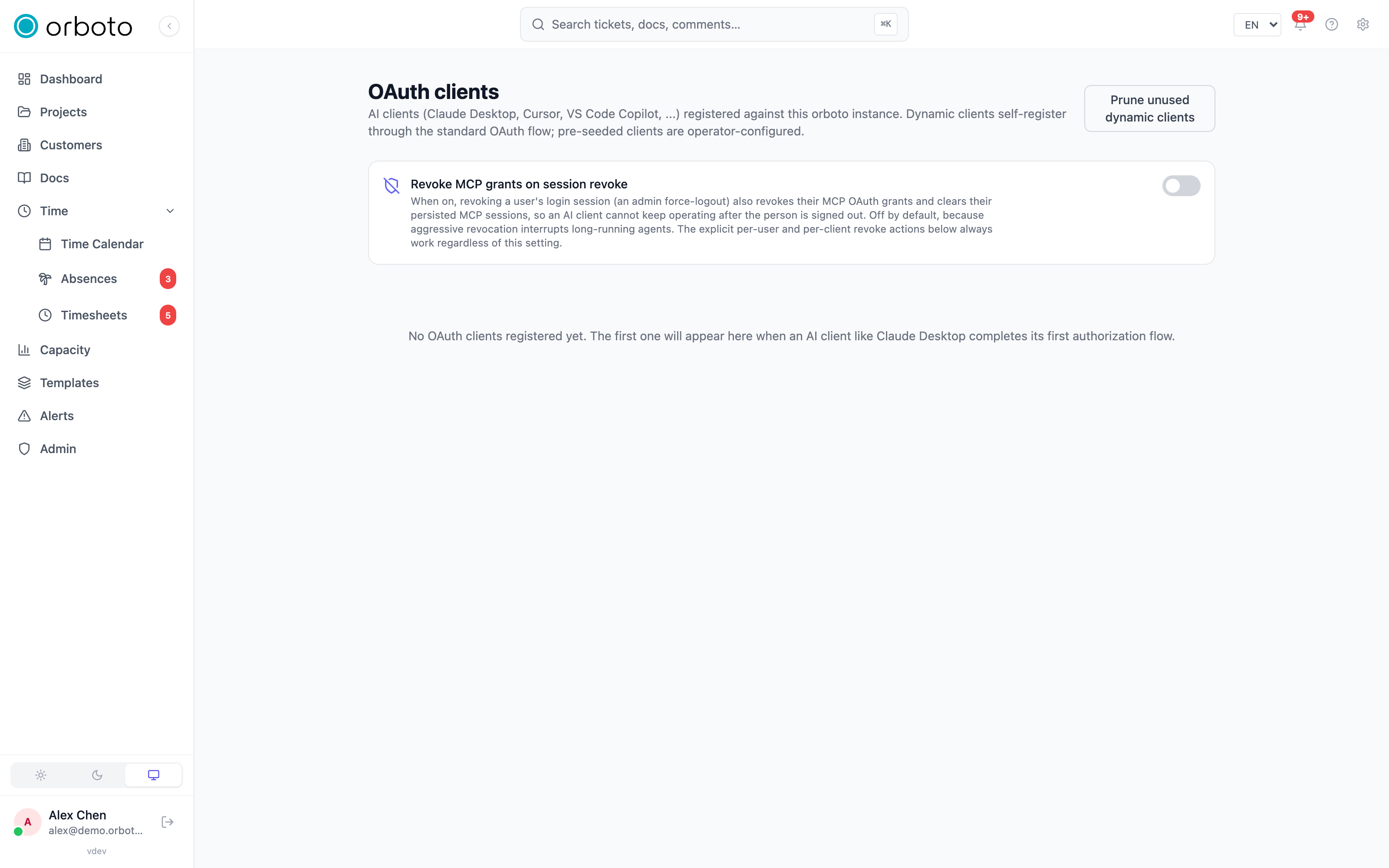
What an OAuth client is
When an app wants to act on a user's behalf without ever seeing that
user's password, it uses OAuth: the user is sent to orboto's own
login page, logs in there (or is already logged in), sees a consent
screen naming the app and what it's asking for, and - if they approve -
orboto hands the app a short-lived token scoped to that one user. The
app itself, registered ahead of time as an OAuth client, is
identified by a client_id; orboto tracks every client that has ever
completed this flow against your workspace, plus every user who has
individually authorized it.
This matters for security because it means an AI client never needs a copy-pasted, long-lived API key sitting in a config file - each user authorizes their own access, that access can be revoked per user without affecting anyone else connected through the same client, and the whole exchange is visible on this page.
How a client gets here
Two ways a client ends up in the list:
- Auto-registered (dynamic) - most MCP-aware AI clients register
themselves automatically the first time someone points them at your
orboto instance's
/mcpURL and completes the OAuth flow. You don't do anything to make this happen; it shows up on this page once the first user finishes authorizing it. - Operator (pre-seeded) - a client an administrator configures ahead of time rather than letting it self-register. These can only be removed via configuration, not the delete button in this list.
The authorize flow an end user sees
This is what happens on the user's side when they connect an AI client to orboto - useful to know so you can tell a colleague what to expect:
- In the AI client (Claude Desktop, Cursor, VS Code, ...), they add orboto's MCP URL as a new connector/server.
- The client opens a browser to orboto's login page (or reuses an existing session if they're already signed in).
- orboto shows a consent screen naming the requesting app and every scope it asks for, plus - where offered - a choice of which identity to connect as: themselves, or an agent account they own.
- They click Authorize. The browser redirects back to the AI client, which now has a working, scoped session.
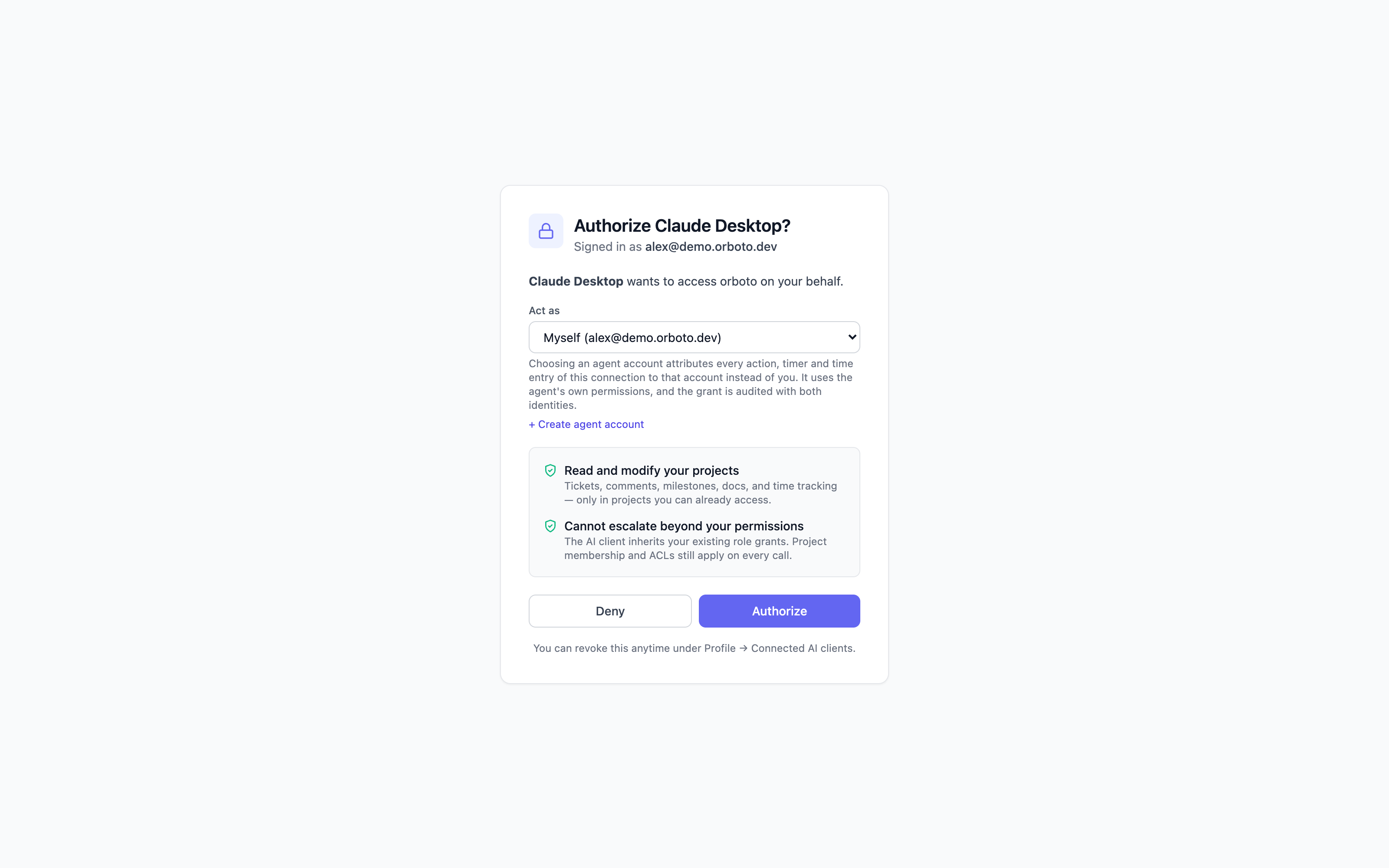
No API key is copy-pasted anywhere in this flow, and the resulting access token rotates automatically without the user doing anything further. The full connect walkthrough per client (Claude Desktop, Cursor, Copilot, Codex) lives in MCP server setup - this page is the admin side: what shows up here once people have connected, and how to manage it.
What you see per client
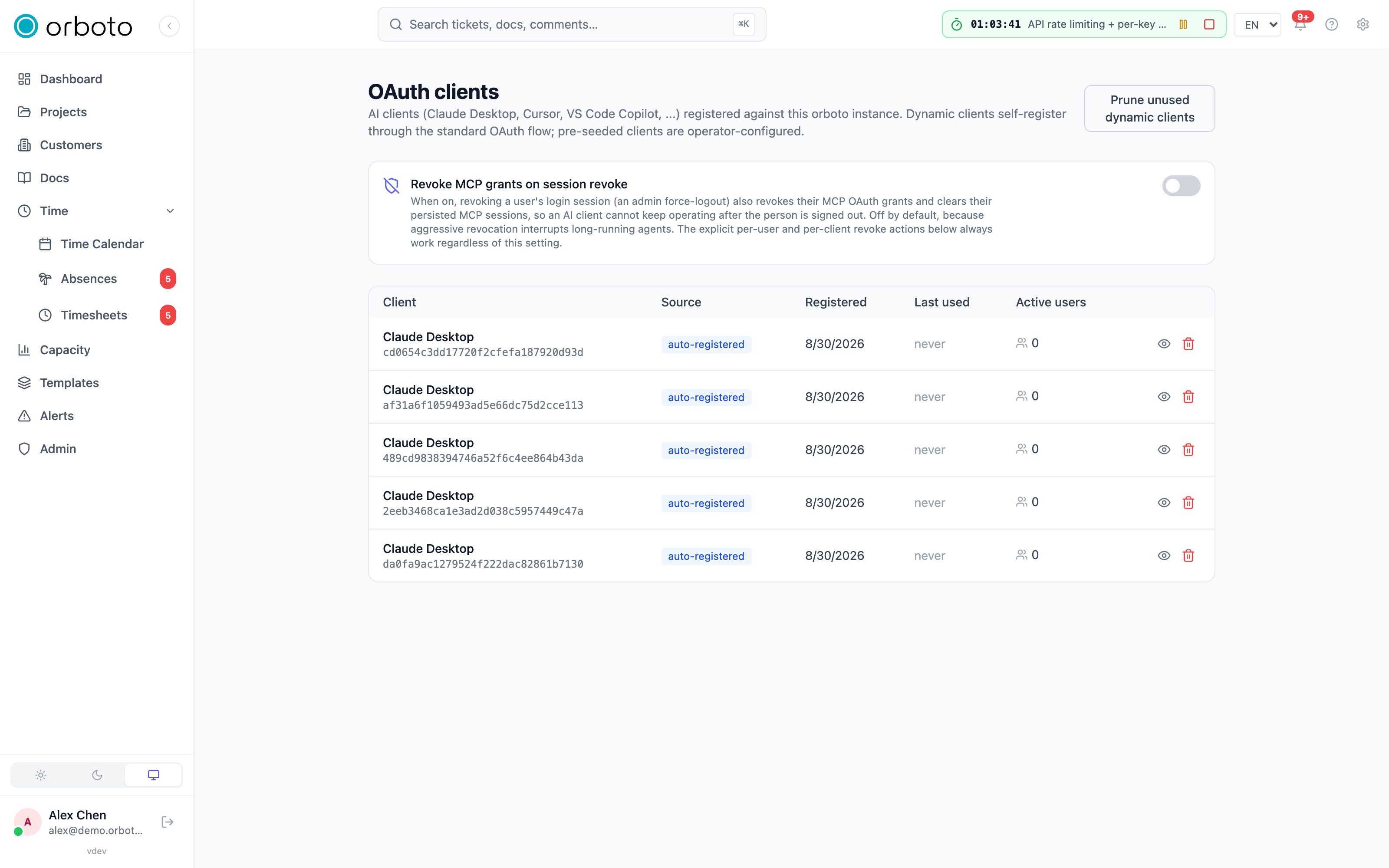
Each row shows the client's name and client_id, whether it's
auto-registered or operator, when it was first registered, when
it was last used, and how many users currently have an active
authorization against it.
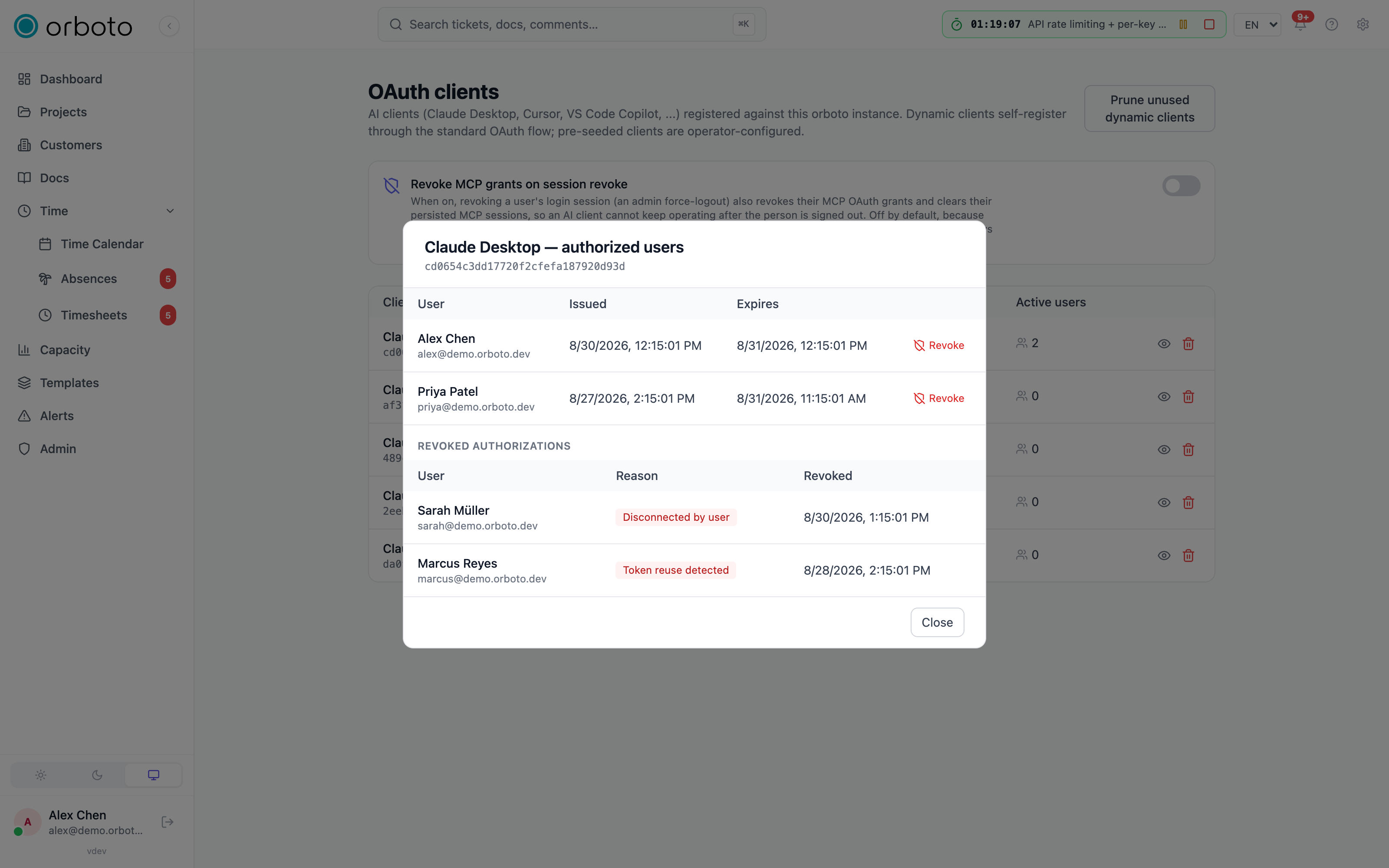
Click the eye icon on a row to open its authorized-users list - every user with a live grant on that client, when it was issued, and when it expires. From there you can Revoke any individual user's authorization: their next call through that client fails, and they have to go through the consent screen again to reconnect. Revoked authorizations move to a separate section on the same view, tagged with why they were revoked (an admin revoke, the user disconnecting it themselves, the user opting out of MCP entirely, a security-related token-reuse detection, or a replacement by a retried refresh) so you can answer "why did this stop working" without digging through logs.
Refresh tokens and retries
Added in v0.212.0 A client renews its access with a refresh token, and every renewal hands out a new refresh token. The tokens of one client and one user form one chain, and exactly one token of it is live.
When a renewal response is lost on the way, the client retries with the token it still holds. orboto answers that retry once: the unused token from the lost response is replaced and the retry's token continues the chain. The replaced token shows in the revoked section of the authorizations dialog with the badge Replaced by a retry. That is normal and needs no action.
A second retry of the same token, or presenting a replaced token later, ends
every token of that client and user, tagged with the token-reuse reason, and the
user connects the client again through the consent screen. A client that received
both responses and kept the earlier token hits exactly this once. A burst of
these for one client and one user usually means the client runs several processes
without sharing its token cache. The audit log records such an end as
oauth.refresh_reuse_revoked with the client id and the trigger.
The orboto CLI and the local MCP proxy renew under a lock next to their credential cache and re-read the cache afterwards, so two terminals of one user never present the same token twice.
Scopes
Added in v0.230.0 When someone connects an AI client or another app to orboto with OAuth, the consent screen names every scope the client asks for. The client's access token can then do what those scopes allow, and never more than the person's own account may do.
| Scope | Shown on the consent screen | What the client can do |
|---|---|---|
mcp | MCP access: can read and change everything your account can, through orboto's tools and API; cannot create keys, webhooks, integrations or invitations, or change your sign-in | Use the orboto MCP server's tools and call the orboto REST API with the person's permissions, including generic calls through the MCP tool orboto_api_call for endpoints without a named tool. |
api | API access: can read and change everything your account can, through orboto's API; cannot create keys, webhooks, integrations or invitations, or change your sign-in | Call the orboto REST API with the person's permissions, the same reach as their web login. The orboto CLI (orboto login) and the browser extension request this scope. |
offline_access | Stay connected (refresh) | Renew access in the background with a refresh token, for up to 90 days without use. Without this scope the client gets a 24-hour access token only and the person signs in again when it expires. |
The mcp scope needs the mcp:use permission and the api scope needs
api:use. If an administrator later removes one of them, the connection
loses that scope on its next request; a connection left with neither answers
401.
What no OAuth client can do
Whatever scopes it holds, an OAuth client cannot:
- create, list, rotate, rename or delete API keys, including keys for agent accounts and the keys the MCP setup wizard creates,
- see or change the person's connected OAuth clients, or those of the workspace,
- see or change sign-in factors (authenticator app, passkeys, backup codes), passwords, or the workspace's sign-in methods, MFA, password, session and IP allowlist policies,
- create accounts, import accounts from another tool, create external agents or auditor access, send or resend invitations, or change the email address of an account,
- create or change anything that keeps sending data or accepting requests after the client is disconnected: webhooks, chat bot connections and routes, git and Sentry connections and their tokens, Lexware, audit forwarding, inbound mailboxes and the inbound mail server, mail intake into a wiki, an agent lane's repository, SSH key or preview host, SSO providers, the mail service connection, the mail logo, key management, external AI connectors and the AI provider, telemetry, federation links and project invites, notification channels, push subscriptions, calendar feeds and calendar connections, backup jobs, export tokens and destination tests, the SCIM provisioning-safety settings, and the system settings that point orboto at an outside server or open sign-up.
The client can still delete or revoke any of these.
These requests answer 403 with errors.auth.oauth_credential_route_refused,
also when they go through orboto_api_call. Do them in orboto in your
browser, or with an API key.
Two things stay possible: a client can disconnect itself, and the orboto browser extension can confirm your second factor before it fills a stored login.
If you signed in to the orboto CLI with orboto login in the browser, the CLI
commands that set up such a connection (orboto chat-bot connections add,
orboto lexware connect, orboto sentry connect, orboto git-rotate-token,
orboto compliance invite, orboto lanes assign with a new repository, the
git step of orboto connect) need a profile with an API key instead.
Because an OAuth client cannot create an API key or such a channel, nothing it does outlives the moment you disconnect it under Profile -> Connected AI clients.
Acting as an agent account
Delegating to an agent account (offered on the consent screen) attributes
the connection's actions, timers and time entries to that agent instead of the
person authorizing it, and the connection runs with the agent's own permission
set; the person's own timer and timesheet stay untouched. Only the person's
own signed-in session can give this consent: an API key or another OAuth token
cannot (403).
Added in v0.230.0 Acting as an agent works only while the owner's own
global roles cover everything the agent holds globally. This is checked when
the person authorizes, on every request and when the connection renews. An
agent that someone created under their profile counts as covered while its
owner holds the agent:create-own permission; any role an admin grants that
agent on top must also be the owner's. When the agent later gains a role its
owner lacks, the connection stops working for that owner ("Delegated access
revoked") until the owner holds the role too. A refusal at consent answers
403 with errors.permissions.authority_exceeds_caller and is recorded in the
audit log as security.authority_refused for the operation oauth.act_as.
See Who may grant what.
Either way, permission enforcement happens the same way it does for any logged-in user or API key: nothing here bypasses orboto's normal access control.
Connections made before 0.230.0
Before 0.230.0, clients got a refresh token even when they did not request
offline_access. These connections keep working: the refresh token still
renews, but it no longer extends its own lifetime, so the connection ends at
most 90 days after the update. The client then asks the person to sign in once
more. The orboto MCP server, the CLI and the browser extension all request
offline_access, so they get a regular long-lived connection again.
Deleting a client
Deleting an auto-registered (dynamic) client immediately invalidates every user's authorization against it - not just one. A confirmation dialog spells this out before it happens. Operator (pre-seeded) clients can't be deleted from this page at all; that's a deliberate guard against accidentally removing a client your deployment configuration depends on.
Housekeeping: prune unused clients
Over time, dynamic clients that were only ever tried once (or where the integration was abandoned) accumulate. Prune unused dynamic clients removes every dynamic client that currently has zero active authorizations and hasn't been used in 30 or more days - a one-click cleanup that never touches a client anyone is still actively using, and never touches operator-configured clients at all.
Coupling session revoke to MCP grant revoke
By default, force-logging a user out (revoking their login session as an admin) does not also revoke their MCP OAuth grants - a long-running agent process shouldn't be interrupted just because someone force-logged the person out of the web UI elsewhere. The toggle Revoke MCP grants on session revoke changes that: when it's on, an admin force-logout also revokes the user's MCP grants and clears their persisted MCP sessions, so an AI client genuinely can't keep operating after the person is signed out. It's off by default because aggressive revocation interrupts long-running agents; the explicit per-user and per-client Revoke actions above always work regardless of this setting, so you can still revoke a specific grant surgically without flipping the global toggle.
Troubleshooting
- A client I expect to see isn't listed - it only appears after its first user completes the OAuth authorize flow; registering a client doesn't itself create a list entry until someone connects through it.
- Delete is greyed out on a client - it's an operator (pre-seeded) client; those are removed via configuration, not this list, precisely so a deployment's expected clients can't vanish from an accidental click.
- A user says their AI client suddenly can't reach orboto - check their row under that client's authorized-users list; if it's moved to the revoked section, the badge names why (their own disconnect, an admin revoke, an MCP opt-out, or a security-triggered revoke from token-reuse detection, or "Replaced by a retry", see below). Added in v0.211.3 "Removed when linking SSO" means an SSO login linked the user's unverified account and removed its credentials (see SSO setup).
- A client gets
403witherrors.auth.oauth_credential_route_refusedAdded in v0.230.0 - the request would create or change a credential or a channel that outlives the connection (an API key, a webhook, an integration, an invitation, a sign-in setting); see What no OAuth client can do. Do it in the browser, or with an API key. - An agent connection stops working with "Delegated access revoked" Added in v0.230.0 - the agent account holds a global role its owner does not; see Acting as an agent account.
- Prune unused dynamic clients removed something I still wanted - it only ever removes clients with zero active authorizations that haven't been used in 30+ days; if a client qualified, it genuinely had no active users and no recent activity. Reconnecting simply re-registers it.