

Budget and cost tracking
Track spend against a configured budget, per-person cost, and the fully loaded cost of a project including AI usage.
This page covers the money-related cards on a project's
Analytics page: Budget and Loaded member
cost. Both need the budget:view permission - without it, they simply
don't appear on the page, and the Actual cost overview tile is hidden too.
Setting a budget and rates first
Nothing on this page shows a meaningful number until a budget and at least one hourly rate exist somewhere in the project. There are three places to configure this:
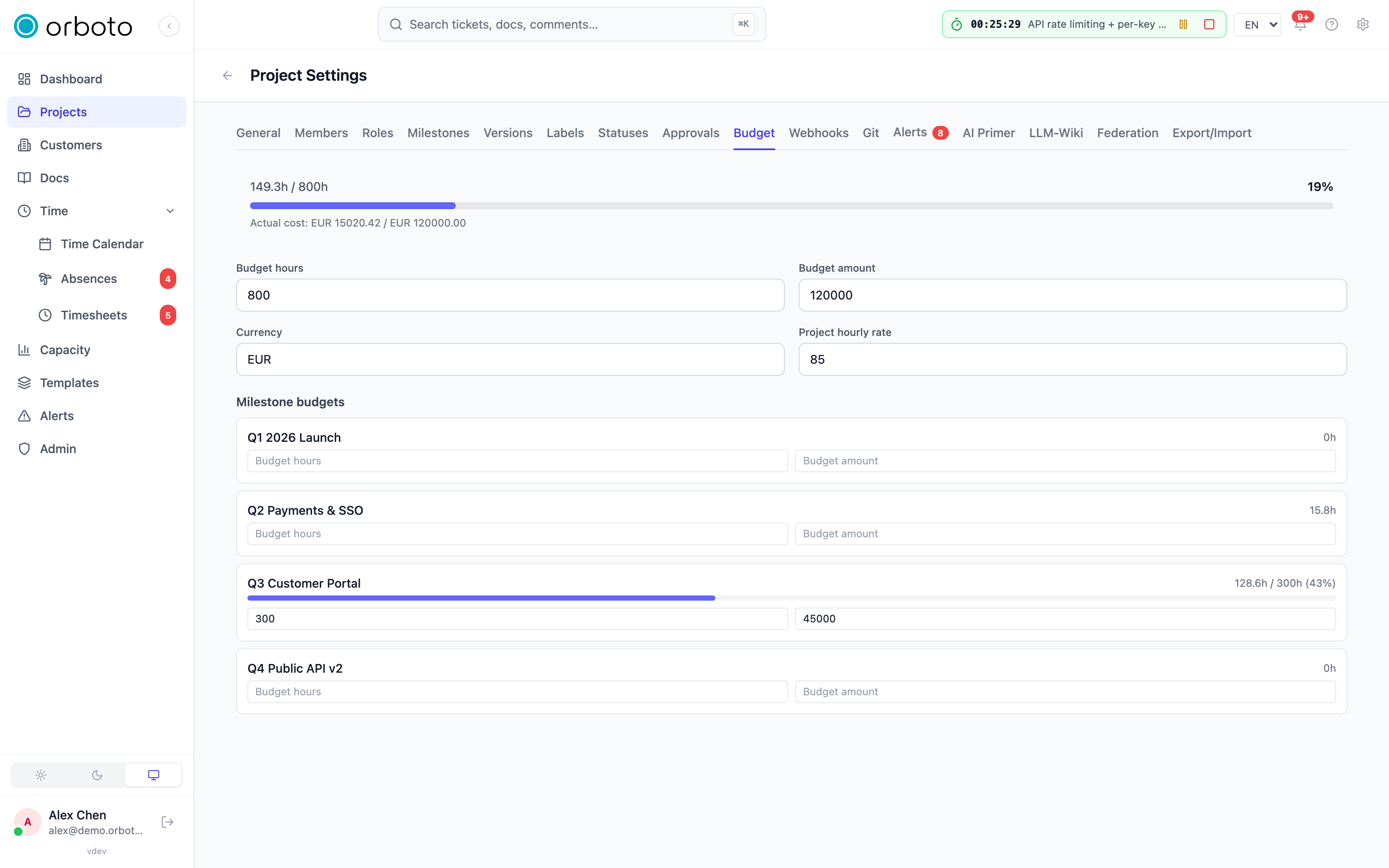
- Project settings -> Budget tab - set Budget hours and/or Budget amount (with a Currency) for the whole project, plus a Project hourly rate used when a contributor has no rate of their own. Either budget field can be left empty; a project can track hours only, money only, both, or neither.
- Milestone budgets - each milestone can carry its own Budget hours /
Budget amount, edited inline in the Milestone budgets table at the
bottom of the Budget card (needs
milestone:edit) or from the milestone's own settings. A milestone without its own budget falls back to the project's. - Per-person hourly rate - set on a user's account under
Admin -> Users, alongside an optional Overhead factor (a
loaded-cost multiplier on top of the rate, e.g.
1.3for +30% to cover employer costs beyond the raw wage - leave it empty to inherit the workspace default).
How a rate is resolved
Whenever orboto needs to price someone's logged time, it resolves a rate through a cascade, stopping at the first one that's set:
- That person's own hourly rate (Admin -> Users).
- The project's hourly rate (Project settings -> Budget).
- The customer's default hourly rate (set on the customer record this project belongs to, if any).
- If none of those are set, the rate is "none" - the person's cost shows as 0, but they're still listed with a visible "no rate" marker rather than silently vanishing from the table.
This cascade is live, not historical: cost is always computed from whoever's rate is configured right now, at query time - a time entry does not remember what the rate was on the day it was logged. Raising someone's rate today changes the reported cost of every hour they've ever logged on this project, immediately.
Budget card
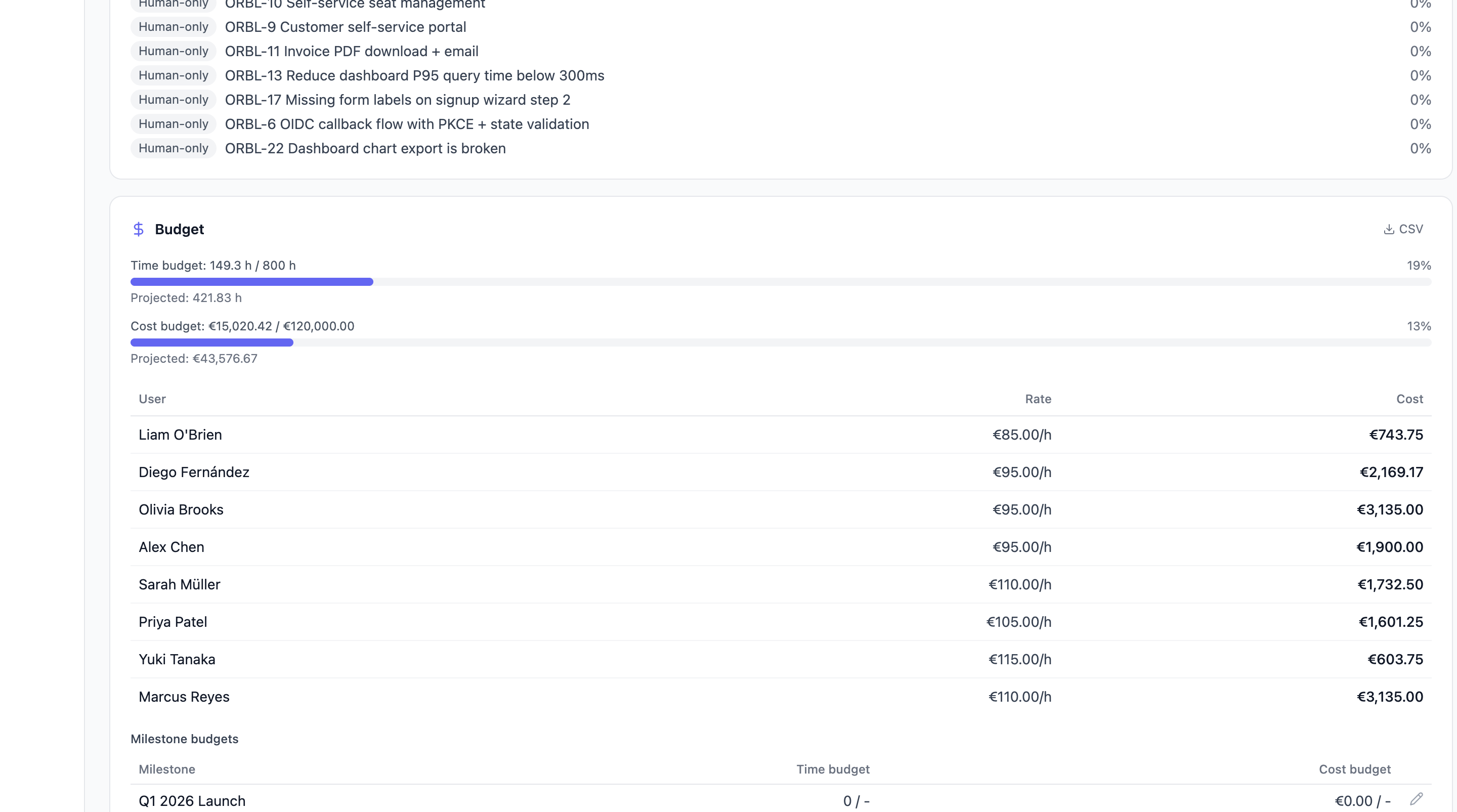
If no budget is configured, the card just prompts you to set one - it never substitutes the ticket estimate total as a stand-in budget.
- Time budget / Cost budget meters - used hours or spend against the configured budget, as a percentage bar. Turns red past 100%.
- Projected (under each meter) - not the same thing as "used." It is a forward-looking estimate: the sum of every ticket's time estimate (not logged time), priced by the rate cascade above - split evenly across a ticket's Responsible assignees when it has any, or the project/customer rate for unassigned work. Read "Projected: over budget" as "if the remaining estimated work costs what the plan says, the total will exceed the budget" - a warning based on plan, not a report of what already happened.
- Per-user actual cost table - each contributor's logged hours, their resolved hourly rate, and their cost, so you can see cost per person, not just the total.
- Milestone budgets table - the same used/budget comparison per
milestone, with an inline edit control if you hold
milestone:edit. A warning banner appears when milestone budgets together exceed the project's overall budget ("Milestones over-allocate the project budget") - useful for catching a plan that adds up wrong before it becomes a problem.
Added in v0.230.0 Private milestones. The Milestone budgets table and the over-allocation check cover only milestones you can see; a private milestone needs milestone:view_private, and without it its name and budget never reach you, in the page or in GET /projects/{id}/analytics/budget (milestones and milestoneRollup). The project totals - the time and cost meters, the projected figures and the per-user table - still cover the whole project, because budget:view is a grant over the whole project and those figures name no milestone or ticket. The totals cover everything while the milestone rows cover only what you see, so the rows can add up to less than the totals. The difference is the share of the milestones you cannot see, plus work that belongs to no milestone (for budgets, plus whatever the project budget leaves unallocated) - a figure without a name.
Loaded member cost
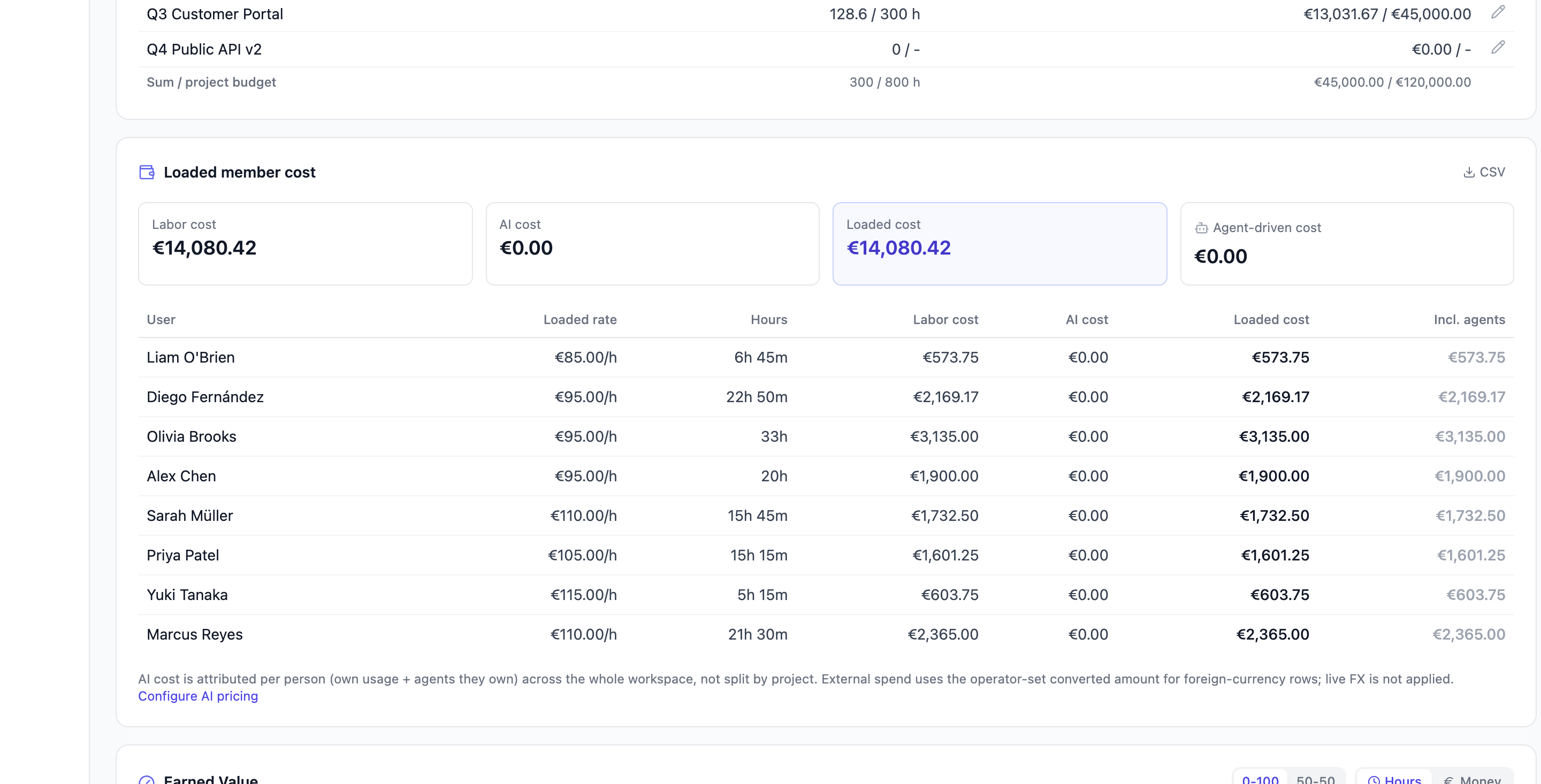
Goes beyond the raw hourly rate to the fully loaded cost of a person's (or agent's) time on this project, scoped by the date-range picker:
- Loaded rate = base hourly rate (same cascade as above) x the
overhead factor. A rate shown as
50 EUR/h (x1.3)means 65 EUR/h is actually charged in the totals. - Labor cost = loaded rate x hours logged in the range.
- AI cost = AI spend attributable to that person: their own AI usage plus the usage of any agent accounts they own, split into orboto AI (priced usage of orboto's own AI features) and External (spend from external tools like Claude Code or Codex, entered separately under Admin -> External AI spend by hand, by CSV import, by a provider connector or through the signed webhook). AI cost is workspace-scoped, not project-scoped - it reflects that person's total AI spend across every project they touch, not just this one, because AI usage itself carries no per-project dimension.
- Loaded cost = Labor cost + AI cost.
- Incl. agents ("true cost") = Loaded cost, plus the loaded cost of any agent accounts that person operates - so a human who runs several AI agents sees their real total footprint, not just their own hours.
An External AI by provider breakdown, when present, shows external spend split by provider (e.g. "Claude Code", "Codex"). A footnote clarifies that converted foreign-currency external spend uses the amount entered at the time, not a live exchange rate.
How this connects to customer reports
The Customer report builder (opened from the project header, not from
Analytics) has a money pricing mode that prices work at the project's or
customer's rate for an external audience - deliberately excluding your
internal per-person rate and overhead, since a customer should never see
your internal cost structure. See
Requirements documents
for that feature; it needs budget:view for money pricing, the same
permission as this page.
Troubleshooting
- The Budget card just says "No budget configured for this project."
Set Budget hours and/or Budget amount in Project settings -> Budget
- see Setting a budget and rates first above.
- Added in v0.230.0 The milestone rows add up to less than the project total. Expected when the project has private milestones you cannot see, or work that belongs to no milestone. Ask for
milestone:view_privateif you need the full breakdown. - A person shows "no rate" instead of a cost. None of the three rate levels (their own, the project's, the customer's) are set for them. Set at least the project's hourly rate as a fallback that covers everyone.
- Costs changed after I didn't log any new time. Someone's hourly rate or overhead factor was changed. Cost is always computed from the currently configured rate, not a historical snapshot - see How a rate is resolved above.
- "Milestones over-allocate the project budget." The sum of every milestone's own budget exceeds the project-level budget. This is a planning warning, not an error - either raise the project budget or trim a milestone's allocation. Added in v0.230.0 The sum covers the milestones you can see, so someone with access to private milestones can get the warning when you do not.
- AI cost looks too high / includes work from other projects. Expected
- AI cost is attributed per person across the whole workspace, not per project, because AI usage itself has no project dimension.
- The Loaded member cost card is empty. No time was logged by anyone in the selected date range - widen the range picker.
Estimation, collaboration and activity
How accurate your estimates run, how humans and agents split the work, and recent git activity.
Earned Value Management
Whether the progress you've made matches what your spend and schedule should have bought - explained from first principles, with a worked example.