

Translations
Auto-translation of mismatched-language content, the review workflow, and language-enforcement guardrails.
orboto's UI ships in multiple languages out of the box - each user picks their own from a dropdown in their Profile, independent of anything on this page. Content - ticket titles and descriptions, comments, docs - is a separate concern: it can be machine-translated when it arrives in a different language than the workspace expects, if an AI provider is configured, and it feeds features that work best when content is linguistically consistent.
Why this matters
orboto's search (full-text search with stemming and stopwords) and its AI features (semantic search, duplicate detection, Ask-Docs) both assume the workspace's content is written in one consistent language. A workspace with tickets scattered across five languages doesn't just look untidy - full-text search stops finding obvious matches because its stemming rules are language-specific, and semantic-similarity comparisons between a German ticket and its near-duplicate English twin are far weaker than between two tickets in the same language. The controls on this page exist to keep content uniform without forcing everyone who writes a ticket to personally translate it first.
Setting the expected language
Admin -> System settings -> Workspace language sets the language content is expected to be written in. This drives three related controls, all under System settings:
- Auto-translate new tickets to workspace language (off by default) - when a new ticket is written in a different language, orboto translates the title and description via the configured AI provider and keeps the original text as a comment, so nothing is lost. Requires AI to be configured; without it, mismatched tickets are only flagged with a warning, not translated.
- Reject tickets not written in the workspace language (off by
default) - Added in v0.204.0 refuses agents and API clients whose
ticket reads as another language. A person in the browser is not
refused: the ticket is saved and the language notice appears. To refuse
people too, also turn on Also refuse people in the browser. An agent
that means to keep the language passes
allowLanguageMismatch=true; the refusal names this in itshintfield. Before 0.204.0 the block applied to everyone, and the browser showed the API's error text. - Both interact: auto-translate resolves a mismatch before the strict guardrail would reject it, when both are on.
The review workflow
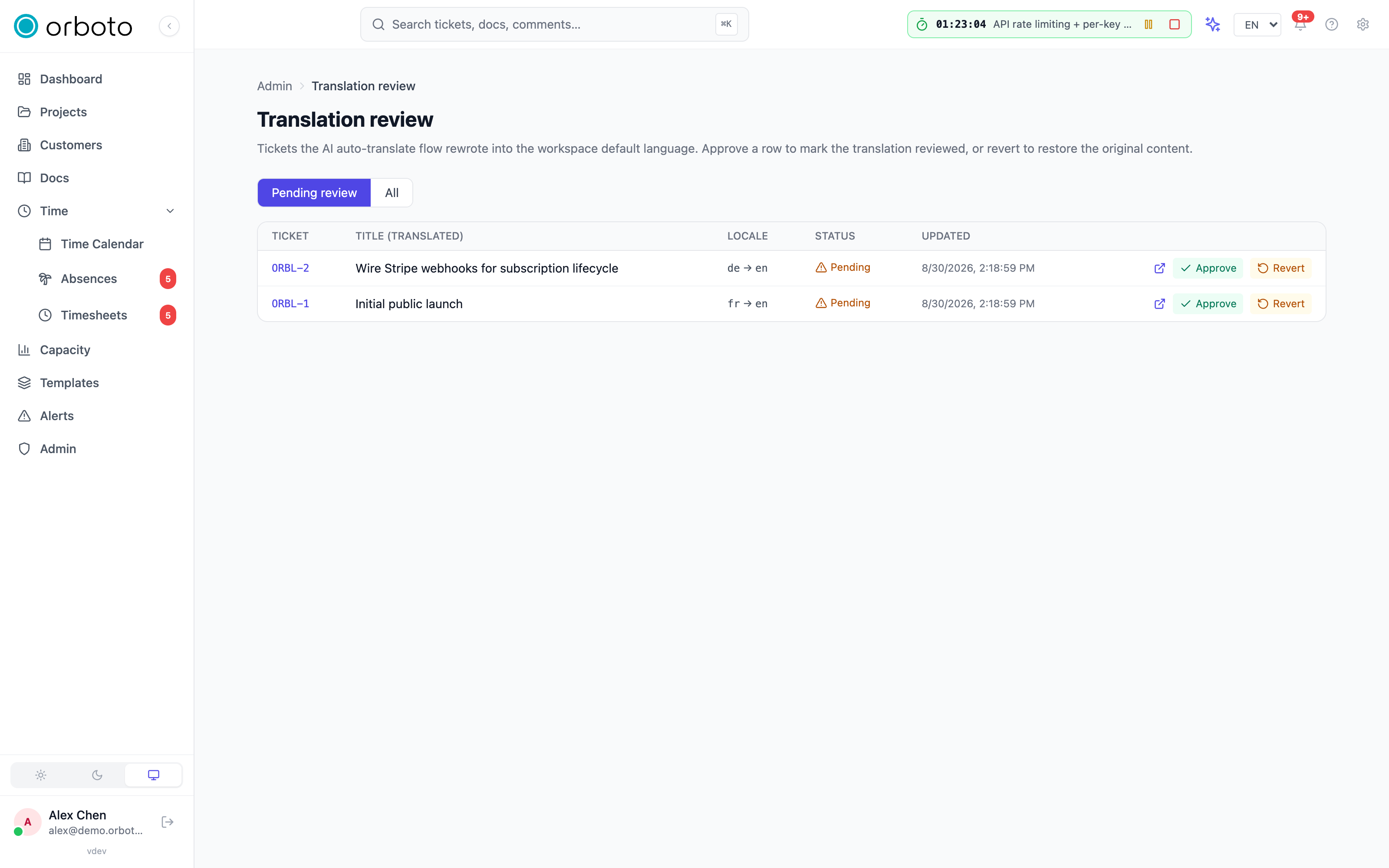
Admin -> Translations lists every ticket the auto-translate flow rewrote, defaulting to the pending queue (all reviewed rows are still visible under All). Each row shows the ticket, its translated title, the source -> target locale pair, and review status. Per row:
- Approve marks the translation reviewed - it's already being served to users reading in the target language; approving just closes the review loop.
- Revert restores the original pre-translation content and removes the auto-translated marker - use it when the machine translation materially changed meaning or tone.
- Open ticket jumps straight to the ticket for full context.
Translations regenerate lazily: if the source text changes after translation, the next request produces a fresh translation rather than serving a stale one - so an edited ticket's translation catches up automatically, no manual re-run needed.
Troubleshooting
- Translations never appear even with auto-translate on - confirm an AI provider is actually configured and reachable (Admin -> AI settings); auto-translate silently produces nothing without one, it does not error loudly on every affected ticket.
- A ticket keeps getting flagged as the wrong language - short, jargon-heavy text (a one-line title, mostly proper nouns or code) is where automatic language detection is least reliable. If this repeats across a batch (e.g. an import), it's worth reviewing whether that batch's content is actually the expected language before trusting the detector on it.
- Strict enforcement is blocking legitimate mixed-language work - an agent or integration can override per-request, but if this is a recurring, legitimate pattern (a support inbox that receives multiple languages by design), reconsider whether enforcement should be on for that workspace at all rather than fielding overrides constantly.
- A reverted translation reappears - if the source content hasn't changed, reverting is final; if it recurs, the ticket's content is probably being re-edited into the "wrong" language repeatedly - check who's editing it and in what language they're working.
Own and answer feedback reports
On a workspace that receives feedback reports from other orboto instances: who owns each report, the unattended alert, the one-step public reply and how a report follows its fix.
Federation
Sync projects across separate orboto instances, or share a single project with a partner org - concepts, security model, and a full setup walkthrough.