

System settings
Every workspace-wide switch, grouped and explained: access, locale, outbound email, project defaults, workforce cost, and kill switches.
Admin -> System settings holds every workspace-wide configuration key that isn't specific to AI (that has its own page - see AI providers and models). The page renders as a series of cards, one per group; every field saves individually as you change it - there's no separate "Save all" step, so a field takes effect the moment you commit it (press Enter or click away for a text field, immediately for a checkbox or dropdown).
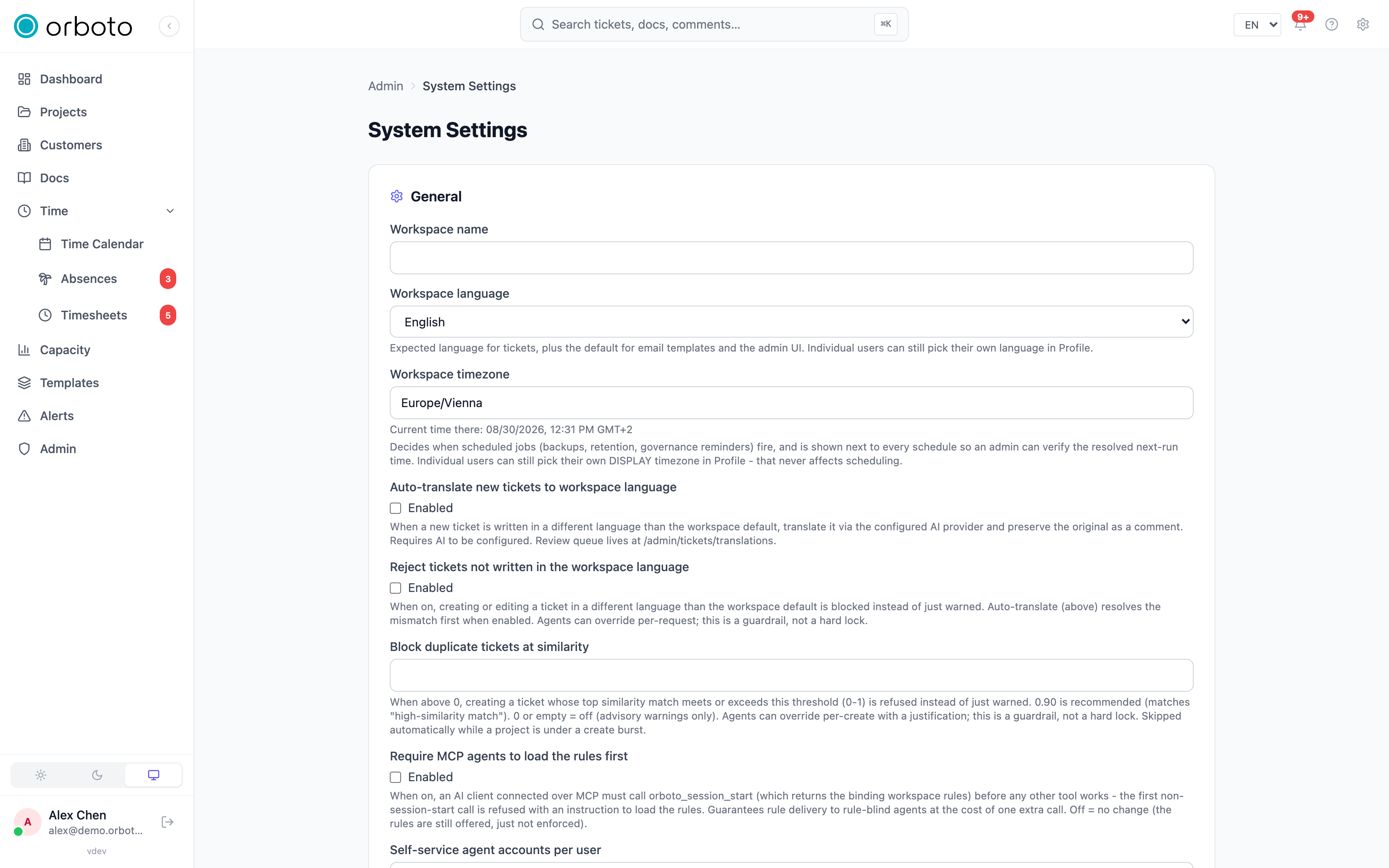
General
- Workspace name and Logo URL - shown in the app header and browser tab title everywhere in the workspace.
- Date and time - Added in v0.203.0 the workspace default for the date format, the time format and relative times. It applies to everyone who has not picked their own under Profile -> Preferences, and to readers who have no account at all: invitation and magic-link emails, customer reports and requirements specs.
- Project readiness - Added in v0.204.0 who sees the setup line on project pages until they choose for themselves: people who can fix a project's setup (the default), everyone, or nobody.
- Workspace language - the language content is expected to be written in. This single setting drives the auto-translate and strict-language guardrails documented in full on Translations - set it once here before turning either of those on.
- Workspace timezone - the sole authority for when scheduled jobs
fire: backups, retention cleanup, digests, alerts. Type a real IANA
zone name (e.g.
Europe/Berlin) - a suggestion list appears as you type, and the field shows the current time in that zone right below it once you've entered a valid one, so you can visually confirm you typed the zone you meant. This is completely separate from each user's own display timezone in their Profile, which only affects what time they see on screen, never when anything actually runs. - Allow self-registration - on by default. Off requires every new user to be invited rather than signing up on their own.
- Allowed email domains - a comma-separated allowlist (e.g.
acme.com, partner.org); leave empty to allow any domain to self-register when self-registration is on. - Default currency - the ISO-4217 code (EUR, USD, GBP, and others) used for any newly created project; a project that already exists keeps whatever currency it was created with, changing this default never retroactively changes existing projects.
- Presence indicators - the online/invisible status dot shown on avatars throughout the app. Turning this off hides every presence surface workspace-wide instantly; the underlying presence data isn't deleted, so turning it back on later shows correct state again rather than starting from scratch.
- Send welcome email on registration - on by default; fires once per new account (self-registration or invitation-redeem). This toggle ONLY controls whether the email fires at all - to change its subject or body, use the Email Template Editor's "Welcome" template, not this page.
- Block duplicate tickets at similarity - a number from 0 to 1 (or empty). At 0/empty, a near-duplicate ticket only gets an advisory warning when created. Set it above 0 (0.90 is the recommended starting point, corresponding to a "high-similarity match") to have orboto outright refuse creating a ticket whose closest existing match scores at or above that similarity - the creator (or an agent) has to deliberately override with a stated justification to push through anyway. This check is automatically skipped while a project is in the middle of a rapid create-burst (a bulk import, for example), so it never blocks legitimate bulk work.
- Require MCP agents to load the rules first - off by default. When on, any AI client connected via MCP must call the session-start tool (which returns this workspace's binding operating rules) before any other MCP tool call is allowed to run in that session - the very first non-session-start call gets refused with an instruction telling the agent what to do instead. This guarantees every agent actually sees your rules at least once per session, at the cost of one extra call per connection.
- Self-service agent accounts per user - how many bot accounts one
human user is allowed to create for themselves via the OAuth "Act as"
picker on the consent screen.
-1means unlimited,0turns self-service creation off entirely (only an admin can create bot accounts, under Admin -> Users), and leaving it empty defaults to1. This cap only counts a user's own self-created, currently-active bots - bots an admin created directly are never counted against it. - Maintenance mode - off by default. Turning it ON asks for an extra confirmation click first ("Enable maintenance mode? Everyone except super-admins is locked out..."), since it's disruptive: every request from a non-super-admin gets a 503 with a maintenance page instead of the normal app, until you turn it back off (which is instant, no confirmation needed). Use it for a migration window or to contain an incident. Every toggle - on and off - is written to the audit log.
Email delivery
Pick a provider from the dropdown: Disabled (no outbound email at
all), orboto Mail Service (recommended - EU-hosted, connects via
OAuth to your account at account.orboto.io/mail, sends from the
pre-verified noreply@orboto.io identity with no DNS setup, billing
rolled into your orboto subscription), Resend
(a third-party API), or SMTP (your own existing mail server).
Choosing a provider reveals only that provider's own fields:
- orboto Mail Service - either click the Connect button below
(OAuth flow, no manual key entry) or paste an API key (starts with
oms_) directly, plus the verified From address and an optional base-URL override for self-hosted/staging use. - Resend - an API key from resend.com/api-keys (starts with
re_) and a From address using a domain you've verified in Resend. - SMTP - host, port, username, password, and From address for your own mail server.
Whichever provider is active, a Send test email box at the bottom of this card lets you type any address and fire a real test message through the exact live configuration - do this after any change before assuming delivery works, since a saved-but-wrong credential otherwise fails silently until the first real notification tries to go out.
Projects
- Enable RACI on new projects - off by default. RACI (Responsible / Accountable / Consulted / Informed roles on tickets) stays opt-in per project either way; this only decides whether it starts pre-enabled on a brand-new project instead of the project owner having to turn it on themselves. AI agents also won't proactively suggest RACI assignments on a project where it isn't enabled.
- Team availability (free/busy) - who can see a teammate's near-term workload as a badge in the assignee picker: Disabled (default - nobody but admins), Shared-project members only (you see it for people you share at least one project with), or All users. Individual users can additionally opt themselves out in their own profile regardless of this workspace-wide setting.
Workforce cost
These three fields feed the "loaded member cost" analytics report and nothing else - they don't gate or change any other behavior:
- Overhead factor - a multiplier applied on top of a member's hourly
rate to approximate their fully-loaded cost to the business (benefits,
office overhead, etc).
1.3models a 30% markup over their raw rate. Applies workspace-wide by default; an individual member's overhead can still be overridden per-person in Admin -> Users. - AI input token price and AI output token price (per one million tokens, in the workspace currency) - lets the same cost report also attribute a dollar figure to each person's AI usage (their own calls, plus any bot accounts they own). Leave either at 0 or empty to exclude AI spend from that report entirely.
Kill switches
- MCP server - a dedicated card further down this same page (below the grouped settings) turns off the entire Model Context Protocol surface for the whole workspace at once - useful for compliance, incident response, or a staged rollout of MCP access. Even with MCP on workspace-wide, an individual user still additionally needs their own MCP permission to actually use it.
- Agent autonomy pause - stops every AI agent's self-directed work workspace-wide in one click; work explicitly assigned to an agent by a human keeps running regardless. This switch deliberately does NOT live on this page - it's on Agents administration, right next to the live view of which agents are currently active, since that's the more useful place to decide "should I hit pause right now."
Other cards on this page
Below the grouped settings, three standalone cards: Report branding (toggle the "Generated with orboto.io" footer on exported documents - removing it needs Business or Enterprise), Telemetry (opt out of the anonymous usage beacon), and Developer tools (a self-service download of the AI-agent skill package - the same download available from your own Profile page, surfaced here too for an operator who wants a single place to find everything an integrator might need).
Delegation
Every settings area can be delegated without handing out full system
access. The clearest example: the AI provider keys on the
AI settings page are writable by anyone holding the
AI-admin permission alone, entirely independent of the general
admin:system:write permission this page's other fields need. The
general rule across all of orboto's admin surfaces: what a user cannot
change, they also do not see - a partial-access admin gets a genuinely
smaller page, not a full page with disabled controls.
Troubleshooting
- Timezone save is rejected - the value must be a real IANA zone name
(
Europe/Berlin,America/New_York), never an abbreviation likeCETor a raw UTC offset; the error appears right under the field, and the "current time there" preview only shows once you've entered something valid. - Test email succeeds but real notifications still don't arrive - confirm the provider selected is genuinely the one you configured; switching providers doesn't clear the other providers' now-stale fields, and the test always uses whichever provider is currently selected in the dropdown, so a stale selection can pass its own test while the real, intended provider never gets used.
- A masked secret field looks empty after a page reload - that's expected, not a bug: secrets never round-trip back into the form once saved. Leaving the field blank on your next save keeps the existing stored value; typing anything into it replaces it.
- Maintenance mode locked out the last admin too - only super-admins bypass the maintenance page; if no super-admin account exists on this instance, you'll need to disable it directly against the database or restore from a backup, since the UI itself sits behind the same gate for everyone else once it's on.
- A change to "Enable RACI on new projects" didn't affect an existing project - correct, by design; this setting only decides the default for brand-new projects going forward. Toggle RACI on an existing project from that project's own settings instead.