

Compliance exports and SIEM forwarding
Hand an auditor a signed, verifiable evidence bundle, or stream every audit event to your SIEM in real time.
Two ways to get audit evidence out of orboto and into someone else's hands: a one-off downloadable bundle for an audit, or a continuous real-time stream into your own security tooling. Both build on the audit log and its tamper-evident hash chain rather than inventing separate evidence.
Generating a compliance evidence export
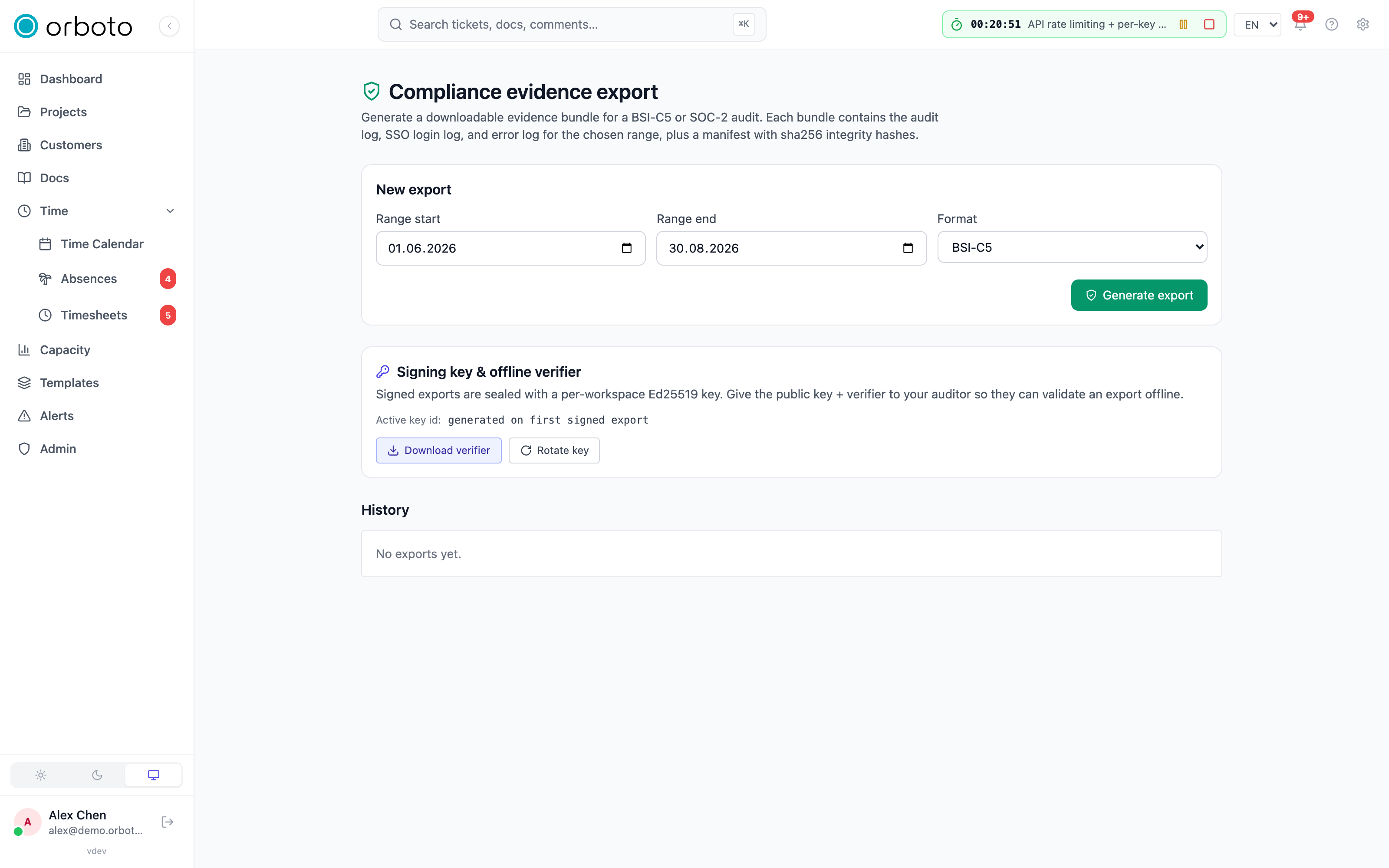
Open Admin -> Compliance evidence export. Under New export:
- Pick a range start and range end date.
- Pick a format from the dropdown, grouped into two families:
- Evidence bundle (NDJSON) - BSI-C5 or SOC-2. Each is a ZIP containing the audit log, the SSO login log, and the error log for the chosen range, plus a manifest with a sha256 integrity hash per file inside. In the SOC-2 manifest the SSO login log maps to the common criteria CC6.1 and CC6.2 (logical access and user registration; Added in v0.211.1 before this release it was mapped to CC6.7), the audit log to CC6.1 and CC7.2, and the error log to CC7.3.
- Signed / tamper-evident (auditor) - reuses the hash chain's own
hashes rather than computing new ones: Signed CSV (one CSV file
where every row is individually Ed25519-signed over its chain hash,
plus one signature for the whole file), Hash-chained JSON-Lines
(one JSON object per line, each carrying its own
prev_hash,hash, andsignature), Category bundle (separate signed CSVs split by category - login, permission-change, data-access, config-change, and so on - handy when an auditor only wants one category), or Auditor pack (all of the above together, plus the public key and the offline verifier script - the single file to hand over when you don't know in advance exactly what format the auditor's tooling wants).
- Click Generate export. Building a bundle for a large date range can take a moment - a note says so, and asks you not to close the page; the export appears in the History table below once it's ready.
Every signed export ships as a self-contained ZIP carrying public-key.pem
and a manifest.json with the export's own signature, its bundleHash,
the signing key's id, the row count, and the chain's tail hash at export
time - a complete chain of custody an auditor can check without any
access to your live orboto instance at all.
History, verifying, and downloading
Each row in History shows the format, date range, status, size, and creation time. For a completed signed export specifically, a Verify button appears - it re-checks the export's own signature and hash chain server-side and shows a pass/fail result inline, so you can confirm an export is good before you send it anywhere. Download works on any completed export regardless of format.
The signing key
A card on the same page shows the workspace's current Ed25519 signing key (used for every signed export) and a Rotate button. Rotating generates a new key for future exports; old keys are kept on file, so exports signed before a rotation stay verifiable against the historical key, not just the current one.
Offline verification (for the auditor)
The auditor pack includes verify-audit-export.mjs, a single
dependency-free Node.js script - also downloadable on its own from this
page. The auditor runs it on their own machine, with no network access to
your orboto instance and no orboto runtime installed at all:
node verify-audit-export.mjs audit-log.jsonl public-key.pemIt exits 0 for a valid, untampered export (and prints nothing alarming);
1 if tampering is detected, printing exactly which row and why; 2 for
a script-level error (wrong file, corrupted download). It re-implements
the identical canonicalization and hash-chaining rules the server uses,
so a clean offline run matches the server's own Verify result
byte-for-byte - nobody has to trust orboto's own claim that an export is
valid.
SIEM forwarding
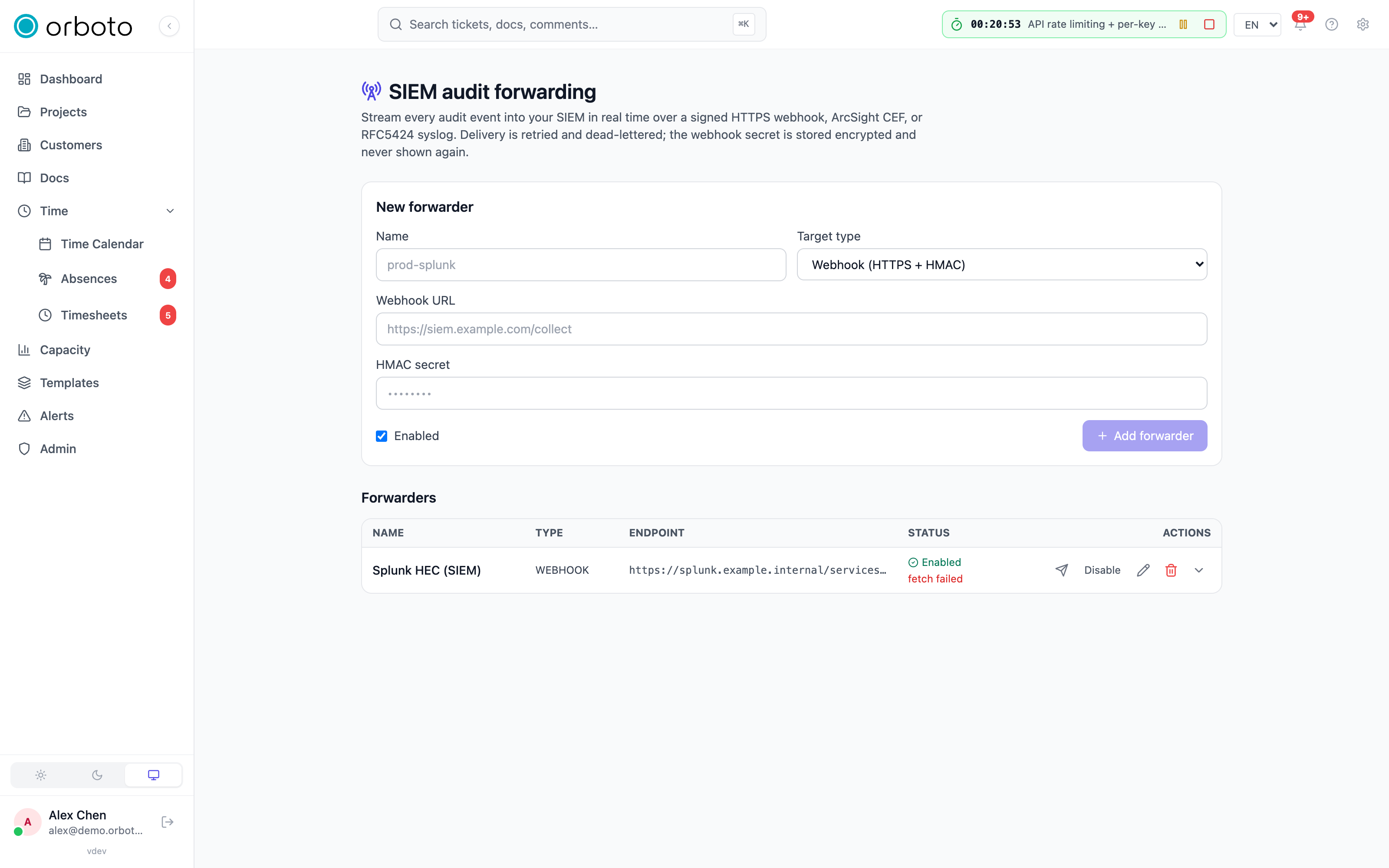
Admin -> Audit forwarding streams every audit event to your own SIEM in real time, independently of the periodic exports above - useful when security already lives in a central log platform and shouldn't require someone to remember to run an export.
Adding a forwarder
Click the add button and pick a type:
| Type | Transport | Format | Typical target |
|---|---|---|---|
| Webhook | HTTPS POST | JSON, HMAC-signed | Splunk HEC, Microsoft Sentinel, any HTTP log collector |
| CEF | TCP, optional TLS (default port 514) | ArcSight CEF line | ArcSight / classic CEF collectors |
| Syslog | TCP, optional TLS (default port 6514, TLS on by default) | RFC5424 line | rsyslog, syslog-ng, or any generic syslog SIEM |
For webhook, the endpoint field is a full https:// URL. For CEF/syslog,
it's host:port. An optional HMAC secret on a webhook forwarder signs
every POST with the same X-Orboto-Signature: sha256=<hex> scheme used
by regular webhooks - verify it on your
collector by recomputing the HMAC over the exact bytes received. The
secret itself is never returned by the API once saved (the form shows
only whether one is set); leaving it blank while editing keeps the
existing one.
Before you rely on it: test-send
Every forwarder has a test-send button (the paper-plane icon) that
delivers a synthetic siem.forwarder.test event through the exact same
delivery path a real event would take - use it right after saving a new
forwarder to confirm connectivity and correct parsing on the receiving
end before flipping it on for real traffic.
Delivery behavior
- Forwarding is fully decoupled from whatever action produced the audit event: the event is written to the audit log first, then handed off to the forwarding queue - a slow or completely offline SIEM never slows down or blocks the action that triggered it.
- Each (event, forwarder) pair retries with backoff, up to five attempts. A forwarder that already succeeded for a given event is skipped on any later retry pass, so retries can never double-deliver the same event.
- After the retry budget is exhausted, the attempt is recorded as
dead_letterrather than silently disappearing. - Expand any forwarder row to see its delivery log: every attempt with its outcome (success / failed / dead-letter), the attempt count, and the last error - the place to look when "is my SIEM actually getting everything?" needs a real answer instead of a guess.
- Toggle (enable/disable) and Edit work on any forwarder; Delete removes it and stops all further deliveries permanently.
Payload shapes
Webhook JSON body (inside no extra envelope - this IS the body):
{
  "id": "<audit row uuid>",
  "timestamp": "2026-06-20T10:00:00.000Z",
  "action": "ticket.updated",
  "actor": { "id": "<uuid|null>", "email": "alex@example.com" },
  "entity": { "type": "ticket", "id": "ACME-42" },
  "details": {},
  "source": "orboto"
}
CEF line shape: CEF:0|orboto|orboto|<version>|<action>|<action>|3|<extensions>,
where the extensions carry rt (event time, epoch ms), suser/suid
(actor email/id), cs1/cs2 (entity type/id labeled entityType/
entityId), and externalId (the audit row id). Severity is always 3.
Syslog uses PRI 134 (facility local0, severity info); the actor and
entity ride in RFC5424 STRUCTURED-DATA under the orboto@0 SD-ID, with
the full JSON event as the message body.
This is an Enterprise capability - it works on every tier with a soft-warn note on the License page rather than being blocked, so you can try it before deciding to upgrade.
Troubleshooting
- A signed export won't verify with the offline verifier - re-download it first; a partial or corrupted download breaks the hash chain the verifier checks. If a clean re-download still fails, treat it as a genuine tamper signal and cross-check against a live Verify integrity run on the same date range from the audit chain page.
- SIEM forwarder shows repeated dead-letters - test-send first to rule out a bad endpoint or wrong port (CEF defaults to 514, syslog to 6514); check the forwarder's delivery log for the last error, which usually points straight at a TLS handshake or authentication failure at the collector.
- Webhook forwarder's HMAC never matches on the receiving end - sign over the raw bytes received, exactly as the webhooks doc describes; the same trap applies here as for regular webhooks.
- An export generation seems stuck - large date ranges genuinely take time to build; check the History table's status before assuming it failed. If it's been stuck at "generating" far longer than the range would justify, retry with a narrower date range.