

Federation conflicts and user mapping
Merge ghost users created by federated events, and resolve edits that raced across two synced instances.
Once a federation link or a project pair is syncing (see Federation), two things need ongoing admin attention: identities that arrive from the peer without a matching local account, and edits that happened on both sides close enough together that one had to lose. Both surfaces live under Admin -> Federation, reachable from the buttons at the top of that page.
Federated ghost users
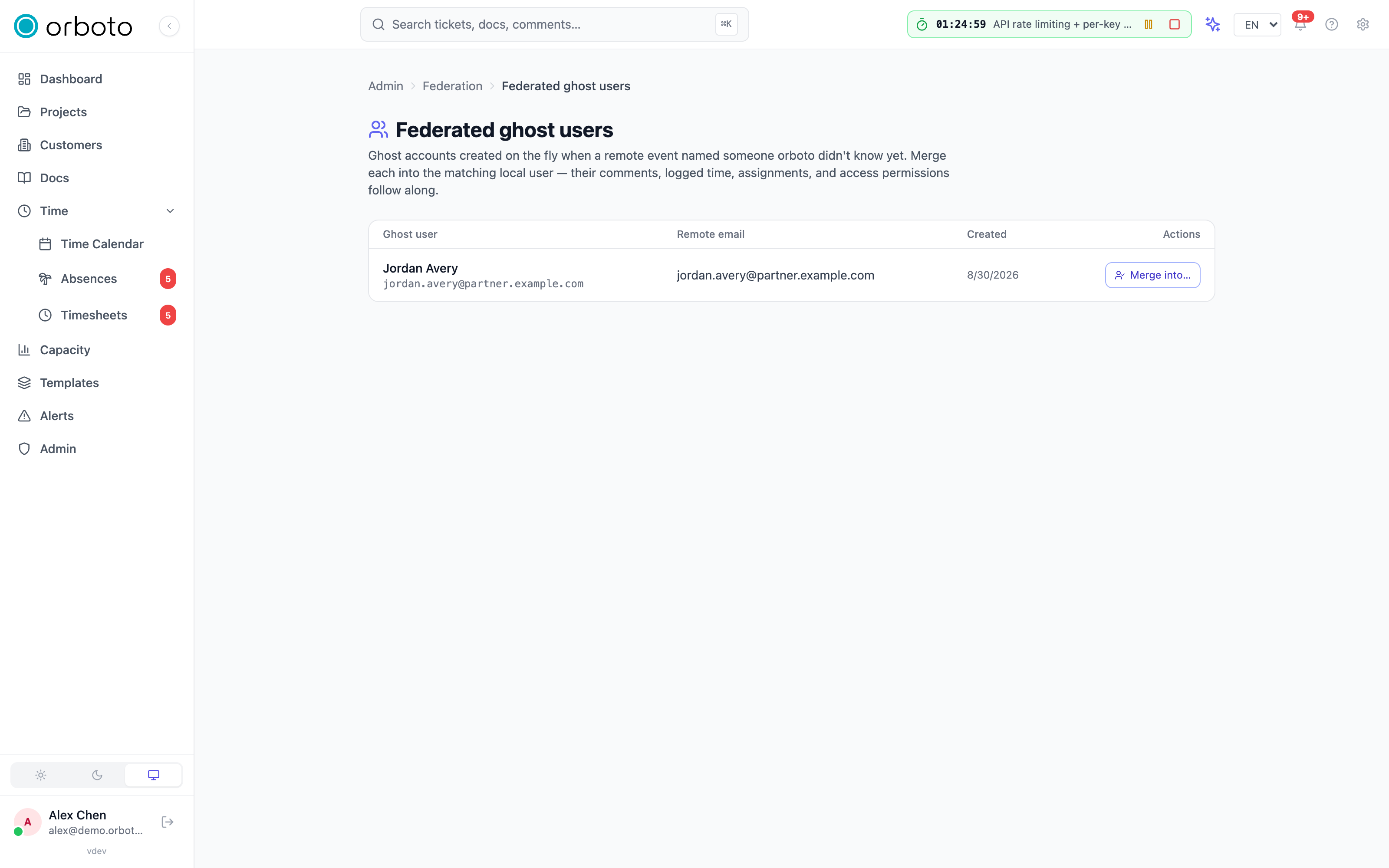
When a synced event names a user your instance has never seen - the author of a comment, the assignee of a ticket - orboto can't just drop the attribution, so it auto-creates a lightweight ghost user: a placeholder account with the peer's name and email, no password, no sign-in. This keeps every comment and time entry correctly attributed from the moment it arrives, instead of showing "unknown user" or silently reassigning it to whoever happened to run the sync.
Admin -> Federation -> Ghost users lists every ghost currently on your instance: its generated name, the remote email it came from, and when it was created. For each one:
- Click Merge into....
- Search for the real local user by name or email (type at least two characters to search).
- Pick them from the results list.
- Click Merge.
The merge rewrites every row the ghost owned onto the real user - a confirmation toast reports exactly how many of each: comments, time entries, ticket assignments, ticket-access ACL rows, project memberships, and the internal sync-user mapping (so future events from that same remote person resolve straight to the real account, no new ghost created). The ghost account itself is deleted once the rewrite completes.
When to merge: as soon as you recognize who a ghost actually is - a subcontractor who also has a real seat on your instance, a partner company's employee you're now collaborating with more directly. There's no downside to leaving a ghost unmerged (attribution stays correct either way); merging just consolidates it into one account going forward.
Ghost users never sign in
Added in v0.230.0 A ghost user cannot sign in to your instance in any way
and never holds a credential. Every sign-in and credential path refuses it:
password, password reset, sign-in link, passkey, SSO, API keys (also when an
admin tries to create or rotate one), the MCP setup wizard and OAuth
connections. An admin cannot send a ghost a reset link either: the request
answers 403 ("This account mirrors a user of a federated instance and cannot
sign in here. Ask an administrator to merge it into a local account.").
If the person should have a login on your instance, merge the ghost into their local account as described above; everything the ghost authored moves to the real account.
Updating to 0.230.0 closes any session, sign-in link, API key or OAuth connection an existing ghost user held, and clears an SSO binding it carried. Nothing needs to be done for this.
Sync conflicts
What counts as a conflict
Federation resolves concurrent edits with last-write-wins by
timestamp: when an incoming event's updatedAt is older than the
local row's own updatedAt, the incoming edit loses - your local copy
already had a newer change, so the incoming one is skipped rather than
overwriting it. That skip is what gets recorded as a conflict; nothing
is ever silently dropped - both the incoming and the local payload are
preserved for you to review.
How often this should happen
- A one-way link (source -> target) - essentially never; the consuming side never edits, so there's nothing for it to conflict with.
- A bidirectional link or project pair, normal use - a handful a week is unremarkable; usually two people editing the same ticket or comment on both sides within moments of each other.
- After a network split or an extended peer outage - a batch on reconnection as both sides' backlogs re-converge, tapering off quickly.
- Dozens or more per day, sustained - something is wrong; work through the checklist below rather than dismissing them one by one.
Working the queue
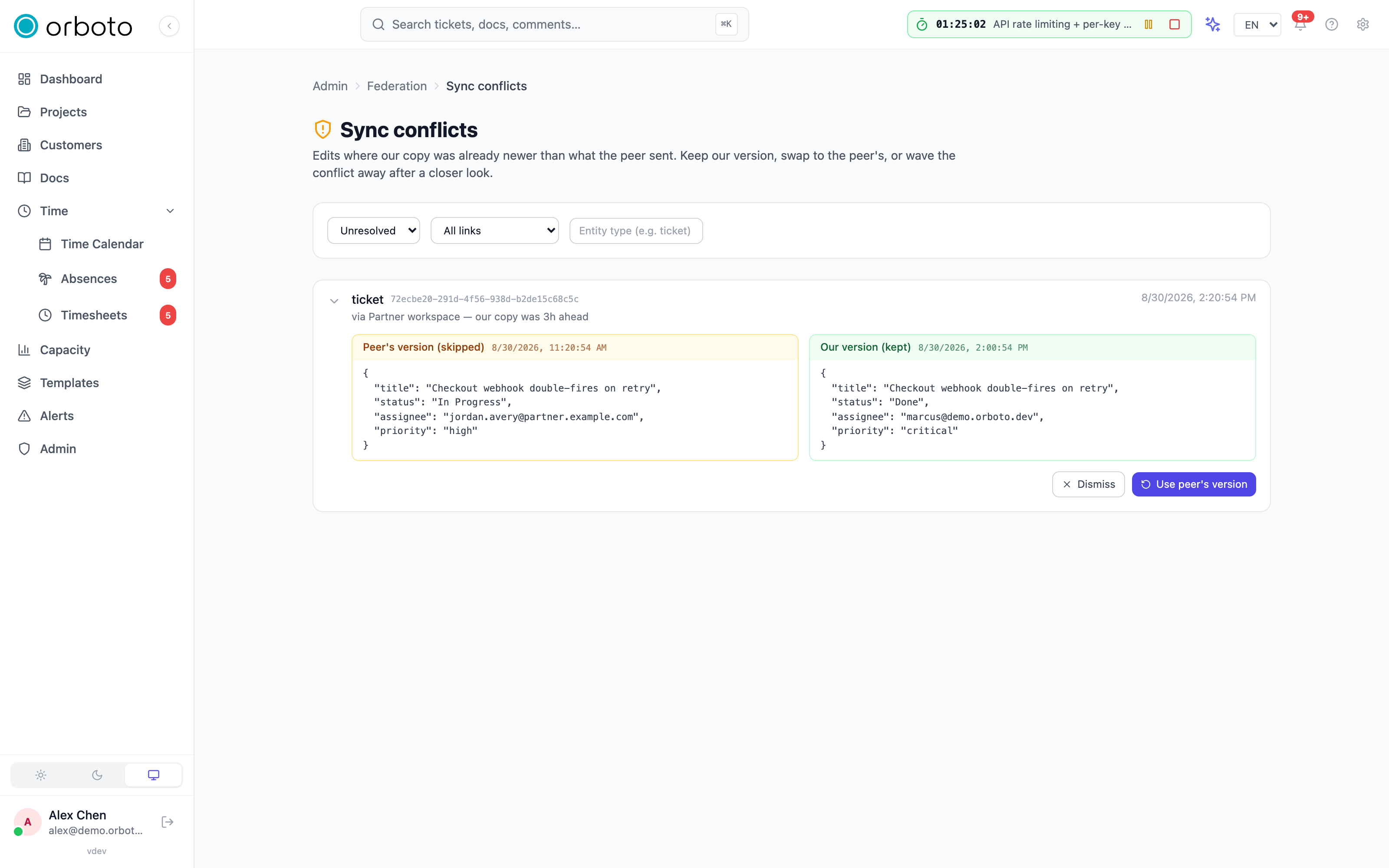
Admin -> Federation -> Conflicts lists conflicts filtered to
Unresolved by default. Filter further by link, by project federation
pair (once you have any), or by entity type (e.g. ticket). Click a row
to expand it and see both payloads side by side: the peer's version
(labeled "skipped", in amber, with its timestamp) and your local version
(labeled "kept", in green, with its own timestamp) - the raw JSON each
side held at the moment of the conflict.
For each unresolved row, decide:
- Dismiss - the two payloads are effectively the same content (a near-simultaneous edit that raced through the sync loop, or the meaningful fields already match). No action needed; marks the row resolved with no data change.
- Use peer's version (re-apply) - the incoming payload should have won - the remote side is the canonical source for this data, or its edit was actually the more complete/correct one. This overwrites your local row with the peer's payload and marks the row resolved.
- Neither fits cleanly (each side has a piece of the right answer) - edit the local row by hand to the state you actually want, then Dismiss the conflict (the manual edit is now the record; dismissing just closes the queue item).
A resolved row stays visible under the Resolved or All filter with its resolution shown, for later audit.
Preventing conflicts in the first place
- On a bidirectional link, agree a simple rule with the other side: edits to a given shared ticket happen on ONE side at a time when possible. Keep both hosts' clocks tightly NTP-synced - skewed clocks can make a genuinely correct, later edit look older than it was and lose a conflict it should have won.
- For a ticket you know is about to be touched on both sides at once, use orboto's realtime in-instance updates (if both people are on the same instance) or just say so in chat first - federation replication has the link's poll-interval latency, it isn't instant.
- If one side is authoritative in practice more often than not, consider
switching that link from
bidirectionaltosource/target- demoting concurrent edits from "occasional silent loss to review" into "a workflow rule that's enforced by the system", which is easier to reason about at scale.
Troubleshooting
- A conflict keeps reappearing for the same ticket - both sides are likely still actively editing it around the same time on every sync cycle; agree who edits it going forward, or temporarily pause the link while you coordinate the change together.
- Sudden spike in conflicts across many entities at once - check NTP sync on both hosts first; a clock that jumped (VM resume, manual change) can make every subsequent conflict decision wrong until it's corrected. The second most common cause is a bulk import running on one side while the other stayed live and editable - pause the link during large imports if this keeps recurring.
- "Use peer's version" doesn't seem to have taken effect - the mask or entity scope on the link may be excluding the field you expected to change; re-apply overwrites what the sync pipeline is allowed to carry, not fields that never cross at all.
- A ghost user's merge target search finds nobody - search matches by name or email; if the real account uses a different email than the one the remote side sent, search by name instead, or check the account actually exists on this instance yet.
Federation
Sync projects across separate orboto instances, or share a single project with a partner org - concepts, security model, and a full setup walkthrough.
System settings
Every workspace-wide switch, grouped and explained: access, locale, outbound email, project defaults, workforce cost, and kill switches.