

Capacity planning
Compare planned and logged work against what your team can actually deliver, person by person.
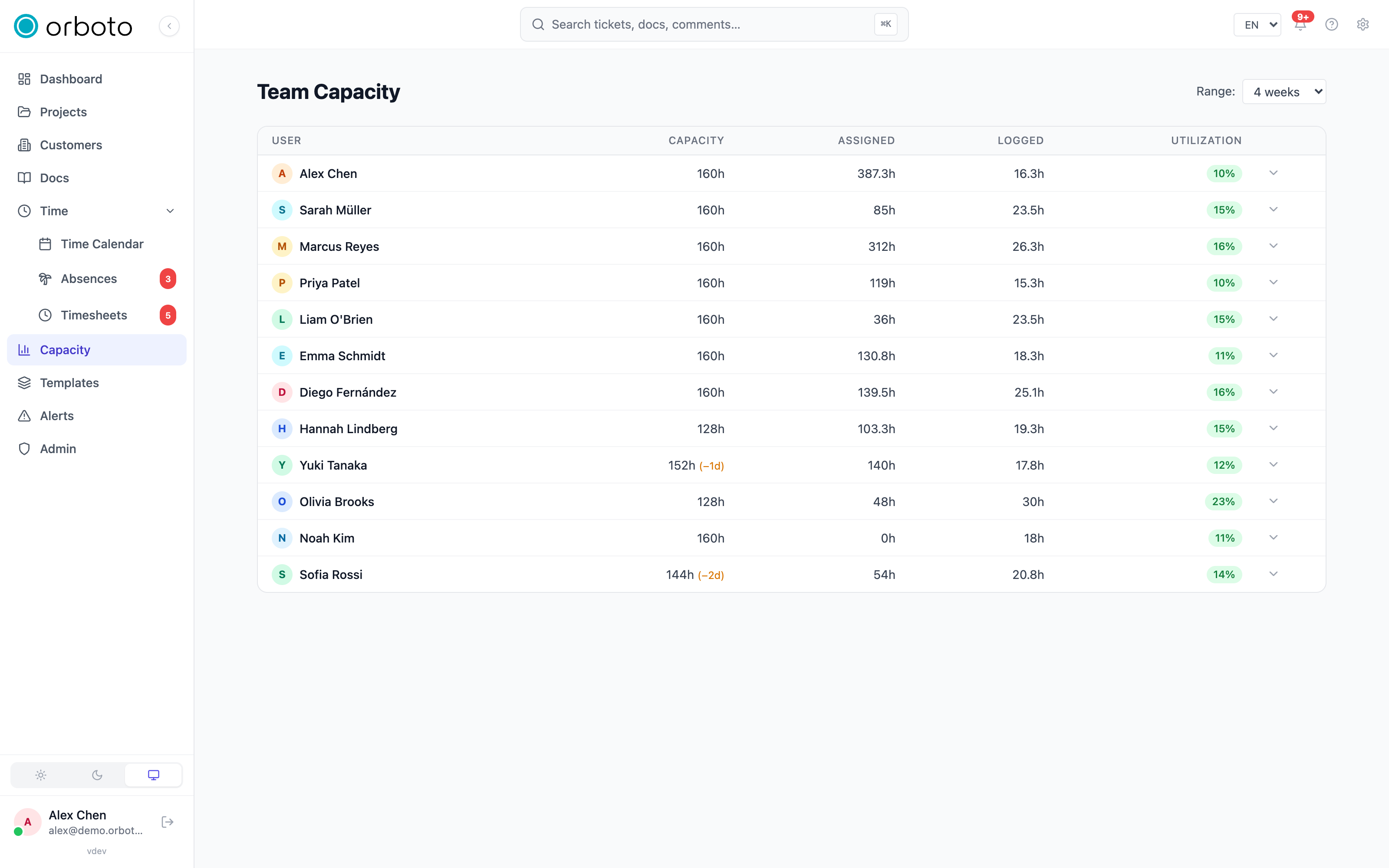
Capacity answers "can we actually do all this in the time planned?" - it compares each person's available working time against what's assigned to them and what they've actually logged.
How capacity is computed
Each member has a work schedule (working days and hours per day), editable per user from their profile in the admin area. From that, orboto derives available hours for any date range you pick.
Non-working time is subtracted automatically: weekends, public holidays, company closures, and approved absences all reduce capacity. This is the same blocked-days source that drives the Time Calendar, so the two views never disagree with each other.
Reading the view
Open Capacity in the sidebar.
- Pick a range: 1, 2, 4, or 12 weeks starting from the current week.
- For each person, the table shows:
- Capacity - available hours for the range, with blocked days (holidays, closures, absences) called out separately, e.g.
160h (−2d). - Assigned - the sum of estimates on every open (not-done) ticket currently assigned to them, across projects you can see - not limited to the selected range.
- Logged - actual time entries recorded inside the range.
- Utilization - logged hours as a percentage of capacity, color-coded: green under 50% (room to spare), yellow in the healthy middle, red over 100% (overbooked).
- Capacity - available hours for the range, with blocked days (holidays, closures, absences) called out separately, e.g.
- Expand a row (the chevron) to see the person's logged hours broken down per project - useful when someone is overbooked and you need to know which project to pull work from.
Who you can see. A super-admin sees every active user. Everyone else sees only people who share at least one project with them - capacity is scoped to your own visibility, never the whole workspace.
Acting on it
- Rebalance by reassigning tickets or moving due dates for anyone showing red.
- If someone is systematically overbooked, set up a User Over Capacity alert rule so you're notified automatically instead of having to check the page - see Milestones and alerts.
Troubleshooting
Someone's capacity looks lower than expected. Check the (−Nd) marker next to their capacity figure - it means N working days in the range are blocked by a holiday, company closure, or an approved absence. That's expected, not a bug.
A person is missing from the table entirely. You only see people who share a project with you (unless you're a super-admin). If you expect to see them, confirm you're both members of at least one common project.
Assigned hours look too high or too low. Assigned sums the estimates on every open ticket assigned to the person right now, regardless of the date range you picked - it is not scoped to the window like Logged is. A ticket with no estimate contributes nothing to this column even if work is happening on it, and a closed (Done) ticket drops out of the sum entirely.