

Critical path
See which tickets actually control your delivery date and how much slack every other ticket has, computed from ticket dependencies.
The critical path is the longest chain of dependent tasks in a plan - the chain that determines the earliest a project can possibly finish. Any task on that chain that slips pushes the whole finish date back by the same amount. Every task not on that chain has some amount of slack (also called float): room to run late without affecting the finish date, because something else is already the limiting factor.
A small example. Say a project has two paths: ACME-1 → ACME-2 → ACME-3, three tickets that must happen in order and together take 6 days, and a separate ticket ACME-4 that takes 2 days and isn't blocked by anything. The project can't finish before day 6, no matter how fast ACME-4 goes - so ACME-1, ACME-2, and ACME-3 are the critical path, each with zero slack, while ACME-4 has 4 days of slack: it could start up to 4 days late and still not be the reason the project runs over.
This technique - working out the longest chain and how much slack everything else has - is called the Critical Path Method (CPM). orboto computes it automatically from your ticket dependencies.
What you need before this is useful
Critical path is only meaningful once a project has:
- Dependencies between tickets - use the "blocks / blocked by" relationship in a ticket's Dependencies section. Without any dependencies, there's no chain to compute.
- Estimates on tickets - used to size how long each ticket occupies in the schedule (see below for what happens without one).
How orboto turns estimates into a schedule
CPM needs a duration for every ticket. orboto converts each ticket's estimate into working days at 8 hours per day, and rounds up to at least 1 day - so even an unestimated ticket still occupies a one-day slot in the schedule rather than vanishing from it entirely. All the scheduling math works in whole working-day units; turning those into actual calendar dates (skipping weekends and holidays) is the Gantt's job.
For each ticket, orboto computes four numbers, all as working-day offsets from the start of the window being scheduled:
- ES / EF (Earliest Start / Earliest Finish) - the soonest the ticket could start and finish, found by walking forward from its dependencies.
- LS / LF (Latest Start / Latest Finish) - the latest it could start and finish without delaying the project, found by walking backward from the finish date.
Slack (or float) is the gap between those: LS - ES. A ticket with zero slack is on the critical path - any delay there delays everything after it. A ticket with slack can run that many days late without changing the finish date.
Where to see it
Gantt view
Open a project's Gantt view and select Critical path in the toolbar. With it on:
- Tickets on the critical path are highlighted (a red outline on the bar).
- Hovering a bar shows either "critical (0 slack)" or "slack: N day(s)".
- Dependency arrows on the critical path are drawn in red and full opacity; everything else fades so the chain that matters stands out.
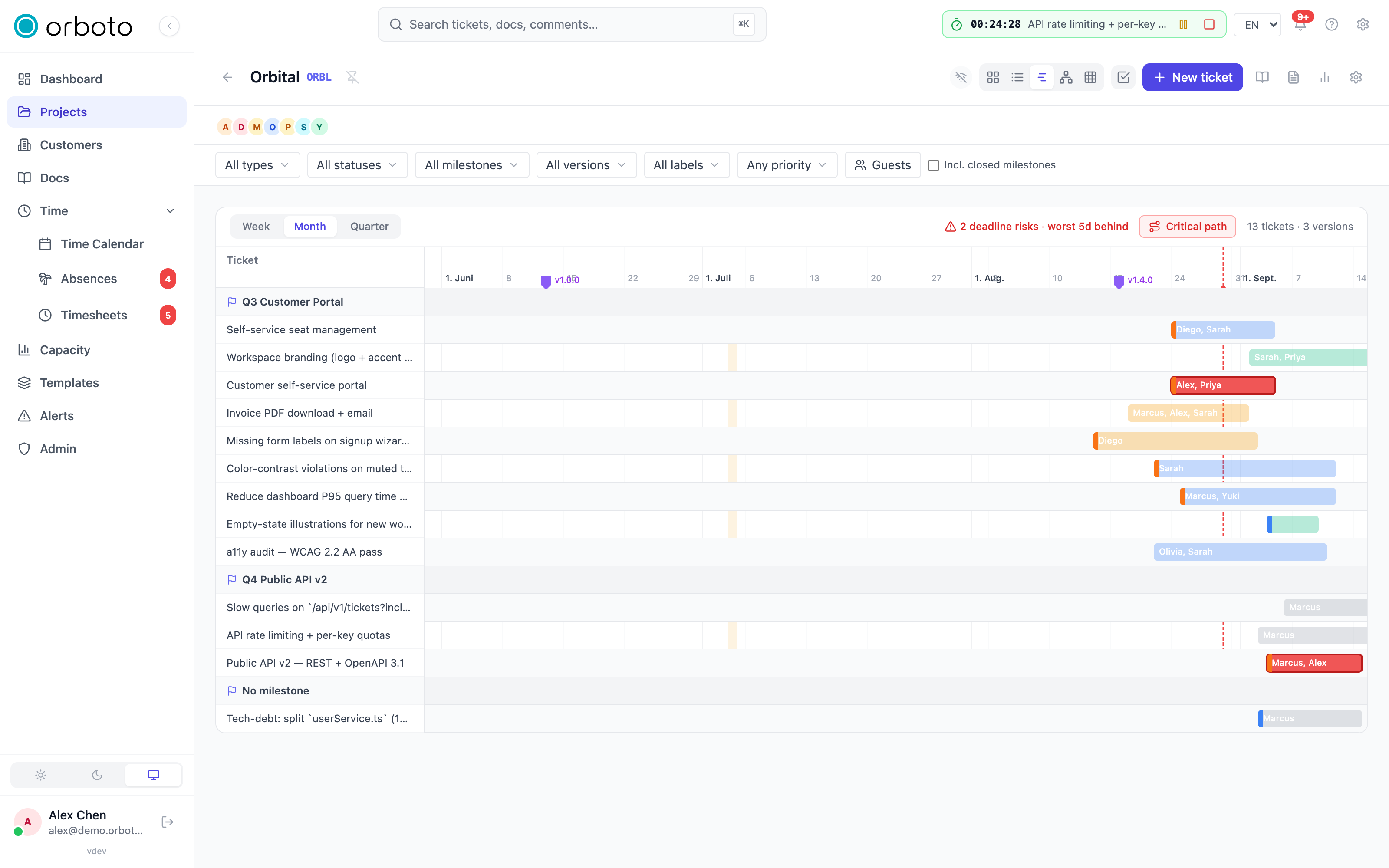
The same milestone filter you use elsewhere on the Gantt scopes the critical-path calculation too - turn it on to see the critical path for just one milestone's tickets, with dependencies pointing outside that milestone ignored rather than breaking the calculation.
Network diagram
Select the Network icon in the view switcher to open the Network diagram - a node-and-edge layout with one box per ticket, positioned by dependency order, showing the full CPM detail directly:
- Each box shows the ticket's key, title, and duration in days.
- ES, EF, LS, and LF are printed in the box's corners.
- A slack N or critical label sits in the middle, colored green for slack and red for critical.
- Edges (dependency arrows) between critical-path tickets are drawn thicker and in red; others are thin and grey.
- Pan by dragging, zoom with the scroll wheel or the zoom buttons, and use Fit to view to frame everything at once.
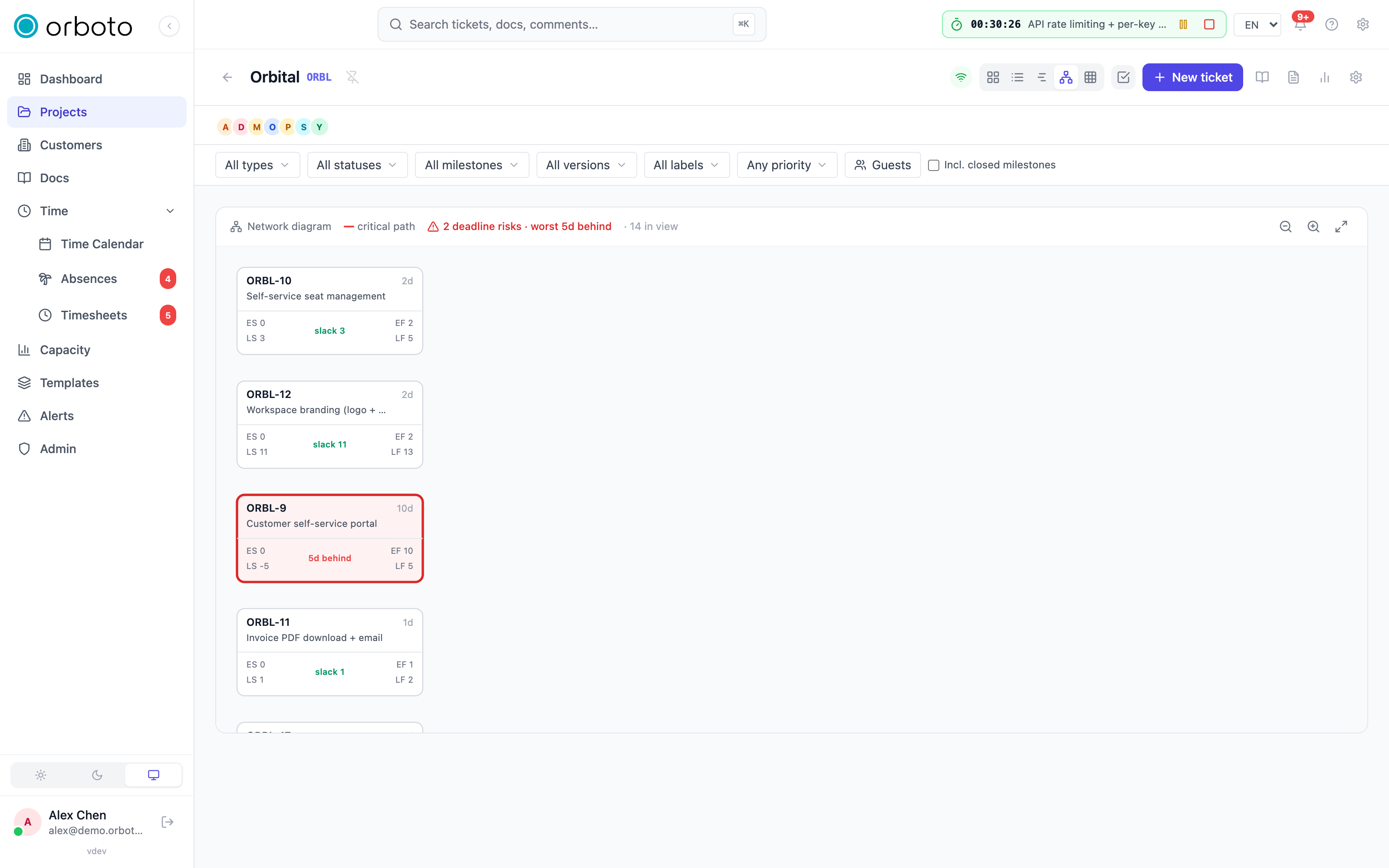
Like the Gantt, the Network diagram respects the project's current milestone filter.
Deadline-aware float
By default, slack is measured against the whole project's finish date - so a chain that finishes well before the last ticket looks comfortably relaxed, even if it has its own hard due date it's actually going to miss. orboto accounts for this: each ticket's effective deadline is the earlier of its own due date and its milestone's due date (whichever is tighter), and that deadline feeds into the same backward pass that computes LS/LF.
When a chain can't realistically meet that deadline, its slack goes negative - it's already behind, not just tight - and every ticket on that chain is flagged as a deadline risk. Both the Gantt and Network views highlight these tickets in red, with a summary badge like "3 deadline risks · worst 2d behind" and a tooltip on the affected ticket giving the exact due date and the shortfall in working days. A ticket with a comfortable deadline (later than the schedule would already deliver it) is unaffected - its slack is unchanged.
Dependency cycles
CPM has no answer for a cyclic dependency (ticket A blocks B, which blocks A). If your dependencies contain a cycle, orboto can't compute a critical path at all - instead of a highlighted chain, both the Gantt and the Network diagram report the cycle directly, naming the tickets tangled in it, and note that the critical path is undefined until it's broken. Remove one of the dependencies in the cycle and the calculation resolves immediately.
What you're allowed to see
The critical path respects the same visibility rules as everything else in a project: you need to be a project member, private tickets you can't see (and any dependency edges touching them) are excluded from the calculation, and external guests only see tickets in milestones they've been given access to. The path and slack figures you get always reflect only the tickets you're allowed to see - not the project's full dependency graph if it's bigger than your view of it.
Troubleshooting
The Critical path toggle doesn't seem to do anything. It only has something to highlight once tickets have dependencies on each other - a project with no "blocks / blocked by" links has no chain to compute. Add dependencies first.
A ticket I expected to be critical shows slack instead. Check whether it's missing a dependency that should connect it to the real chain, or whether an unrelated, longer chain elsewhere in the project is the actual constraint - the critical path is always the single longest chain, not every chain that looks important.
The Network diagram shows a cycle message instead of a path. Two or more tickets depend on each other in a loop. The message names the tickets involved - remove one dependency between them to break the cycle.
A ticket's slack looks too generous given its due date. Confirm the due date is actually set on the ticket (or its milestone) - slack is only deadline-aware for tickets with an effective deadline; without one, slack is measured against the project's overall finish date instead.
An unestimated ticket is taking up more schedule time than I expected. Every ticket occupies at least one working day in the schedule, even with no estimate recorded - add an estimate if you want its duration to reflect actual expected effort instead of the one-day floor.