

RACI roles
Assign Responsible, Accountable, Consulted and Informed roles per ticket, with exactly one enforced owner for every piece of work.
RACI is a way of writing down, explicitly, who does what on a piece of work - instead of leaving it implied by who happens to be assigned. The name is an acronym for four roles:
- Responsible - does the work.
- Accountable - owns the outcome and signs off on it. Exactly one person, always.
- Consulted - gives input before a decision is made (two-way).
- Informed - kept in the loop after the fact (one-way).
The point of RACI is avoiding the classic failure mode where three people are "kind of" assigned to something and each assumes someone else has final say. Naming exactly one Accountable person ("one throat to choke") forces that ambiguity out into the open.
A small example. Say ticket ACME-42, "Migrate billing to the new payment provider," involves two engineers doing the actual work, an engineering lead who has to sign off before it ships, a security reviewer whose input is needed beforehand, and an account manager who just needs to know when it's live. In RACI terms: the two engineers are R, the lead is A, the security reviewer is C, and the account manager is I.
How this maps onto orboto
RACI in orboto is an optional layer on top of assignees, not a replacement for them:
- R and A together are exactly the ticket's existing assignees - anyone you assign to a ticket already has one of those two roles.
- C and I are new: an advisory layer that doesn't change who's assigned, but does change who gets notified and who's expected to weigh in.
Turning RACI on for a project
RACI is off by default per project. Open Settings → General and check Enable RACI roles (requires project:edit).
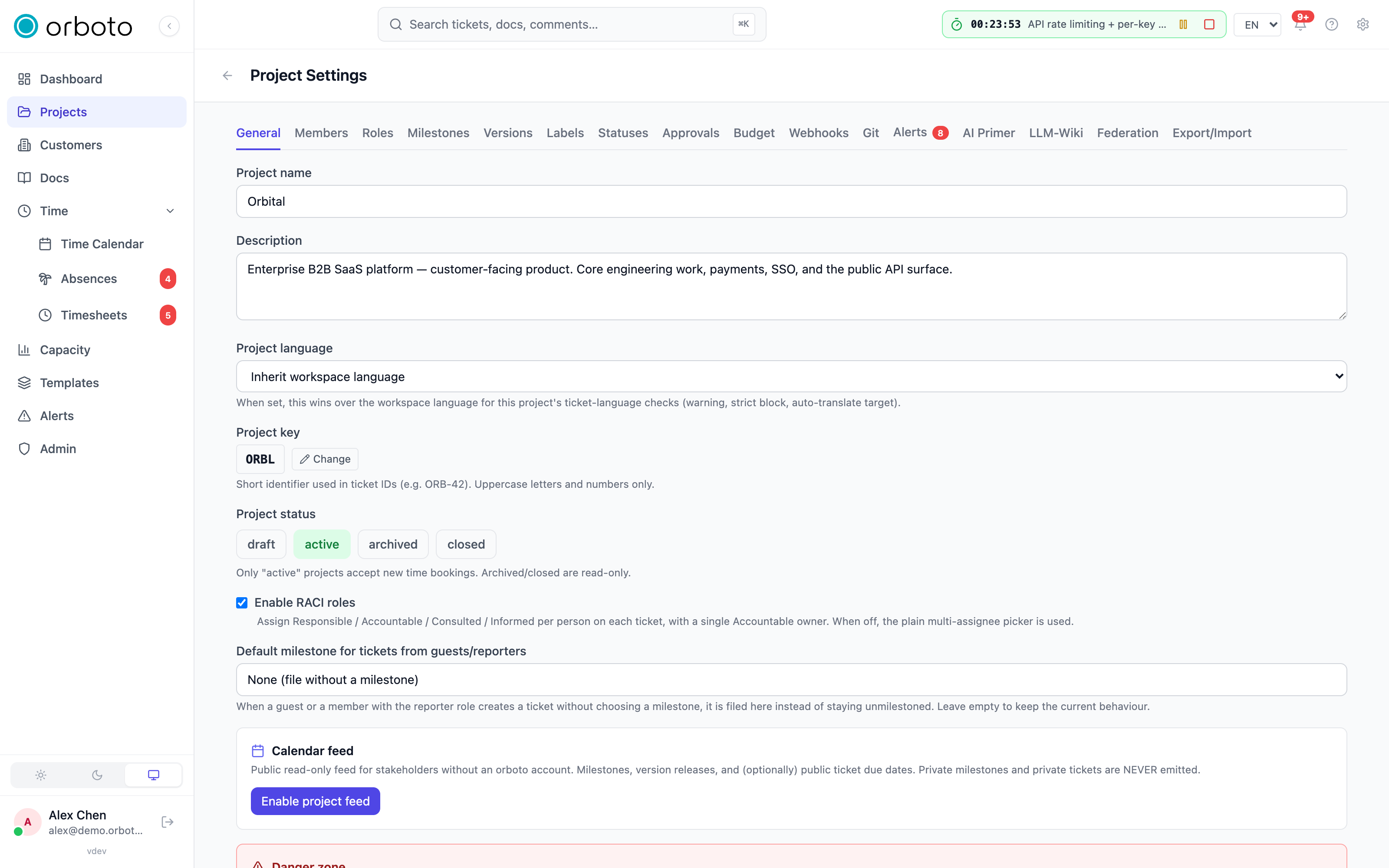
While it's off, the ticket detail panel shows the plain multi-assignee picker and there's no RACI view in the project - zero extra surface for projects that don't want it. Turning it on switches every ticket's people-picker into the role editor described below, and adds a RACI matrix view to the project's view switcher.
Setting roles on a ticket
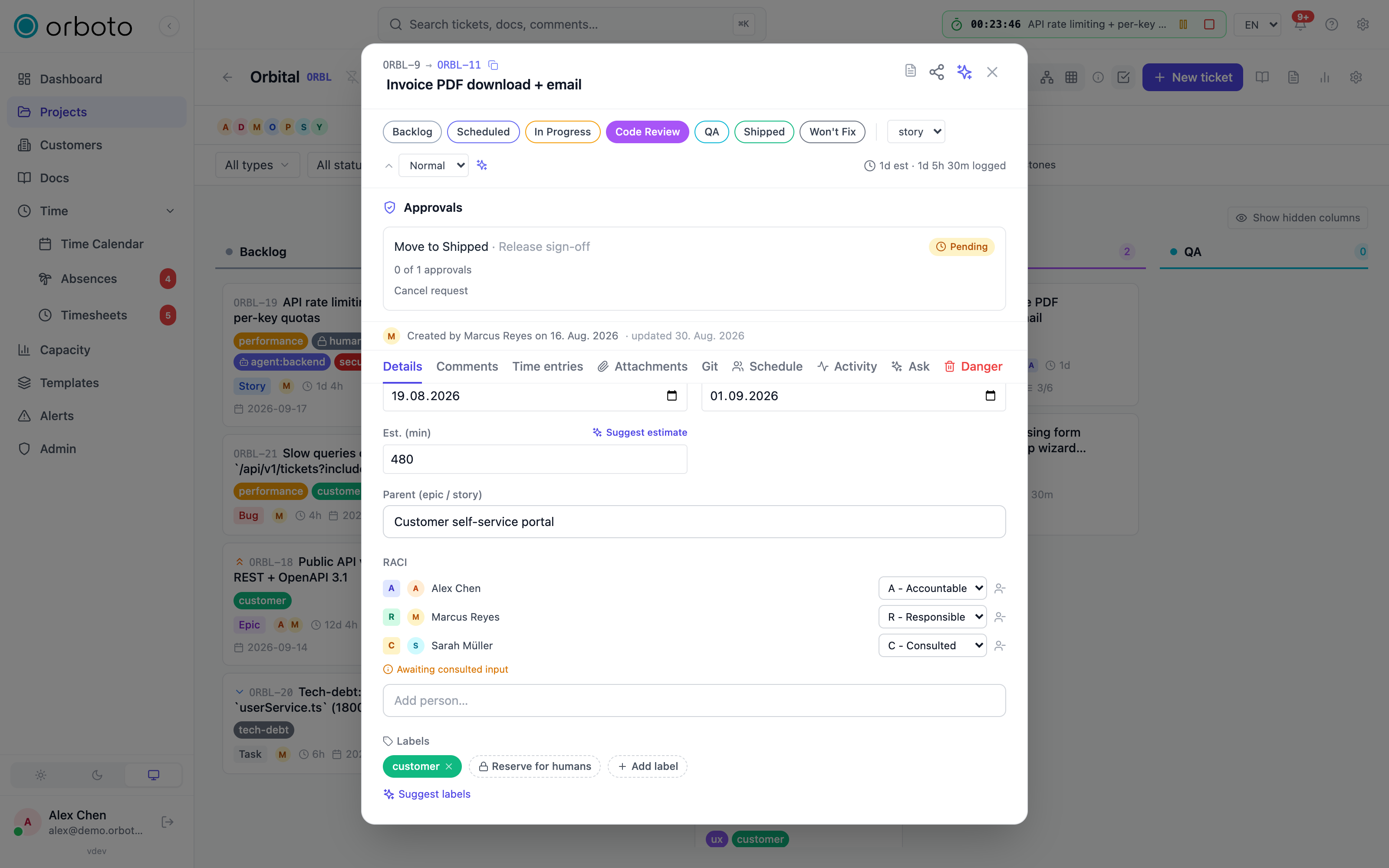
Once RACI is enabled, open a ticket and look at its RACI section (where the assignee picker used to be). Each person on the ticket shows as a row: a colored single-letter badge (A/R/C/I), their avatar and name, and - if you have the ticket:manage_raci permission - a dropdown to change their role and a remove button.
- Add a person using the search box at the bottom (Add person…); they're added as Responsible by default, and you can change that afterward.
- Change a role from the dropdown next to their name.
- Remove a person with the button next to their row.
Rows are always shown Accountable first, then Responsible, Consulted, Informed.
The single-Accountable rule
At most one person can hold A on a ticket, and orboto enforces this on the server, not just in the UI. Trying to make a second person Accountable is rejected with an error naming who currently holds it. To hand accountability to someone else, change the current Accountable's role first (to R, C, or I, or remove them), then set the new person to A.
The "awaiting consulted input" hint
If anyone on the ticket holds C, a small amber hint appears: "Awaiting consulted input." This is a reminder, not a gate - orboto doesn't block you from closing a ticket just because a Consulted person hasn't commented. If your team needs a hard requirement like that, an approval gate can require sign-off from a specific RACI role before a ticket enters a given status.
Where it shows up elsewhere
A ticket with an Accountable person shows a small A badge on its Kanban card, so you can spot ownership without opening the ticket. Anywhere else a ticket's assignees are listed, RACI-enabled tickets carry the full role breakdown alongside them.
The RACI matrix
Once RACI is enabled, a grid icon appears in the project's view switcher (next to Kanban, List, Gantt, and Network) - select it to open the RACI matrix: rows are tickets, columns are project members, and each cell shows that person's role on that ticket.
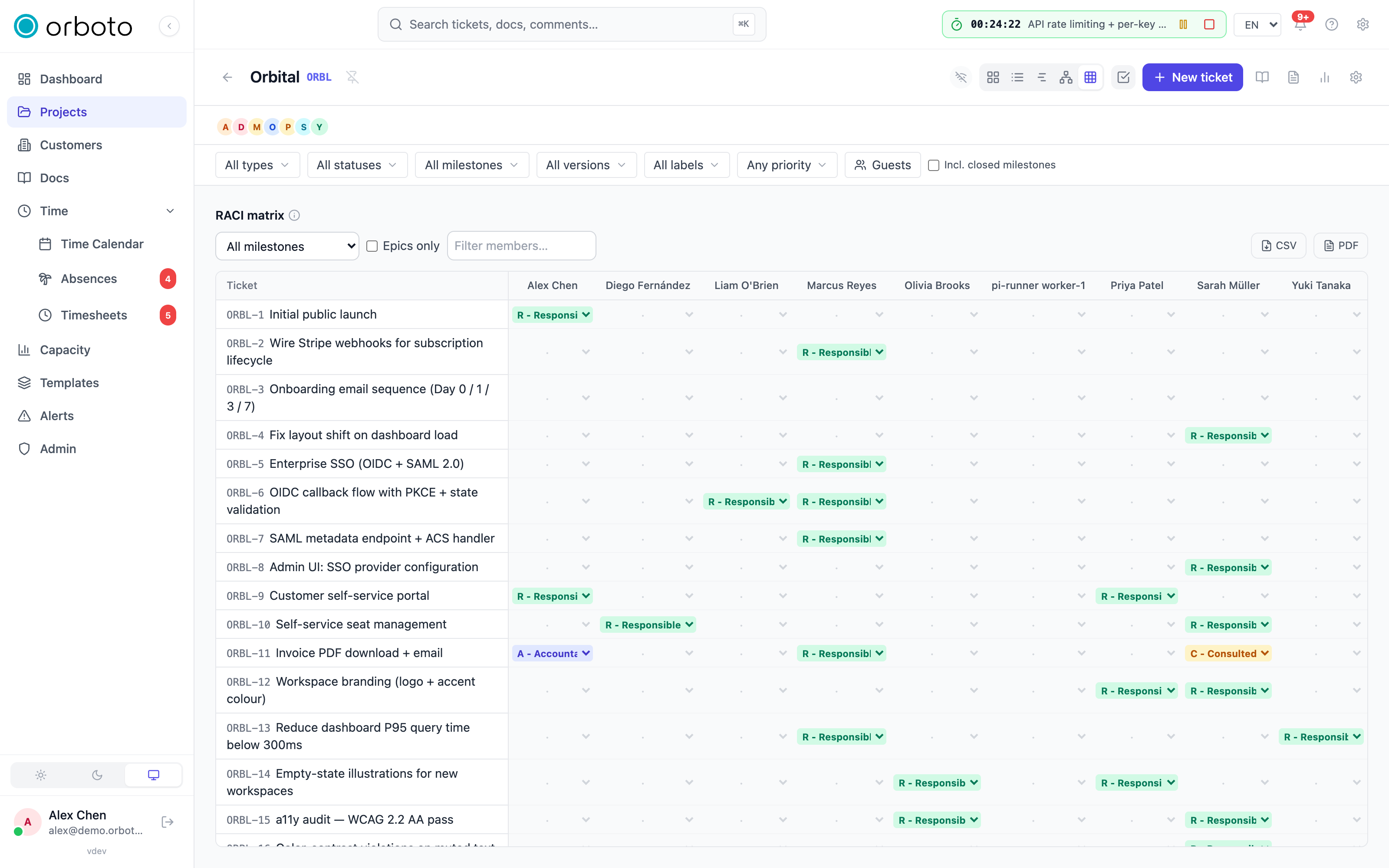
- Filter by milestone - the dropdown at the top defaults to all milestones.
- Epics only - narrows the rows to epic-type tickets, useful for a high-level ownership review.
- Filter members - a text box that narrows the columns by name.
- Cells are editable in place (with the same permission as the ticket-level editor) - pick a role directly from the matrix instead of opening each ticket.
- Select a ticket's row to open it.
- Export the current view (respecting your filters) as CSV or PDF - the format a status deck or a PMO report typically wants.
If you land on the matrix for a project that hasn't enabled RACI, it shows a short explanation instead of an empty table, pointing you back to the Settings toggle.
Notifications
Marking someone Informed puts them on the ticket's notification list, exactly the way being an assignee does - they'll be notified of changes according to their own notification preferences (for example, whether "ticket status changed" notifications are on for them). Removing the I role takes them off that list.
Permissions
Setting or changing RACI roles requires ticket:manage_raci, a permission separate from general ticket editing - so a workspace can let a lead or PMO own responsibility assignment without giving them full ticket-edit rights, or restrict who can reassign accountability. By default, any role that has ticket-edit rights also has this one, so nothing changes for existing roles until an admin deliberately narrows it. Reading a ticket's RACI roles and the matrix follows the same visibility as the ticket itself - no separate permission is needed just to look.
Troubleshooting
I don't see the RACI matrix icon in the view switcher. RACI hasn't been enabled for this project - a project admin turns it on in Settings → General.
I can't change anyone's RACI role. You need the ticket:manage_raci permission; without it you see roles read-only.
I tried to make someone Accountable and got an error. Someone else already holds it - the error names them. Change or remove their role first, then set the new Accountable.
A Consulted person hasn't responded and I want to close the ticket anyway. That's allowed - Consulted is advisory only. If you need it to be a hard requirement, set up an approval gate that requires the Consulted role's sign-off before the ticket can enter that status.