

Workflows and statuses
What a ticket's status is made of, the five categories every custom status maps to, and what actually controls whether a ticket can move.
Every ticket has a status - a word or short phrase describing where it stands: "To Do", "In Progress", "Waiting on Customer", "Deployed", whatever fits how your team talks about work. The set of statuses a project uses, in the order they're worked through, is often called its workflow. This page explains what a status is built from, how to design a project's own set of statuses, and what really controls whether a ticket can move from one to another.
What a status is made of
A status has a name you choose freely (any text that fits your process), plus a few properties that make it behave correctly everywhere else in orboto:
- Color - shown on the ticket card and the Kanban column header.
- Category - one of five fixed buckets baked into orboto (see below). This is the part that isn't free-form, and it's what analytics, alerts, and progress tracking actually key off - not the name.
- Terminal - marks the status as a closing state. Moving a ticket into a terminal status stamps its
closed_attimestamp. - Hidden on Kanban by default - keeps a column off the board until someone opts in to see it.
The five categories
Every status - default or custom - belongs to exactly one category. Naming a status whatever you like ("QA", "Blocked", "Deployed") doesn't change the underlying bucket it reports into:
| Category | Meaning | What it drives |
|---|---|---|
| To Do | Not yet started | Counts as open in burndowns |
| In Progress | Actively being worked on | - |
| In Review | Done, pending review or QA | - |
| Done | Completed and delivered | Counts toward progress %, sets closed_at, counts in velocity and cycle-time |
| Won't Fix | Closed without being delivered (scope removed, duplicate, no longer needed) | Also closes the ticket and sets closed_at, but is excluded from velocity and cycle-time so abandoned work never inflates "how fast are we shipping" |
Done and Won't Fix are both terminal categories (the ticket is closed either way), but only Done counts as delivered. That split exists so a project that closes a lot of tickets as out-of-scope doesn't look artificially fast or slow in analytics.
You can add as many custom statuses as you want - a "QA" status between In Progress and Done, a "Waiting on Customer" status for a support queue - as long as each one is assigned to one of these five categories.
Where to configure statuses
Open a project's Settings → Statuses tab. Changing anything here requires the project:edit permission.
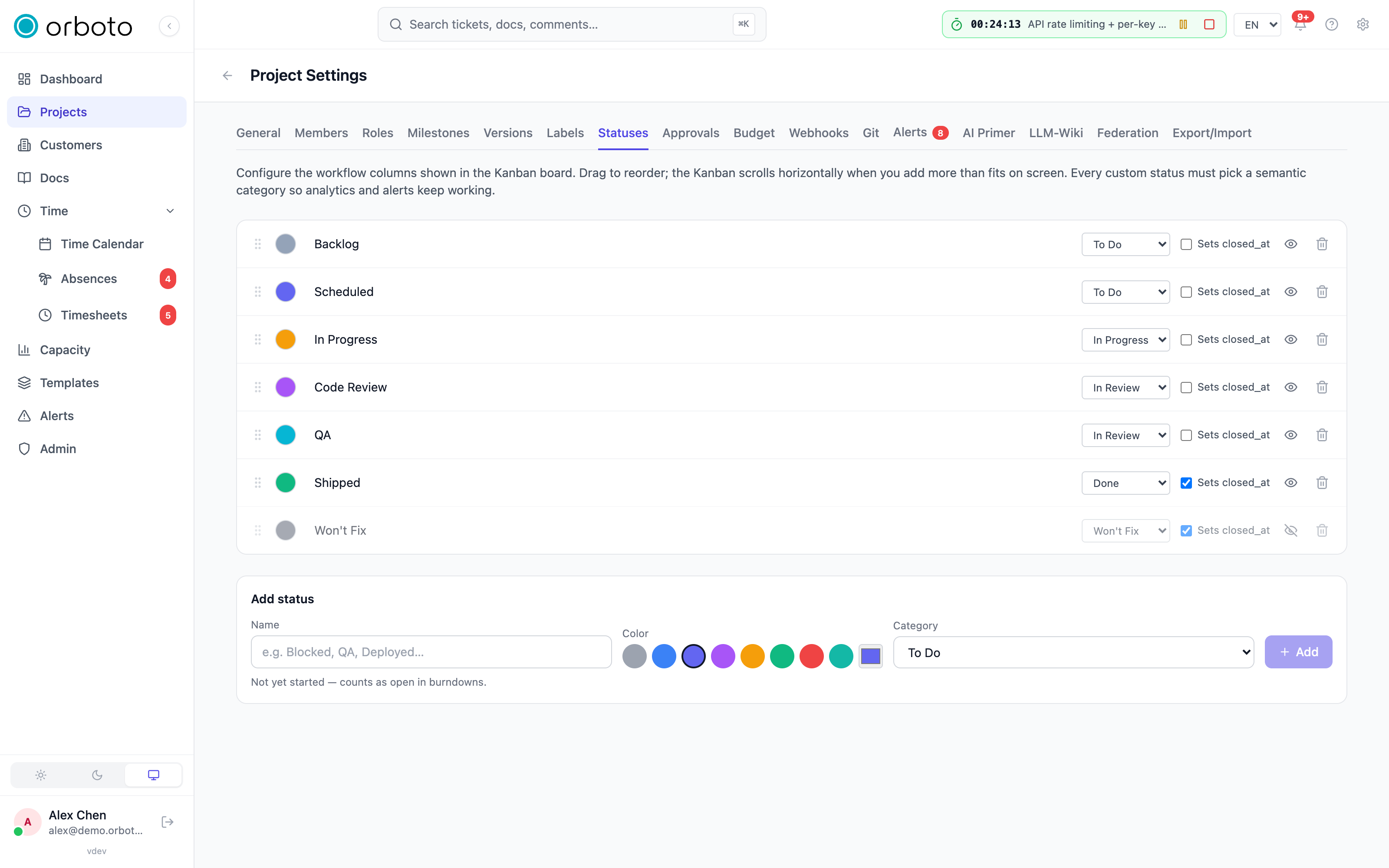
The tab's own explanation sums it up: it configures the workflow columns shown on the Kanban board, you can drag rows to reorder them, and every status must pick a category so analytics and alerts keep working.
Default statuses on a new project
Every new project starts with five statuses:
| Name | Category | Terminal | Hidden on Kanban |
|---|---|---|---|
| To Do | To Do | No | No |
| In Progress | In Progress | No | No |
| In Review | In Review | No | No |
| Done | Done | Yes | No |
| Won't Fix | Won't Fix | Yes | Yes |
Won't Fix starts hidden on the board so a fresh project's Kanban isn't cluttered with a column most tickets never visit - toggle it visible any time (see below).
Adding a status
In the Add status form, enter a name, pick a color, and choose a category. New statuses are appended to the end of the list. Whether the status is terminal is set automatically from the category you pick (Done and Won't Fix are terminal by definition) - you can flip it manually afterward if you need a non-default combination.
Status names must be unique within a project; trying to add or rename to a name that's already taken is rejected.
Editing a status
Each row in the list is editable in place:
- Color - select the swatch to open a picker with eight presets plus a free-form hex picker.
- Name - select the text and type; saves when you click away.
- Category - change it from the dropdown at any time. If tickets are currently sitting in that status, they stay put - only their category-derived behavior (progress %, whether they count as closed) changes immediately.
- Terminal ("Sets closed_at") - a checkbox you can toggle independently of category.
- Hide/show on Kanban - the eye icon toggles whether the column appears on the board by default.
Reordering statuses
Drag a row by its grip handle. The order you set here is the left-to-right order of columns on the Kanban board.
Deleting a status
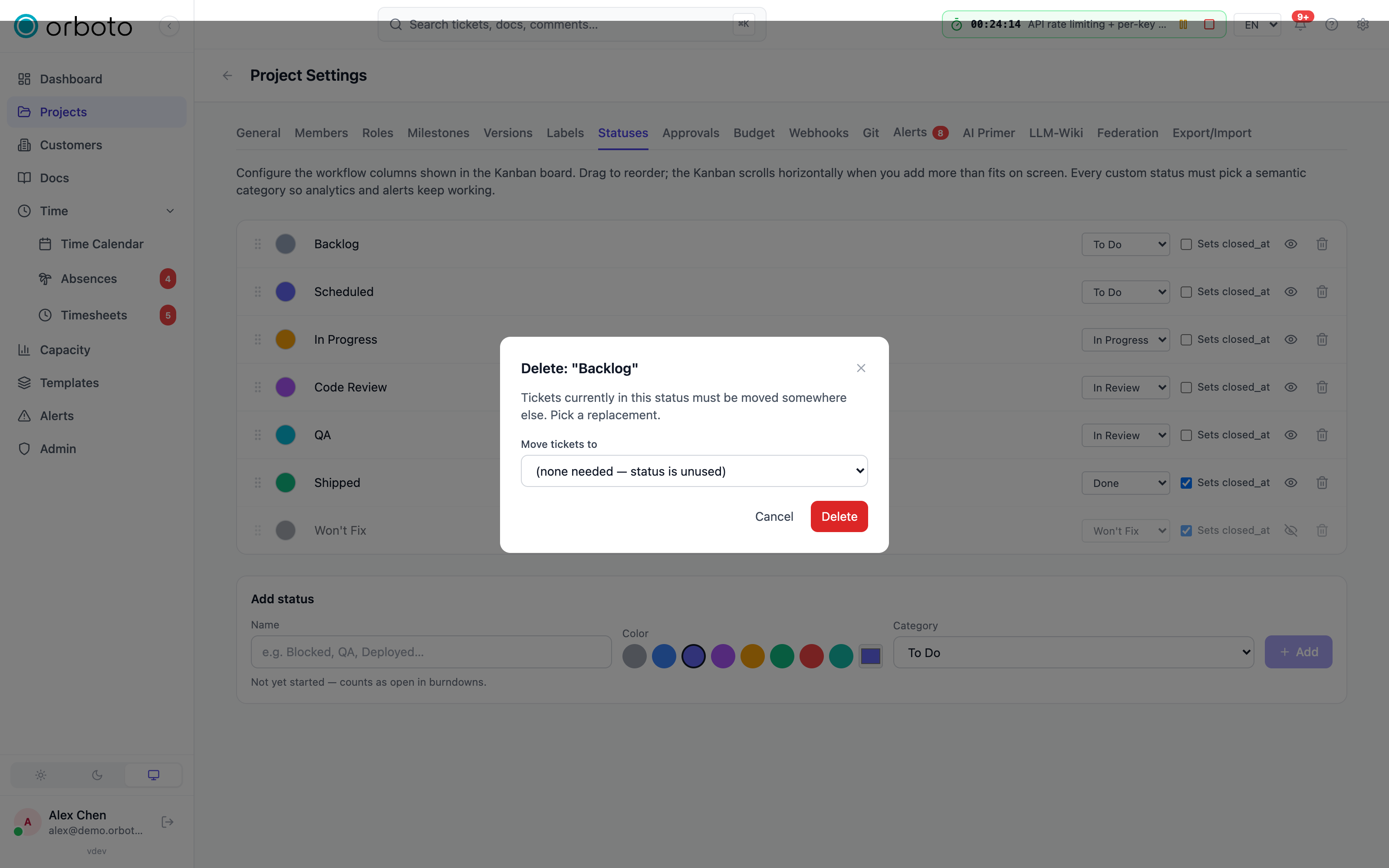
Select the trash icon on a row. Two rules protect you from breaking a project:
- A project always keeps at least one status. Deleting the last remaining one is refused.
- If any tickets are currently in that status, you must pick where they go. The delete dialog shows a "Move tickets to" dropdown; every ticket in the deleted status is moved to the status you pick before the delete goes through. If the status is unused, no target is needed.
There's no undo - review the reassignment target carefully, especially on a status with many tickets in it.
How the Kanban board uses statuses
The board shows one column per status, not per category - a project with eight custom statuses gets eight columns, laid out left to right in the order you set on the Statuses tab, and the board scrolls horizontally if they don't all fit. Category isn't a grouping mechanism on the board; it's the layer underneath that keeps analytics, burndowns, and alerts correct regardless of what you name things.
Any status flagged Hidden on Kanban by default doesn't appear as a column until someone turns on Show hidden columns above the board - handy for a Won't Fix-style status you rarely need to look at, without deleting it.
What actually restricts a move
By default, a ticket can move directly between any two statuses - there's no fixed sequence forcing it through "In Review" before "Done". Three real mechanisms can stop a move, and none of them are a per-status "allowed next statuses" list:
- Permission. Moving a ticket between statuses (on the board, by drag, or from the ticket detail panel) requires its own permission, separate from general ticket editing. Without it, the move is refused.
- Open blockers. A ticket can't be moved into a terminal status (Done, Won't Fix, or any custom status you flagged Terminal) while it still has open dependencies blocking it. This check is not configurable and applies to everyone, including admins - a ticket with unresolved blockers is always a data-integrity problem, not a policy call. Close or resolve the blocking tickets first, or remove the dependency if it no longer applies.
- Approval gates. A project can optionally require sign-off from specific people before a ticket may enter a chosen status - for example, before anything reaches "Released". This is the actual configurable transition restriction in orboto; see Approval gates for how to set one up and what happens when a gated move is attempted.
Any of the three shows up the same way: the move is rejected and the reason appears in a banner on the ticket (or, on the board, the card snaps back to its original column with the same message).
Troubleshooting
I can't move a ticket to a status I know exists. Check, in order: whether you hold the permission to change ticket status, whether the ticket has open blockers (visible under its Dependencies), and whether the target status has an approval gate awaiting sign-off (an Approvals panel appears on the ticket once a gated move is attempted).
Adding or renaming a status fails with "already exists". Status names must be unique per project - pick a different name, or edit the existing one instead of creating a duplicate.
I deleted a status and now can't find where its tickets went. Every ticket in a deleted status is moved to the reassignment target you picked in the delete dialog - check that status's column. There's no undo; ask a project admin whether a recent backup can help if the wrong target was picked.
A status column isn't showing up on the Kanban board. It's likely flagged Hidden on Kanban by default - toggle Show hidden columns above the board, or turn the flag off for that status in Settings → Statuses.
Changing a status's category didn't move any tickets. That's expected - tickets stay in the same named status; only the category-driven behavior (whether they count as open/closed, whether they show in velocity) changes.